

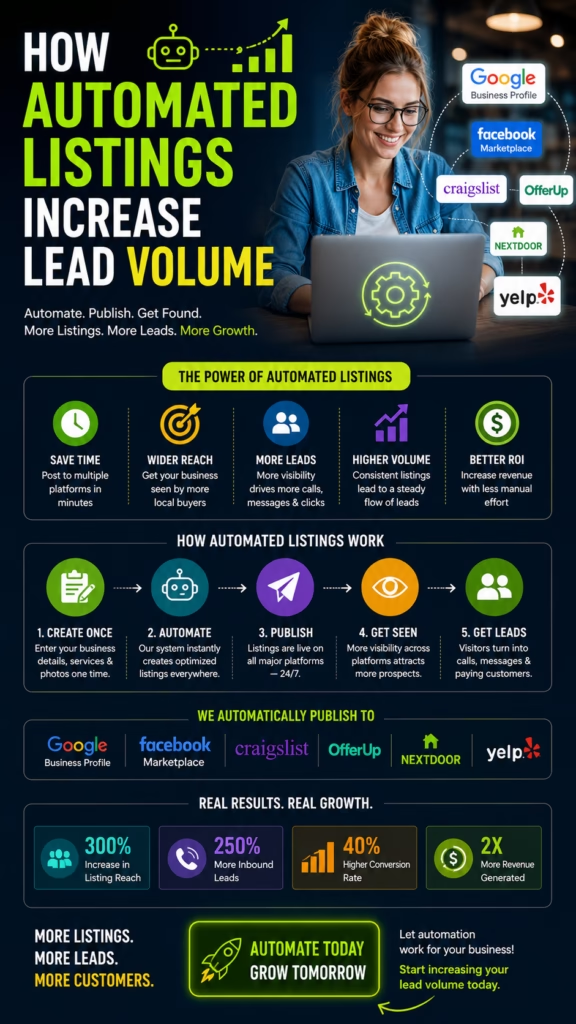
How Automated Listings Increase Lead Volume
How Automated Listings Increase Lead Volume explains how businesses can use automated posting, optimized listings, multi-platform distribution, tracking, message workflows, and follow-up systems to generate more calls, messages, quote requests, appointments, and customers.
Introduction
How Automated Listings Increase Lead Volume is one of the most important topics for businesses that want more local visibility without manually posting every offer, product, service, or promotion one platform at a time. Listings can create leads, but manual listing work is often slow, inconsistent, and difficult to scale.
Automated listings help businesses stay visible across more places, more often, with a more organized process. Instead of relying on occasional manual posts, businesses can use systems to create, schedule, update, rotate, and track listings across platforms such as Craigslist, Facebook Marketplace, OfferUp, Nextdoor, Google Business Profile, websites, directories, landing pages, and social channels.
Automated listings increase lead volume by expanding visibility, improving consistency, reducing manual work, and helping every inquiry enter a trackable follow-up system.
Lead volume usually grows when a business has more relevant opportunities to be found. More listings can mean more exposure, more local search visibility, more marketplace views, more message opportunities, and more customer touchpoints. But automation only works when the listings are high-quality, local, clear, and connected to a response system.
A strong automated listing strategy includes optimized titles, strong photos, clear descriptions, platform-specific formatting, local targeting, offer testing, message response workflows, CRM tracking, and follow-up automation. The goal is not to spam platforms. The goal is to create a repeatable lead generation system that increases qualified visibility and customer action.
Main idea: How Automated Listings Increase Lead Volume comes down to using automation to publish better listings more consistently while tracking and converting every inquiry.
Table of Contents
- 1) What automated listings are
- 2) Why automation increases lead opportunities
- 3) Multi-platform visibility and local reach
- 4) Listing consistency and posting frequency
- 5) Optimized titles that attract clicks
- 6) Photos and visuals that increase response
- 7) Descriptions that convert viewers into leads
- 8) Local targeting and city selection
- 9) Offer testing and lead volume growth
- 10) Fast replies and message workflows
- 11) Lead tracking and CRM integration
- 12) Follow-up automation after inquiries
- 13) Quality control and platform compliance
- 14) Common mistakes that reduce results
- 15) Final thoughts
- 16) FAQs
- 17) Extra keywords
1) What Automated Listings Are
Automated listings are business, product, service, or marketplace posts that are created, organized, scheduled, published, updated, or rotated using software or workflows instead of being handled manually one by one. These listings may promote products, services, inventory, appointments, offers, events, local availability, or lead magnets.
For many businesses, manual listing work becomes a bottleneck. A team may forget to post, use inconsistent copy, miss important platforms, fail to update availability, or leave old offers active. Automation helps create a repeatable process.
Automated listings can include:
- Marketplace listings
- Service listings
- Product listings
- Google Business Profile posts
- Directory listings
- Local landing pages
- Social posts
- Offer posts
- Inventory updates
- Appointment availability posts
How Automated Listings Increase Lead Volume starts with turning inconsistent manual posting into a repeatable visibility system.
2) Why Automation Increases Lead Opportunities
Automation increases lead opportunities because it helps businesses show up more consistently. More consistent visibility can create more chances for customers to discover, click, message, call, or request information.
Automation can also reduce delays. Instead of waiting for someone to manually post a listing, update a promotion, or refresh an offer, the system can help keep listings active and organized.
Manual posting:
Inconsistent schedule
Limited platforms
Slow updates
Missed inquiries

Automated listing system:
Consistent publishing
More platform coverage
Faster updates
Tracked lead flow
Lead volume grows when businesses create more consistent opportunities for the right customers to find and contact them.
3) Multi-Platform Visibility and Local Reach
Automated listings can help businesses reach more customers across more platforms. Different customers use different channels. Some search Google. Some browse Facebook Marketplace. Some check Craigslist. Some use OfferUp. Some ask neighbors on Nextdoor. Some visit business directories or social media pages.
A multi-platform listing strategy helps the business appear in more places where customers are already looking. This can increase total impressions, views, messages, calls, and inquiries.
Automated listings may support platforms such as:
- Google Business Profile
- Craigslist
- Facebook Marketplace
- OfferUp
- Nextdoor
- Business directories
- Company website
- Landing pages
- Facebook and Instagram
- Other local channels
Automated listings increase lead volume by expanding local reach across the platforms customers already use.
4) Listing Consistency and Posting Frequency
Consistency is one of the biggest advantages of automated listings. Many businesses post heavily for a few days and then stop. Others forget to update listings or let old offers sit too long. Automation helps create a more predictable posting rhythm.
Consistent listings can help maintain visibility, test offers, refresh local presence, and reduce gaps in lead flow. The business should still monitor quality and platform rules, but automation can make the process easier to maintain.
Listing consistency checklist:
Post regularly
Refresh outdated offers
Update availability
Rotate titles and descriptions
Track response by platform
Pause weak listings
Improve strong listings
Consistent listing activity creates more opportunities for customers to respond over time.
5) Optimized Titles That Attract Clicks
Titles are one of the first things customers see. Automated listings should not use weak or generic titles. A strong title should clearly communicate what is being offered and why the customer should pay attention.
Titles can include the product, service, benefit, location, offer, urgency, or availability. Different platforms may need different title styles, so automation should allow variation instead of repeating the same title everywhere.
Title examples:
Local Painting Estimates Available This Week
Move-In Ready Mobile Home – Limited Offer
Same-Day Mattress Delivery Available
Affordable Landscaping Help Near You
Used Work Truck Available – Local Pickup
Automated listings increase lead volume faster when titles are clear, specific, local, and benefit-focused.
6) Photos and Visuals That Increase Response
Photos and visuals strongly affect response rates. A listing with weak images may get fewer clicks, even if the offer is good. A listing with clear, real, attractive photos can build trust and increase messages.
Businesses should use photos that show the real product, service result, project, team, vehicle, storefront, before-and-after example, or customer-facing experience. Visuals should match the listing and make the offer feel real.
Strong listing visuals include:
- Real product photos
- Before-and-after photos
- Completed project photos
- Storefront photos
- Team photos
- Service vehicle photos
- Inventory photos
- Clean branded graphics
- High-quality local visuals
Better visuals help automated listings convert more views into messages, calls, and inquiries.
7) Descriptions That Convert Viewers Into Leads
Descriptions should make the offer easy to understand. A listing description should explain what is available, who it helps, where it is located, what is included, why it matters, and how the customer should respond.
Automated listing systems should avoid generic copy that looks copied everywhere. Descriptions should be platform-specific, clear, readable, and action-focused.
Description formula:
What is being offered
Who it is for
Main benefits
Location or service area
Price or offer details
Trust proof
Call to action
Automated listings increase lead volume when descriptions remove confusion and make the next step obvious.
8) Local Targeting and City Selection
Local targeting helps automated listings reach the right people. Posting everywhere without strategy can waste effort and create low-quality leads. Businesses should focus on cities, neighborhoods, and service areas where customers are most likely to respond and convert.
Good city selection should consider demand, distance, delivery range, service area, competition, customer type, job value, and platform activity.
Local targeting should consider:
- Primary service area
- Nearby high-demand cities
- Delivery or pickup range
- Customer demographics
- Competition level
- Average job value
- Travel time
- Platform activity by area
- Lead quality by location
Automated listings work better when visibility is focused on markets that can produce real customers.
9) Offer Testing and Lead Volume Growth
Automated listings make it easier to test different offers. A business can compare which titles, photos, descriptions, prices, cities, categories, and calls to action generate the most leads.
Offer testing helps businesses improve lead volume over time. Instead of guessing, the business can use response data to understand what customers actually want.
Offer testing examples:
Free estimate vs. limited appointment opening
Local delivery vs. pickup only
Financing available vs. discounted price
Seasonal service check vs. emergency availability
Before-and-after proof vs. offer-focused listing
Automated listings increase lead volume when businesses use data to improve offers, titles, photos, and targeting.
10) Fast Replies and Message Workflows
More listings can create more leads, but lead volume only matters if the business responds quickly. Customers often message multiple businesses. The first helpful response may win the conversation.
Businesses should use saved replies, message routing, lead alerts, missed call text-back, and clear response scripts. The goal is to move the customer toward a call, quote, appointment, visit, or purchase.
Message workflow:
Lead sends inquiry
System alerts the team
Saved reply confirms availability
Business asks qualifying question
Lead is moved to quote, booking, visit, or follow-up
Automated listings produce better results when paired with fast response workflows.
11) Lead Tracking and CRM Integration
Lead tracking is essential because businesses need to know which listings generate results. Without tracking, automation can create activity but not insight. Businesses should know which platform, city, title, photo, offer, and description produced each lead.
A CRM or lead tracker can organize customer details, source, service requested, location, status, follow-up date, appointment status, and revenue outcome.
Automated listing lead tracking should include:
- Lead name
- Phone or message contact
- Platform source
- Listing title
- City or location
- Offer type
- Service or product interest
- Lead status
- Follow-up date
- Closed outcome
Automated listings increase lead volume more profitably when every inquiry is tracked by source and outcome.
12) Follow-Up Automation After Inquiries
Many leads do not convert on the first message. They may ask a question, compare options, wait for availability, or forget to respond. Follow-up automation helps the business stay in touch.
Follow-up can include text reminders, quote follow-ups, appointment confirmations, email sequences, reactivation messages, review requests, and CRM tasks. The key is to follow up without overwhelming the customer.
Follow-up workflow:
Lead comes in
Reply is sent quickly
Lead is saved in CRM
Follow-up reminder is created
Appointment or quote is offered
Lead is booked, nurtured, or closed
Follow-up automation helps businesses convert more of the leads generated by automated listings.
13) Quality Control and Platform Compliance
Automation should improve listing quality, not lower it. Businesses should review listings for accuracy, clarity, compliance, and platform fit. Each platform has different rules and user expectations, so one generic listing may not work everywhere.
Quality control helps protect accounts, improve customer trust, and reduce wasted effort. Businesses should avoid misleading claims, duplicate spam patterns, outdated information, poor photos, and unclear offers.
Quality control checklist:
- Accurate offer details
- Correct pricing
- Clear location
- Real photos
- Platform-specific formatting
- No misleading claims
- Updated availability
- Clear contact method
- Compliance with platform rules
Automated listings work best when automation is balanced with quality, compliance, and customer trust.
14) Common Mistakes That Reduce Results
Automated listings can increase lead volume, but only when used correctly. Many businesses make the mistake of automating weak content, using poor photos, ignoring responses, or failing to track results.
- Automating generic listings
- Using poor-quality photos
- Posting without local targeting
- No platform-specific formatting
- No clear offer
- No call to action
- Slow replies
- No lead tracking
- No CRM system
- No follow-up process
- Ignoring platform rules
- Not testing titles or offers
- Measuring volume but not lead quality
Big mistake: automating activity without building a complete lead generation and follow-up system.
15) Final Thoughts
How Automated Listings Increase Lead Volume comes down to using automation as a multiplier for quality, consistency, and follow-up. Automation can help businesses publish more listings, reach more local customers, test more offers, and respond faster.
However, automation alone is not enough. The listings still need strong titles, real photos, clear descriptions, local targeting, platform-specific formatting, tracking, and follow-up. When these pieces work together, automated listings can become a powerful engine for lead volume growth.
Final takeaway: Automated listings increase lead volume by helping businesses create more consistent visibility, capture more inquiries, track every source, and follow up faster.
16) FAQs
1) How do automated listings increase lead volume?
Automated listings increase lead volume by helping businesses publish consistently, reach more platforms, keep offers active, respond faster, and track inquiries.
2) What are automated listings?
Automated listings are product, service, business, or marketplace posts created, scheduled, updated, or distributed using software or workflows.
3) What businesses can use automated listings?
Local service businesses, retailers, contractors, dealerships, mobile home sellers, furniture stores, mattress stores, equipment companies, and real estate businesses can use automated listings.
4) What platforms can automated listings support?
They can support platforms such as Google Business Profile, Craigslist, Facebook Marketplace, OfferUp, Nextdoor, websites, directories, and social media depending on the system.
5) Do automated listings replace marketing strategy?
No. Automation should support strategy, not replace clear offers, strong copy, quality photos, tracking, and follow-up.
6) Why does consistency matter?
Consistency helps businesses stay visible and creates more opportunities for customers to respond.
7) Do titles matter in automated listings?
Yes. Titles are often the first thing customers see, so they should be clear, local, specific, and benefit-focused.
8) Do photos affect lead volume?
Yes. Strong photos can increase trust, clicks, messages, and calls.
9) What should listing descriptions include?
Descriptions should include what is offered, benefits, location, price or offer details, trust proof, and a call to action.
10) Should listings be different by platform?
Yes. Each platform has different users, rules, formatting, and response behavior.
11) What is local targeting?
Local targeting means choosing cities, neighborhoods, and service areas most likely to produce qualified leads.
12) Can automated listings improve lead quality?
Yes, if they use clear offers, proper targeting, accurate descriptions, and qualification steps.
13) What is lead tracking?
Lead tracking is recording which listing, platform, location, title, or offer produced each inquiry.
14) Why is CRM integration useful?
CRM integration helps organize leads, track follow-up, manage appointments, and measure revenue outcomes.
15) How fast should businesses reply to automated listing leads?
Businesses should reply as quickly as possible because customers often contact multiple sellers or providers.
16) Can follow-up automation help?
Yes. Follow-up automation can help with reminders, quote follow-ups, appointment confirmations, and reactivation messages.
17) What is the biggest mistake with automated listings?
The biggest mistake is automating low-quality listings without tracking, strong photos, clear offers, or fast follow-up.
18) Can automated listings work for services?
Yes. Service businesses can use automated listings to promote estimates, appointments, seasonal services, and local availability.
19) Can automated listings work for products?
Yes. Product-based businesses can use automated listings to promote inventory, local pickup, delivery, pricing, and availability.
20) Are automated listings only for marketplaces?
No. They can also support business profiles, websites, directories, landing pages, and social media posts.
21) How should businesses test offers?
Businesses can test different titles, photos, descriptions, prices, cities, and calls to action to see what generates the best leads.
22) Does automation increase spam risk?
It can if used poorly. Businesses should follow platform rules, avoid misleading content, and prioritize quality.
23) What metrics should businesses track?
Track views, messages, calls, platform source, city, offer, lead status, appointments, closed customers, and revenue.
24) What is the main goal of automated listings?
The main goal is to increase qualified lead opportunities while reducing manual posting work and improving follow-up.
25) Are automated listings a one-time setup?
No. They work best with ongoing testing, updates, tracking, quality control, and follow-up optimization.
17) Extra Keywords
- How Automated Listings Increase Lead Volume
- automated listings
- automated posting
- lead volume
- marketplace automation
- local lead generation
- multi-platform listings
- business listing automation
- lead generation automation
- automated marketplace listings
- Craigslist automation
- Facebook Marketplace automation
- OfferUp automation
- Nextdoor listing automation
- Google Business Profile posts
- local posting automation
- listing optimization
- automated lead tracking
- CRM lead management
- follow-up automation
- local customer acquisition
- business growth automation
- multi-channel lead generation
- marketplace lead generation
- automated customer inquiries













