

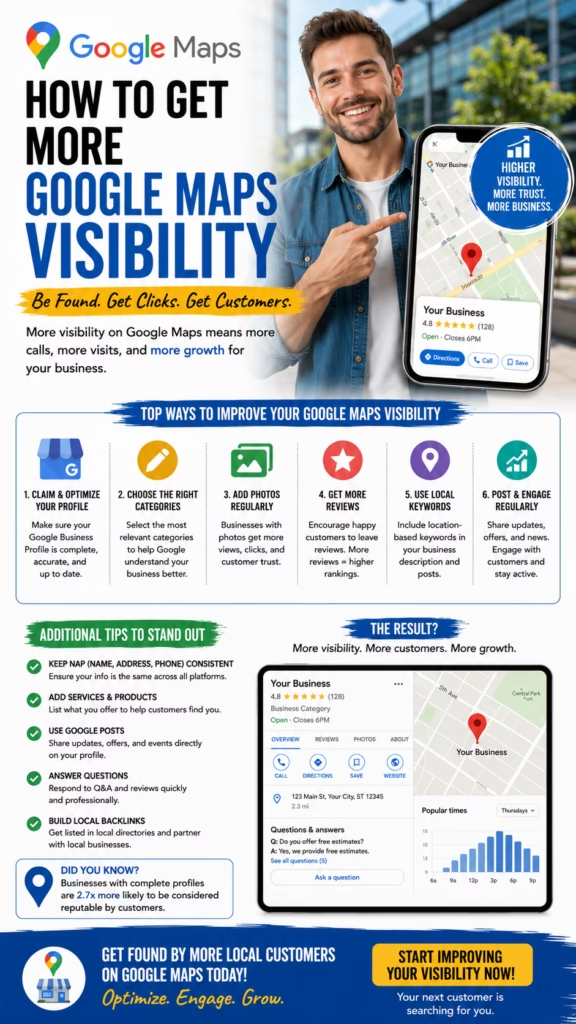
How to Get More Google Maps Visibility
How to Get More Google Maps Visibility explains how local businesses can improve Maps rankings, increase calls, get more direction requests, and turn nearby searches into real customers.
Introduction
How to Get More Google Maps Visibility starts with one simple truth: customers often choose from the businesses they see first. When someone searches for a plumber, roofer, dentist, med spa, moving company, HVAC contractor, pest control company, restaurant, attorney, auto repair shop, or local service provider, Google Maps is usually one of the first places they look.
Google Maps visibility matters because it puts your business in front of nearby customers at the exact moment they are searching. Unlike broad advertising, Maps visibility connects your company with people who already have local intent. They are not just browsing. They may be ready to call, request directions, book an appointment, compare reviews, or visit your website.
Google Maps visibility improves when your Google Business Profile is complete, active, trusted, locally relevant, and supported by strong reviews, local SEO, and consistent business information.
The goal is not just to appear somewhere on Google Maps. The goal is to appear for the right searches, in the right areas, with a profile that gives customers enough confidence to take action. A strong Maps strategy includes profile optimization, category selection, service details, reviews, photos, posts, website relevance, local landing pages, citations, engagement signals, and ongoing tracking.
Main idea: How to Get More Google Maps Visibility is about building stronger local relevance, stronger trust, stronger engagement, and stronger consistency across your entire local presence.
Table of Contents
- 1) Why Google Maps visibility matters
- 2) How Google Maps visibility works
- 3) Optimizing your Google Business Profile
- 4) Choosing the right business categories
- 5) Writing a stronger business description
- 6) Adding services, products, and attributes
- 7) Getting more quality reviews
- 8) Responding to reviews the right way
- 9) Using photos to improve trust
- 10) Posting updates on Google Business Profile
- 11) Building local website relevance
- 12) Creating city and service pages
- 13) Keeping NAP information consistent
- 14) Building citations and local mentions
- 15) Improving proximity and service-area signals
- 16) Using Google Maps lead tracking
- 17) Avoiding Google Maps visibility mistakes
- 18) Building a monthly Maps optimization routine
- 19) How Google Maps fits into local SEO
- 20) Final thoughts
- 21) FAQs
- 22) Extra keywords
1) Why Google Maps Visibility Matters
Google Maps visibility matters because local customers use Maps to make fast buying decisions. They compare business names, reviews, ratings, photos, distance, hours, services, and websites before deciding who to contact.
If your business does not appear for important local searches, competitors may capture those calls instead. A stronger Maps presence can help you earn more attention from people who are already close to taking action.
Better Google Maps visibility can help generate:
- More local phone calls
- More website visits
- More direction requests
- More appointment requests
- More walk-in customers
- More quote requests
- More trust from local searchers
- More review-driven leads
- More service-area exposure
- More long-term local growth
Google Maps is one of the most important local lead channels because it captures buyers with immediate intent.
2) How Google Maps Visibility Works
Google Maps visibility is influenced by several local ranking signals. The most important areas are relevance, distance, and prominence. Relevance means your profile matches the search. Distance means your business is near the searcher or relevant service area. Prominence means your business appears trusted and established online.
That means your Maps strategy should not focus on one tactic only. Reviews matter, but reviews alone are not enough. Categories matter, but categories alone are not enough. A strong strategy combines profile quality, local content, trust signals, engagement, and consistent information.
Google Maps visibility is influenced by:
Business categories
Business name accuracy
Service details
Location and service area
Reviews and ratings
Review responses
Photos and updates
Website local relevance
Citations and local mentions
Searcher proximity
Profile engagement
Business prominence
Maps visibility improves when Google clearly understands what you do, where you serve, and why customers trust you.
3) Optimizing Your Google Business Profile
Your Google Business Profile is the foundation of Google Maps visibility. A thin or incomplete profile gives Google and customers less information to work with. A complete profile can improve trust, relevance, and conversion.
Start by making sure the business name, address, phone number, website, hours, categories, services, photos, description, and attributes are accurate. Keep the profile updated regularly so it feels active and reliable.
Google Business Profile optimization checklist:
- Correct business name
- Accurate address or service area
- Local phone number
- Website link
- Primary category
- Secondary categories
- Business hours
- Services and products
- Business description
- Photos and updates
A complete Google Business Profile gives customers more reasons to choose you.
4) Choosing the Right Business Categories
Categories help Google understand what your business is. The primary category is especially important because it tells Google the main service or business type you want to be associated with.
Choose the most accurate primary category available. Then add relevant secondary categories that match real services you provide. Do not choose categories just because they have search volume if they do not accurately represent your business.
Category optimization tips:
Choose the most accurate primary category
Use relevant secondary categories
Match categories to real services
Review competitor category patterns
Avoid unrelated categories
Update categories when services change
Align website content with categories
Use service pages to support categories
Check category relevance by city
Do not overstuff categories
The wrong category can make your business less relevant for the searches that matter most.
5) Writing a Stronger Business Description
Your business description should clearly explain what you do, who you serve, where you work, and why customers should trust you. It should include natural local keywords, but it should not sound stuffed or robotic.
A strong description helps customers understand your business quickly. It can also support relevance when it aligns with your services and location.
Business description should include:
- Main service or business type
- Local area served
- Customer types served
- Core services
- Experience or trust signals
- Quality standards
- Appointment or quote process
- Simple reason to contact you
A good business description is clear, local, trustworthy, and customer-focused.
6) Adding Services, Products, and Attributes
Services, products, and attributes give your profile more detail. For service businesses, the services section can help customers see exactly what you offer. For product-based businesses, products can help show popular items, packages, or categories.
Use clear service names. Add descriptions where helpful. Keep everything accurate and avoid adding services you do not truly offer.
Examples of profile details to add:
Core services
Specialty services
Emergency services if offered
Service packages
Popular products
Appointment options
Accessibility details
Payment options
Online booking if available
Service-area details
Detailed services and products can help your profile match more relevant local searches.
7) Getting More Quality Reviews
Reviews are one of the strongest trust signals for Google Maps visibility. Customers use reviews to decide whether your business is reliable, professional, responsive, and worth contacting.
The best review strategy is simple: ask happy customers consistently, make the process easy, and never use fake reviews. Quality, recency, detail, and consistency all matter.
Review generation ideas:
- Ask after completed service
- Send a direct review link
- Train staff to request reviews
- Follow up with satisfied customers
- Ask for honest feedback
- Make the request simple
- Do not pressure customers
- Do not buy fake reviews
- Track review growth monthly
- Respond to every review
Consistent real reviews can improve trust, clicks, calls, and local conversion rates.
8) Responding to Reviews the Right Way
Review responses show customers that your business is active and professional. A good response should be polite, specific, and natural. It should thank the customer, mention the service when appropriate, and reinforce local trust.
Negative reviews should be handled calmly. Do not argue. Respond professionally, acknowledge the concern, and offer a path to resolve the issue.
Positive review response example:
Thank you for choosing our team. We appreciate the kind words and are glad we could help with your project.

Negative review response example:
We are sorry to hear about your experience. We take feedback seriously and would like the opportunity to learn more and help resolve the concern.
Professional review responses can improve customer confidence before they ever call.
9) Using Photos to Improve Trust
Photos make your Google Business Profile feel real. Customers want to see your work, location, team, vehicles, products, results, office, equipment, and completed projects. Fresh photos can make your profile more engaging and trustworthy.
For service businesses, before-and-after photos are especially powerful. For retail and restaurant businesses, product and location photos matter. For professional services, team and office photos can help build credibility.
Photo ideas for Google Maps visibility:
- Exterior business photos
- Interior business photos
- Team photos
- Work vehicles
- Before-and-after projects
- Completed service photos
- Product photos
- Customer-friendly spaces
- Equipment photos
- Seasonal updates
Fresh, real photos can make your profile more clickable and trustworthy.
10) Posting Updates on Google Business Profile
Google Business Profile posts let you share updates, offers, events, service reminders, seasonal messages, and announcements. Posts can help your profile look active and give customers more reasons to engage.
Use posts to promote services, answer common questions, highlight seasonal needs, showcase offers, and link to relevant pages.
Google Business Profile post ideas:
Seasonal service reminders
Limited-time offers
New service announcements
Before-and-after project highlights
Customer education tips
Holiday hours updates
Appointment availability
Community involvement
Review highlights
Frequently asked questions
Regular posts keep your profile fresh and help customers understand what you offer right now.
11) Building Local Website Relevance
Your website supports your Google Maps visibility. Google looks at your website to better understand your services, location, authority, and relevance. If your website is thin, generic, or not locally optimized, your Maps presence may be weaker.
A strong local website should clearly show your services, city, service area, reviews, contact information, internal links, and calls to action.
Website elements that support Maps visibility:
- Local homepage content
- Service pages
- City pages
- Contact page
- Embedded map if appropriate
- Local phone number
- Consistent business name
- Reviews and testimonials
- Schema markup
- Fast mobile experience
Your Google Business Profile and website should support each other with matching local relevance.
12) Creating City and Service Pages
City and service pages can help your business build more local relevance. For example, an HVAC company may need pages for AC repair, furnace repair, duct cleaning, and emergency HVAC service in each major city served.
Do not create thin duplicate pages. Each page should be useful, location-specific, and written for real customers.
Strong local page structure:
City or service title
Local introduction
Service details
Common customer problems
Areas served
Reviews or proof
Photos if available
FAQs
Clear call to action
Internal links
Useful local pages can help Google connect your business with more relevant Maps searches.
13) Keeping NAP Information Consistent
NAP stands for name, address, and phone number. Consistent NAP information helps Google and customers trust that your business information is accurate.
If your business name, address, or phone number appears differently across directories, websites, and profiles, it can create confusion. Keep your business information consistent wherever possible.
Places to check NAP consistency:
- Google Business Profile
- Business website
- Facebook page
- Yelp
- Bing Places
- Apple Maps
- Industry directories
- Local chamber pages
- Review platforms
- Data aggregator listings
Inconsistent business information can weaken trust and create local SEO confusion.
14) Building Citations and Local Mentions
Citations are online mentions of your business information. Local mentions can include directories, local news, sponsorships, chamber pages, industry sites, neighborhood pages, vendor lists, and partner websites.
Citations help reinforce that your business is real, local, and established. Quality matters more than random volume.
Useful citation sources:
Industry directories
Local business directories
Chamber of commerce
Local sponsorship pages
Vendor partner pages
Review platforms
Map platforms
Local news mentions
Community websites
Professional association pages
Quality local citations can support business prominence and local trust.
15) Improving Proximity and Service-Area Signals
Proximity is an important part of Google Maps visibility. A business physically close to the searcher may have an advantage, especially for near-me searches. Service-area businesses can still compete by making service areas clear and supporting them with website content, reviews, and local mentions.
You cannot fake proximity. Instead, strengthen relevance and prominence in the areas you actually serve.
Ways to support service-area visibility:
- Add accurate service areas
- Create local city pages
- Earn reviews mentioning services and areas
- Use local photos where appropriate
- Build local citations
- Post neighborhood updates
- Use consistent NAP information
- Show service-area details on website
Service-area visibility improves when your online presence clearly supports the areas you actually serve.
16) Using Google Maps Lead Tracking
Tracking helps you understand whether Google Maps visibility is turning into real business. Views are helpful, but calls, website visits, direction requests, bookings, form submissions, and revenue matter more.
Use tracking numbers carefully, monitor Google Business Profile insights, track website conversions, and ask customers how they found you.
Track these Google Maps metrics:
Profile views
Search terms
Phone calls
Website clicks
Direction requests
Messages
Booking requests
Form submissions
Review growth
Photo views
Top service searches
Closed leads
Revenue from Maps leads
The best Maps strategy measures calls and customers, not just rankings.
17) Avoiding Google Maps Visibility Mistakes
Many businesses struggle with Google Maps because their profile is incomplete, inactive, or inconsistent. Others use the wrong categories, ignore reviews, have weak websites, or fail to track leads.
Fixing basic mistakes can often create meaningful improvement.
Common Google Maps mistakes include:
- Incomplete Google Business Profile
- Wrong primary category
- No review strategy
- No review responses
- Outdated business hours
- Weak service descriptions
- No fresh photos
- Inconsistent NAP information
- Thin local website content
- No lead tracking
Most Google Maps visibility problems come from weak relevance, weak trust, or weak consistency.
18) Building a Monthly Maps Optimization Routine
Google Maps visibility is not a one-time setup. Businesses should review and improve their profiles regularly. A monthly routine keeps your local presence fresh and helps you respond to changes in competition, reviews, services, and customer behavior.
Small monthly improvements can compound over time.
Monthly Google Maps routine:
Check business info
Add new photos
Publish profile posts
Request reviews
Respond to reviews
Review search terms
Update services
Check competitors
Audit citations
Improve local pages
Track calls and leads
Adjust strategy
Consistency is one of the biggest advantages in local Maps optimization.
19) How Google Maps Fits Into Local SEO
Google Maps is one part of a complete local SEO system. A strong local business should connect Google Business Profile optimization with website SEO, review generation, citations, local content, social proof, landing pages, and lead follow-up.
When all of these pieces work together, your business becomes easier to find, easier to trust, and easier to contact.
Complete local SEO system:
- Google Business Profile
- Google Maps optimization
- Local website pages
- Review generation
- Local citations
- Schema markup
- Social proof
- Local backlinks
- Conversion tracking
- Fast lead follow-up
Google Maps visibility becomes stronger when it is supported by a complete local SEO strategy.
20) Final Thoughts
How to Get More Google Maps Visibility comes down to improving local relevance, trust, and consistency. Your business should clearly show what it does, where it serves, why customers trust it, and how people can take the next step.
The strongest Google Maps strategy includes a complete Google Business Profile, accurate categories, detailed services, real reviews, review responses, fresh photos, regular posts, local website content, city pages, consistent NAP information, citations, service-area signals, and lead tracking.
Final takeaway: To get more Google Maps visibility, build a profile and local SEO system that makes your business easier to find, easier to trust, and easier to contact.
21) FAQs
1) What is Google Maps visibility?
Google Maps visibility is how often and how prominently your business appears in Google Maps and local search results for relevant customer searches.
2) How do I get more Google Maps visibility?
Optimize your Google Business Profile, choose accurate categories, get more quality reviews, add photos, publish posts, build local pages, and keep business information consistent.
3) Does Google Business Profile optimization matter?
Yes. A complete and accurate Google Business Profile is one of the most important foundations for Maps visibility.
4) Are reviews important for Google Maps?
Yes. Reviews can improve trust, clicks, calls, and customer confidence.
5) Should I respond to reviews?
Yes. Responding to reviews shows professionalism and helps customers see that your business is active and engaged.
6) Do photos help Google Maps visibility?
Photos can improve engagement and trust by showing customers your business, team, services, products, and results.
7) What are Google Business Profile categories?
Categories tell Google what your business does. Choosing the right primary and secondary categories helps your profile match relevant searches.
8) What is NAP consistency?
NAP consistency means your business name, address, and phone number are accurate and consistent across your website, Google profile, directories, and local listings.
9) Do citations help Google Maps rankings?
Quality citations can support local trust and prominence by reinforcing accurate business information across the web.
10) Should service-area businesses optimize Google Maps?
Yes. Service-area businesses can improve visibility by accurately setting service areas, building local pages, earning reviews, and maintaining strong local relevance.
11) Can I rank in cities where I do not have an address?
It can be harder, but strong service-area signals, local pages, reviews, and local relevance can help support visibility in areas you legitimately serve.
12) How often should I update my Google Business Profile?
Update it regularly with fresh photos, posts, services, hours, offers, and review responses.
13) Do Google posts help?
Google posts can help keep your profile active and provide customers with timely offers, updates, and service information.
14) Should my website support my Google Maps profile?
Yes. Your website should clearly support your services, location, service areas, reviews, and calls to action.
15) What should local service pages include?
They should include service details, city relevance, customer problems, proof, FAQs, photos if available, and a clear call to action.
16) What is the biggest Google Maps mistake?
One of the biggest mistakes is having an incomplete or inactive Google Business Profile with weak reviews, wrong categories, and inconsistent business information.
17) Can fake reviews help Google Maps visibility?
No. Fake reviews are risky, unethical, and can damage trust. Businesses should focus on real customer reviews.
18) Should I use keywords in my business description?
Yes, but naturally. The description should sound helpful and accurate, not stuffed with keywords.
19) What should I track for Google Maps performance?
Track calls, website clicks, direction requests, messages, bookings, review growth, search terms, leads, and revenue.
20) How long does it take to improve Google Maps visibility?
Results vary by competition, location, profile strength, reviews, website quality, and consistency. Improvements usually require ongoing optimization.
21) Does proximity matter on Google Maps?
Yes. Distance between the searcher and the business can influence Maps visibility, especially for near-me searches.
22) Can local SEO improve Google Maps visibility?
Yes. Local SEO supports Maps visibility through website relevance, citations, reviews, local content, schema, and authority signals.
23) Should I add services to my Google Business Profile?
Yes. Services help customers understand what you offer and can support relevance for specific searches.
24) How do I make my profile more trustworthy?
Add real photos, earn reviews, respond professionally, keep details accurate, show services clearly, and maintain a strong website.
25) What is the main goal of Google Maps visibility?
The main goal is to turn local search exposure into calls, visits, bookings, quote requests, and paying customers.
22) Extra Keywords
- How to Get More Google Maps Visibility
- Google Maps visibility
- Google Business Profile optimization
- Google Maps SEO
- local SEO
- Google Maps ranking
- local business visibility
- Google Maps marketing
- Google Business Profile ranking
- Google Maps lead generation
- local search visibility
- Google local pack ranking
- Google Maps optimization tips
- Google Business Profile reviews
- Google Maps photos
- Google Business Profile posts
- local citations
- NAP consistency
- service-area SEO
- local business rankings
- Google Maps calls
- Google Maps website clicks
- local SEO strategy
- Google Maps conversion tracking
- Google Maps growth strategy













