

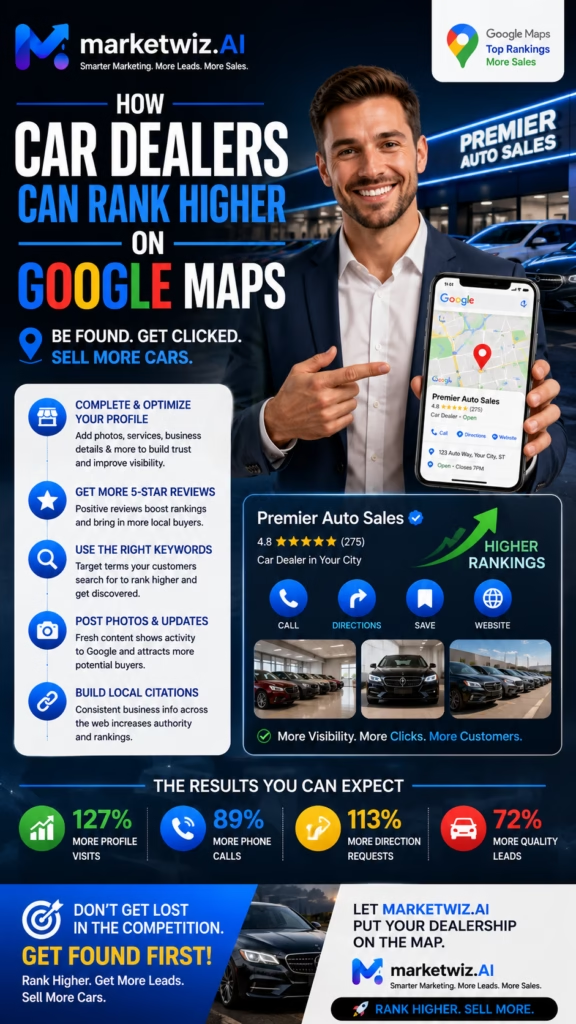
How Car Dealers Can Rank Higher on Google Maps
Learning how car dealers can rank higher on Google Maps can help automotive dealerships improve local visibility, attract qualified vehicle shoppers, generate phone calls, increase direction requests, promote current inventory, schedule test drives, strengthen reviews, support service departments, and connect local search activity to measurable dealership revenue.
Vehicle shoppers often begin online, compare multiple dealerships, review inventory, inspect pricing, calculate payments, research trade-in values, and read customer reviews before deciding where to call or visit.
Google Maps frequently appears during this high-intent research process. A shopper may search for a car dealer near me, used cars nearby, a specific manufacturer dealership, certified pre-owned vehicles, trucks for sale, electric vehicles, dealership financing, or automotive service.
Dealerships that appear prominently with accurate information, strong reviews, current inventory, professional photos, correct department hours, useful website pages, and responsive staff may generate more calls, website visits, directions, test drives, showroom traffic, and sales opportunities.
A weak profile may contain outdated hours, the wrong phone number, few photos, no inventory, incomplete categories, unanswered reviews, duplicate department profiles, and a website that does not match current vehicle availability.
A strong local SEO strategy connects the Google Business Profile, vehicle inventory pages, dealership location pages, sales and service departments, reviews, citations, manufacturer listings, community links, phone tracking, lead routing, CRM follow-up, and dealership revenue reporting.
The Car Dealer Google Maps Formula
Complete Profile + Current Inventory + Strong Reviews + Original Dealership Photos + Local Website Authority + Fast Lead Response = More Qualified Automotive Customers
Why Google Maps Matters for Car Dealers
High Purchase Intent
Local dealership searches often come from shoppers actively comparing vehicles, prices, financing, and nearby inventory.
Dealership Discovery
Google Maps helps customers find the showroom, lot, customer entrance, service drive, parts department, and business hours.
Vehicle Discovery
Profiles and linked inventory pages can highlight new, used, certified, electric, luxury, truck, SUV, and commercial inventory.
Trust Before the Visit
Reviews, photos, responses, dealership information, and department details help shoppers evaluate the business.
Direct Customer Actions
Prospects can call, request directions, browse vehicles, schedule service, request a test drive, or visit the website.
Measurable Revenue
Local search activity can be connected to leads, appointments, showroom visits, vehicle sales, service orders, and gross profit.
Understand Automotive Customer Search Intent
Dealership Discovery Intent
The shopper wants a nearby new-car dealership, used-car dealership, manufacturer franchise, luxury dealership, truck dealer, or independent automotive retailer.
Vehicle Inventory Intent
The buyer may search for a specific make, model, body style, trim, color, mileage range, price range, fuel type, drivetrain, or model year.
Financing Intent
The prospect may research monthly payments, down payments, lender options, prequalification, lease offers, credit requirements, or dealership financing.
Trade-In Intent
The customer may want an appraisal, online trade estimate, purchase offer, lease return, equity review, or trade-in value.
Service Intent
A vehicle owner may search for maintenance, oil changes, tires, brakes, diagnostics, recall service, warranty repair, parts, or manufacturer-certified technicians.
Immediate Visit Intent
Some shoppers are ready to visit today and want accurate hours, directions, parking, available inventory, contact details, and confirmation that the vehicle is still available.
Build a Complete Google Business Profile
Core Dealership Information
- Real-world dealership name
- Accurate street address
- Correct map pin
- Monitored phone number
- Primary website URL
- Sales department hours
- Service and parts hours
- Primary and secondary categories
- Business description
- Inventory and services
Verify the Map Pin and Entrance
Large dealerships may occupy multiple buildings, lots, entrances, or road-facing parcels. The map pin should guide shoppers to the correct customer entrance rather than a delivery gate, employee entrance, service exit, or nearby property.
Use the Correct Phone Routing
The primary number should reach trained staff or a reliable routing system. Sales, service, parts, finance, and body-shop calls should be directed quickly to the correct department.
Profile Accuracy Comes First
Before publishing more content, verify the dealership name, address, map pin, customer entrance, phone number, website, categories, department hours, and inventory links.
Use the Correct Car Dealership Business Name
The Google Business Profile name should match the real-world dealership name displayed on exterior signs, the website, customer paperwork, advertising, and official brand materials.
Avoid Adding Unapproved Keywords
- Best Used Cars Near Me
- Cheap Trucks With Easy Financing
- Certified Pre-Owned Dealer Dallas
- Bad Credit Car Loans
- New and Used Cars With Low Payments
Cities, prices, financing claims, brands, inventory terms, and promotional language should not be added unless they are genuinely part of the dealership's real-world name.
Use Appropriate Fields for Search Relevance
Vehicle types, brands, models, financing, trade-ins, and service information can be communicated through categories, products, services, website pages, descriptions, posts, reviews, and customer questions.
Choose Strong Google Business Profile Categories
Potential Primary Categories
- Car dealer
- Used car dealer
- Manufacturer-specific car dealer
- Truck dealer
- Luxury car dealer
- Electric vehicle dealer
Potential Secondary Categories
- Auto broker
- Motor vehicle dealer
- Auto repair shop
- Auto parts store
- Tire shop
- Car leasing service
Secondary categories should only be used when the dealership genuinely provides those services at the specific location.
Keep Department Categories Organized
Eligible sales, service, parts, collision, and rental departments may require different category strategies. Avoid creating overlapping or confusing profiles without a clear operational reason.
Write a Better Car Dealer Business Description
Information to Include
- Primary dealership type
- Brands or vehicle categories
- New and used inventory
- Certified pre-owned availability
- Financing assistance
- Trade-in options
- Service and parts departments
- Local market served
- Appointment and test-drive options
- Customer-service approach
Example Dealership Description
Local automotive dealership offering new, used, and certified pre-owned vehicles, including cars, trucks, SUVs, hybrids, and electric models. Customers can browse current inventory, request test drives, discuss financing, receive trade-in appraisals, and schedule maintenance through the dealership's sales, service, and parts departments.
Avoid Unsupported Claims
Do not claim guaranteed credit approval, the lowest prices, highest trade values, zero down for everyone, or the largest inventory unless those statements are accurate, supportable, and properly disclosed.
Optimize Sales, Service, and Parts Department Hours
Maintain Accurate Sales Hours
Confirm showroom and sales-office hours for every day. Include accurate weekend, holiday, and special-event hours.
Maintain Accurate Service Hours
Service departments often open earlier and close earlier than sales departments. Customers should not be forced to guess which department is available.
Maintain Accurate Parts Hours
Parts counters may operate on different schedules from sales and service. Publish the correct hours where profile eligibility and department organization allow.
Update Holiday and Event Hours
Dealership promotions frequently occur around holiday weekends. Incorrect special hours can produce wasted trips and negative customer experiences.
Add Vehicle Inventory to Google Business Profile
Vehicle Inventory Categories
- New vehicles
- Used vehicles
- Certified pre-owned vehicles
- Cars and sedans
- SUVs and crossovers
- Pickup trucks
- Electric vehicles
- Hybrid vehicles
- Luxury vehicles
- Commercial vans and work vehicles
Vehicle Listing Information
- Year, make, and model
- Trim level
- Stock number
- Mileage
- Exterior and interior color
- Engine or powertrain
- Drivetrain
- Important features
- Price when accurate
- Vehicle detail page link
Keep Inventory Current
Sold, wholesaled, transferred, unavailable, or incorrectly priced vehicles should not remain prominently displayed without an updated status.
Use Real Vehicle Photos
Actual vehicle photos generally provide more value than stock images because shoppers can inspect the color, wheels, interior, condition, options, and dealership presentation.
Explain Pricing Clearly
Vehicle prices may exclude taxes, registration, title, dealership fees, optional products, financing charges, delivery, or incentives with specific eligibility requirements.
Add Relevant Dealership Sales and Service Information
Sales Services
- Vehicle test drives
- Sales consultations
- Online purchase assistance
- Vehicle delivery when available
- Trade-in appraisals
- Lease consultations
- Financing assistance
- Commercial fleet sales
Service Department Services
- Oil changes
- Brake service
- Tire service
- Battery replacement
- Diagnostics
- Factory maintenance
- Warranty repairs
- Recall service
Parts Department Services
- OEM parts
- Accessories
- Replacement components
- Parts ordering
- Pickup options
- Installation coordination
Use Accurate Department Information
Clearly explain which department performs each service, how appointments work, whether walk-ins are accepted, and which brands or vehicles the department supports.
Use Helpful Google Business Profile Attributes
Available attributes may vary by category and profile eligibility. Add only information that accurately describes the dealership.
Potentially Useful Attributes
- Wheelchair-accessible entrance
- Wheelchair-accessible parking
- Onsite parking
- In-store shopping
- Delivery availability
- Appointment options
- Service appointment availability
- Accepted payment methods
Review Attributes Regularly
Dealership delivery, appointment, accessibility, payment, and customer-service options may change over time.
Upload Better Car Dealership Photos
Exterior Photos
- Road-facing dealership entrance
- Exterior signs
- Customer parking
- Showroom entrance
- Service-drive entrance
- Parts-department entrance
- Nearby landmark or highway access
Interior Photos
- Showroom
- Customer consultation areas
- Finance offices
- Service waiting area
- Parts counter
- Customer amenities
Inventory Photos
- New vehicle rows
- Used inventory
- Certified pre-owned vehicles
- Featured trucks and SUVs
- Electric vehicle displays
- Commercial vehicles
People and Operations Photos
- Sales team
- Service advisors
- Technicians
- Parts staff
- Vehicle delivery moments
- Community events
Use Current Original Images
Real dealership photos help customers recognize the location, entrance, departments, team, inventory, and customer experience.
Use Short Google Business Profile Videos
Useful Dealership Video Concepts
- Quick dealership walkthrough
- How to find the customer entrance
- Featured vehicle overview
- New inventory arrival
- Service-drive walkthrough
- Customer waiting area overview
- Meet the sales team
- Vehicle delivery highlight
Keep Videos Focused
Each video should communicate one clear idea. A short, steady, well-lit video of the real dealership is often more useful than a generic manufacturer commercial.
Do Not Misrepresent Vehicle Availability
Avoid featuring vehicles, pricing, equipment, incentives, or trims that are no longer available without clearly updating the content.
Build a Strong Car Dealership Review Strategy
Ask at Appropriate Customer Moments
- After a positive sales experience
- After vehicle delivery
- After a completed service appointment
- After a parts purchase
- After a resolved customer concern
- After a successful trade-in or appraisal
Separate Sales and Service Feedback
Dealership reviews may cover sales, finance, service, parts, collision, delivery, or customer support. Tracking the department helps management identify operational strengths and problems.
Make Review Requests Simple
Use email, SMS, CRM workflows, post-service communication, delivery follow-up, or receipts to provide a direct review path where appropriate.
Do Not Purchase or Fabricate Reviews
Reviews should reflect genuine customer experiences and should not be written by employees, unrelated parties, or people who did not complete a real dealership interaction.
Respond Professionally to Dealership Reviews
Positive Sales Review Response
Thank you for visiting our dealership and sharing your experience. We are glad our team could help you compare vehicles and complete the purchase process. We appreciate your business and hope you enjoy your vehicle.
Positive Service Review Response
Thank you for trusting our service department. We appreciate the feedback and are glad our team could assist with your vehicle. We look forward to helping with future maintenance needs.
Critical Review Response
Thank you for sharing your feedback. We are sorry the experience did not meet expectations. Please contact our dealership directly so our management team can review the details and discuss the concern privately.
Protect Private Customer Information
Do not reveal credit details, lender decisions, income, applications, payment information, vehicle-identification numbers, addresses, service history, or private transaction information in public responses.
Publish Google Business Profile Posts
Post Ideas for Car Dealers
- New inventory arrivals
- Featured used vehicles
- Certified pre-owned inventory
- Electric vehicle highlights
- Truck and SUV spotlights
- Trade-in opportunities
- Financing information
- Service specials
- Dealership events
- Holiday department hours
Use a Clear Next Step
Encourage the shopper to browse inventory, call the dealership, schedule a test drive, request a trade appraisal, apply for financing, or schedule service.
Keep Offers Accurate
Promotional posts should explain eligible vehicles, expiration dates, pricing, fees, down payments, lender conditions, mileage limits, trade requirements, and other important terms.
Optimize Google Questions and Answers
Common Dealership Questions
- Is this vehicle still available?
- Do I need an appointment for a test drive?
- Do you accept trade-ins?
- Can I apply for financing online?
- Do you sell certified pre-owned vehicles?
- Do you offer vehicle delivery?
- What are the service department hours?
- Do you offer loaner vehicles?
- Can I schedule service online?
- Where is the customer entrance?
Provide Accurate Answers
Answers should reflect current inventory procedures, dealership policies, department hours, financing processes, delivery options, service scheduling, and trade-in procedures.
Monitor Public Answers
Public users may answer questions. Review the section regularly so inaccurate information can be addressed appropriately.
Strengthen the Car Dealership Website
Important Website Sections
- New vehicle inventory
- Used vehicle inventory
- Certified pre-owned inventory
- Vehicle specials
- Financing
- Trade-in appraisal
- Service department
- Parts department
- Dealership location
- Contact and appointment pages
Make the Website Mobile-Friendly
Many shoppers reach the website directly from Google Maps. Vehicle pages should load quickly, display clearly on mobile devices, and make calling, messaging, scheduling, or requesting directions easy.
Keep Dealership Information Consistent
The business name, address, phone number, department hours, map, inventory, pricing, service information, and contact details should align with the Google Business Profile.
Make Inventory Search Easy
Shoppers should be able to filter vehicles by make, model, price, year, mileage, body style, fuel type, drivetrain, color, and other meaningful criteria.
Build Strong Car Dealership Location Pages
Location Page Essentials
- Location-specific title and heading
- Dealership name
- Street address
- Local phone number
- Sales hours
- Service and parts hours
- Embedded map
- Driving directions
- Parking and entrance details
- Dealership photos
Add Unique Local Information
- Nearby cities and neighborhoods
- Highway access
- Local inventory categories
- Brands represented
- Sales and service departments
- Local dealership team
- Customer reviews
- Location-specific FAQs
Avoid Duplicate Location Pages
Each dealership page should contain meaningful local information rather than changing only the city name.
Create Strong Vehicle Inventory and Category Pages
Inventory Category Pages
- New cars for sale
- Used cars for sale
- Certified pre-owned vehicles
- Used trucks
- Used SUVs
- Electric vehicles
- Hybrid vehicles
- Luxury vehicles
Make and Model Pages
Create useful pages for genuine dealership inventory by manufacturer, model, body style, trim, and vehicle category.
Vehicle Detail Page Information
- Year, make, model, and trim
- Stock number and VIN
- Mileage
- Price and disclosures
- Exterior and interior colors
- Features and equipment
- Vehicle history information when available
- Original photos
- Test-drive request
- Financing and trade-in options
Avoid Thin Inventory Pages
A page with only a vehicle name and one stock image provides limited value. Add useful specifications, original photos, pricing context, availability, disclosures, and clear next steps.
Build Local Service and Parts Department Pages
Service Page Topics
- Oil changes
- Brake service
- Tire service
- Battery service
- Factory maintenance
- Diagnostics
- Warranty repairs
- Recall service
Service Page Information
- Department hours
- Appointment link
- Phone number
- Vehicle brands serviced
- Technician qualifications
- Parts information
- Customer amenities
- Service-drive directions
Parts Department Content
Explain OEM parts availability, accessory ordering, pickup, installation, department hours, and contact information.
Connect Service Pages to Google Maps
Service customers should be able to move easily from a local search to department information, appointment scheduling, directions, and phone support.
Publish Local Automotive Content
Local Sales Content Ideas
- Best vehicle types for local commuting
- Truck buying guides for local businesses
- Electric vehicle charging information
- Family SUV buying guides
- Used-car inspection tips
- Winter or summer driving preparation
- Commercial vehicle options
- Local trade-in preparation tips
Local Service Content Ideas
- Seasonal maintenance checklists
- Tire recommendations for local driving
- Battery maintenance in local weather
- Brake-service warning signs
- Manufacturer maintenance schedules
- Road-trip vehicle preparation
Answer Real Customer Questions
Sales and service teams regularly hear questions about inventory, financing, trade-ins, maintenance, warranties, delivery, electric vehicles, leasing, and service scheduling. These questions can become useful local articles and FAQs.
Improve Car Dealership Local Citations
Potential Citation Sources
- Major business directories
- Mapping platforms
- Manufacturer dealer locators
- Automotive directories
- Local chambers of commerce
- Dealer associations
- Local business organizations
- Community sponsorship pages
Keep Information Consistent
Dealership name, address, phone number, website, department hours, categories, and location information should remain accurate across important platforms.
Correct Old or Conflicting Data
Previous dealership names, ownership changes, old addresses, outdated phone numbers, closed departments, and duplicate listings can confuse customers and weaken local data consistency.
Earn Relevant Local Backlinks
Local Link Opportunities
- Manufacturer dealer pages
- Chambers of commerce
- Local media
- Community events
- Charities and nonprofits
- Sports sponsorships
- Business associations
- Trade schools
- Fleet customers
- Local automotive organizations
Create Link-Worthy Resources
Local vehicle guides, electric charging resources, maintenance checklists, community programs, dealership events, scholarship programs, and local driving information may attract relevant mentions.
Avoid Low-Quality Link Schemes
Large numbers of unrelated, automated, or manipulative links do not create the same value as genuine manufacturer, automotive, and community relationships.
Promote Automotive Financing Responsibly
Financing Information May Include
- Online application availability
- Prequalification options
- Lease opportunities
- Estimated payment tools
- Participating lenders
- Required documentation
- Commercial financing
- Manufacturer incentives
Avoid Guaranteed Approval
Do not promise approval, a particular interest rate, a specific monthly payment, zero down, or acceptance of every credit profile unless the statement is accurate and properly disclosed.
Explain Payment Examples
Payment estimates may depend on vehicle price, taxes, fees, down payment, trade equity, credit, lender, term, incentives, and optional products.
Keep Financing Content Consistent
Google posts, vehicle pages, advertisements, sales scripts, and printed materials should not present conflicting financing terms.
Promote Trade-In Opportunities Correctly
Trade-In Information to Explain
- Online appraisal availability
- In-person inspection process
- Vehicle history requirements
- Loan payoff information
- Lease-return considerations
- Equity and negative equity
- Required documents
- Offer expiration periods
Avoid Guaranteed Trade Values
Final appraisal values may depend on mileage, condition, options, accident history, title status, tires, mechanical condition, market demand, inspection, and current wholesale values.
Use Clear Trade-In Calls to Action
Encourage customers to submit vehicle details, schedule an appraisal, bring required documentation, or contact the dealership for a current evaluation.
Optimize Multiple Car Dealership Locations
Each Eligible Location Needs Accurate Information
- Unique physical address
- Correct location phone number
- Accurate sales hours
- Accurate service and parts hours
- Correct map pin
- Location-specific photos
- Store-specific inventory
- Dedicated location page
Organize Department Profiles Carefully
Sales, service, parts, collision, rental, and used-vehicle departments may have distinct operational needs. Profiles should not overlap or create customer confusion.
Avoid Duplicate Location Content
Each location page should explain its inventory, brands, departments, staff, directions, reviews, hours, and local customer information.
Measure Every Location Separately
One dealership may generate more sales calls while another generates more service appointments, test drives, or higher-value transactions.
Improve Google Maps Conversion Into Dealership Visits
Make Calling Easy
Use monitored phone numbers and train staff to answer questions about vehicle availability, pricing, appointments, financing, trade-ins, service, and directions.
Make Directions Easy
Confirm map placement and add customer entrance, service-drive, parking, signage, highway, and landmark photos.
Make Inventory Easy to Browse
Vehicle pages should clearly display availability, pricing, photos, mileage, equipment, financing options, trade-in tools, and test-drive actions.
Offer Specific Appointment Options
Sales staff can offer clear test-drive times, while service teams can provide available appointment windows.
Respond Quickly to Inventory Leads
Vehicle shoppers may contact multiple dealerships. Fast responses should confirm availability, answer questions, provide additional photos, and suggest a next step.
Rankings Create Opportunity
Accurate inventory, responsive staff, transparent pricing, professional sales processes, reliable service, and organized follow-up convert local visibility into dealership revenue.
Track Google Maps Performance and Dealership Revenue
Profile Metrics
- Profile views
- Search appearances
- Website visits
- Phone calls
- Direction requests
- Messages
- Inventory interactions
- Photo views
Sales Conversion Metrics
- Vehicle inquiries
- Test-drive appointments
- Showroom visits
- Financing applications
- Trade-in appraisals
- Deposits
- Vehicle sales
- Front-end and back-end gross profit
Service Conversion Metrics
- Service calls
- Appointments booked
- Repair orders
- Average repair order
- Parts sales
- Customer-pay gross profit
Recommended CRM Fields
- Customer name
- Phone number
- Dealership location
- Lead source
- Google Maps or local search source
- Vehicle or service interest
- Appointment date
- Assigned salesperson or advisor
- Trade-in information
- Sale or repair-order value
Local Search Appointment Rate
Appointment Rate = Scheduled Sales or Service Appointments ÷ Google Maps Leads × 100
Dealership Visit Conversion Rate
Visit Conversion Rate = Tracked Dealership Visits ÷ Qualified Google Maps Leads × 100
Vehicle Sales Conversion Rate
Sales Conversion Rate = Completed Vehicle Sales ÷ Qualified Local Search Leads × 100
Google Maps Revenue Attribution
Attributed Revenue = Vehicle Sales and Service Revenue Connected to Google Maps or Local Search Leads
Local SEO Return on Investment
ROI = (Gross Profit From Attributed Local Search Revenue − Local SEO Cost) ÷ Local SEO Cost × 100
| Metric | What It Measures |
|---|---|
| Phone calls | Customers contacting sales, service, or parts from local search |
| Direction requests | Shoppers and service customers considering a dealership visit |
| Inventory views | Vehicle shoppers researching current inventory |
| Appointments | Local search leads converted into test drives or service visits |
| Vehicle sales and repair orders | Qualified local leads converted into revenue |
| Attributed gross profit | Profit connected to Google Maps and local SEO activity |
Common Google Maps Mistakes Car Dealers Should Avoid
Using an Incorrect Business Name
Adding cities, inventory terms, financing claims, or promotional language to the official profile name can create inconsistency.
Using Confusing Department Profiles
Duplicate or poorly organized sales, service, parts, and collision profiles may confuse customers and split reviews or visibility.
Using Incorrect Department Hours
Sales, service, and parts departments may have different schedules. Incorrect hours can produce wasted trips and missed appointments.
Failing to Update Vehicle Inventory
Sold or unavailable vehicles should not remain featured without an appropriate update.
Using Only Manufacturer Stock Images
Shoppers also need real vehicle, dealership, entrance, showroom, service-drive, staff, and delivery photos.
Publishing Misleading Prices
Advertised prices should not hide required fees, exclude common charges without disclosure, or rely on incentives unavailable to most buyers.
Promising Guaranteed Financing
Approval, rates, down payments, monthly payments, and terms depend on lender requirements and buyer qualifications.
Creating False Locations
Dealers should not create profiles for unstaffed lots, virtual offices, lead-generation addresses, or cities without an eligible dealership location.
Ignoring Service Department SEO
Dealerships may lose valuable maintenance and repair revenue when they focus only on vehicle sales.
Failing to Track Sales and Service Revenue
Calls and directions are useful, but dealerships should connect local search activity to appointments, sales, repair orders, revenue, and gross profit.
A 30-Day Google Maps SEO Plan for Car Dealers
Week 1: Correct the Foundation
- Verify profile ownership and access
- Confirm the real-world dealership name
- Correct the address and map pin
- Confirm department phone numbers
- Update sales, service, and parts hours
- Review primary and secondary categories
- Improve the dealership description
- Review inventory and appointment links
Week 2: Build Inventory and Visual Relevance
- Add vehicle inventory categories
- Add sales and service information
- Upload dealership exterior photos
- Upload showroom photos
- Upload inventory photos
- Upload service-drive photos
- Upload staff photos
- Add useful profile videos
Week 3: Build Trust and Local Authority
- Create sales review workflows
- Create service review workflows
- Respond to recent reviews
- Review questions and answers
- Publish profile posts
- Improve location and department pages
- Correct important citations
- Identify local link opportunities
Week 4: Improve Conversion and Tracking
- Train staff to answer profile calls
- Track Google Maps lead sources
- Track test-drive appointments
- Track showroom visits
- Track trade-in appraisals
- Track service appointments
- Track vehicle sales and repair orders
- Calculate attributed gross profit and ROI
End-of-Month Outcome
After 30 days, the dealership should have a more complete Google Business Profile, stronger inventory relevance, better dealership photos, clearer department information, a more consistent review process, improved local website content, and stronger tracking from local search activity to sales and service revenue.
Final Takeaway: Turn Local Automotive Searches Into Dealership Revenue
Understanding how car dealers can rank higher on Google Maps requires more than verifying a profile and adding a phone number.
The dealership must maintain an accurate business name, address, map pin, phone number, website, department hours, categories, description, inventory, services, attributes, photos, videos, reviews, posts, and customer answers.
The website should support the profile with useful location pages, new and used inventory, certified vehicle pages, make-and-model content, vehicle detail pages, financing information, trade-in tools, sales specials, service pages, parts information, directions, and clear customer actions.
Local authority should be strengthened through accurate citations, manufacturer dealer listings, automotive directories, chambers, community relationships, relevant backlinks, local content, and consistent dealership information.
Once local visibility improves, the dealership must answer calls, confirm vehicle availability, explain pricing and financing clearly, schedule test drives, provide trade appraisals, route service calls correctly, and record the lead source.
Performance should be measured through profile views, calls, directions, website visits, inventory interactions, test-drive requests, showroom visits, financing applications, trade-ins, vehicle sales, service appointments, repair orders, revenue, gross profit, and return on investment.
Google Maps becomes even more effective when connected with inventory SEO, paid search, Facebook Marketplace, Craigslist, social media, video, email, SMS, retargeting, review generation, CRM organization, AI-assisted responses, and consistent sales and service follow-up.
When the complete system works together, a local search can become a profile view, phone call, inventory visit, test drive, trade-in, vehicle purchase, service appointment, positive review, repeat customer, and referral.
Frequently Asked Questions
1. Why is Google Maps important for car dealers?
Google Maps helps nearby shoppers discover the dealership, browse inventory, call, request directions, read reviews, schedule test drives, and find service departments.
2. How can car dealers rank higher on Google Maps?
Maintain a complete profile, accurate categories, current inventory, original photos, genuine reviews, strong location pages, citations, local links, and fast lead response.
3. What should a car dealer add to Google Business Profile?
Add accurate contact details, department hours, categories, description, inventory, services, attributes, photos, website links, posts, and helpful questions and answers.
4. Which category should a car dealer use?
Use the category that most accurately reflects the primary business, such as Car Dealer, Used Car Dealer, or the correct manufacturer-specific category.
5. Should dealers add vehicle inventory to their profile?
Yes. Add real vehicles, categories, prices, photos, mileage, features, availability, and links to vehicle detail pages.
6. Do Google reviews help dealership rankings?
Genuine reviews build trust and may support local relevance by reflecting sales, financing, trade-in, service, and customer experiences.
7. How should dealers respond to reviews?
Respond professionally, thank customers, move complex concerns into private communication, and protect financial and transaction information.
8. How often should dealerships upload photos?
Add current photos regularly and whenever inventory, signage, departments, staff, facilities, or dealership layouts change.
9. Which photos should a car dealer upload?
Upload the dealership exterior, signs, entrances, parking, showroom, inventory, service drive, waiting area, staff, and vehicle-delivery photos.
10. Should car dealers publish profile posts?
Profile posts can promote inventory, certified vehicles, trade-ins, financing, service offers, dealership events, and holiday hours.
11. Can car dealers rank in nearby cities?
Visibility may extend into nearby areas when proximity, relevance, reputation, inventory, website strength, and local content support those searches.
12. Should every dealership location have a profile?
Each eligible staffed location should generally have its own accurate profile and unique dealership location page.
13. What should a dealership location page include?
Include contact details, department hours, map, directions, parking, inventory, brands, financing, trade-ins, service, photos, reviews, and local FAQs.
14. How important is consistent dealership information?
Consistent names, addresses, phone numbers, websites, categories, and department hours reduce customer confusion and strengthen local data accuracy.
15. Can car dealers promote financing on Google Maps?
Yes, when approval, rates, down payments, payments, terms, lender requirements, and incentive conditions are explained accurately.
16. Can dealerships promote trade-in offers?
Yes, when appraisal values are clearly subject to mileage, condition, history, equipment, inspection, market demand, and other factors.
17. How can dealers optimize for “car dealer near me”?
Use a complete profile, current inventory, accurate categories, original photos, reviews, location pages, citations, local links, and a fast website.
18. Should dealerships add questions and answers?
Helpful answers can address inventory, test drives, financing, trade-ins, certified vehicles, service, warranties, delivery, parking, and hours.
19. Can dealers add keywords to the business name?
The profile name should match the real-world dealership name, not added cities, brands, prices, inventory phrases, or financing claims.
20. How do citations help car dealer SEO?
Accurate mapping, automotive, manufacturer, chamber, and business listings reinforce dealership information and improve local discovery.
21. Should dealers build local backlinks?
Relevant links from manufacturers, chambers, media, charities, events, schools, and local organizations can strengthen dealership authority.
22. How can dealerships improve calls from Google Maps?
Use accurate hours, monitored department numbers, useful inventory information, strong reviews, and trained sales, service, and parts staff.
23. How can dealerships increase direction requests?
Confirm the map pin and add signs, customer entrances, service entrances, parking, highway access, and nearby landmark information.
24. Can Google Maps help dealership service departments?
Yes. Highlight service hours, appointments, maintenance, repairs, tires, parts, recalls, service-drive photos, and customer reviews.
25. Can dealers optimize for specific vehicle types?
Yes. Build useful inventory and website content for SUVs, trucks, sedans, electric vehicles, hybrids, luxury vehicles, vans, and specific makes and models.
26. How should dealers handle duplicate profiles?
Review duplicate dealership and department profiles carefully and use appropriate profile-management procedures rather than creating conflicting listings.
27. Which Google Maps metrics should dealers track?
Track views, searches, calls, website visits, directions, inventory interactions, appointments, visits, sales, service orders, revenue, and gross profit.
28. How long does car dealer local SEO take?
Timing varies by competition, proximity, inventory, profile quality, reviews, website authority, citations, and ongoing optimization.
29. Should dealerships combine Maps with other marketing?
Yes. Combine Maps with inventory SEO, paid search, social media, Facebook Marketplace, Craigslist, video, email, SMS, reviews, retargeting, and CRM follow-up.
30. What is the main goal of Google Maps SEO for car dealers?
The goal is to increase local visibility, generate qualified sales and service leads, support vehicle discovery, increase dealership visits, and produce measurable revenue.
30 Additional SEO Keywords
Use these supporting phrases naturally across dealership location pages, vehicle inventory pages, make-and-model pages, service pages, blog content, internal links, FAQs, Google Business Profile content, and automotive marketing campaigns.
Turn Google Maps Visibility Into More Dealership Sales and Service Revenue
MarketWiz.ai helps car dealers improve Google Business Profile quality, strengthen local rankings, organize inventory and dealership locations, generate reviews, publish local content, track calls and direction requests, connect CRM systems, and measure test drives, showroom visits, vehicle sales, service appointments, revenue, and gross profit.
This article provides general marketing, local SEO, and business information and does not provide legal, financial, lending, automotive, warranty, tax, consumer-protection, platform-compliance, or advertising advice. Car dealerships should review current Google Business Profile requirements, franchise rules, dealer licensing requirements, vehicle-pricing regulations, financing and leasing disclosures, lender requirements, trade-in appraisal standards, warranty terms, vehicle-history disclosures, privacy rules, call and message consent requirements, review policies, and applicable local, state, and federal laws before publishing content or implementing automated communication, scheduling, tracking, review, or follow-up systems. Vehicle prices, payment examples, incentives, and trade values should clearly identify eligibility conditions, exclusions, fees, and limitations.













