

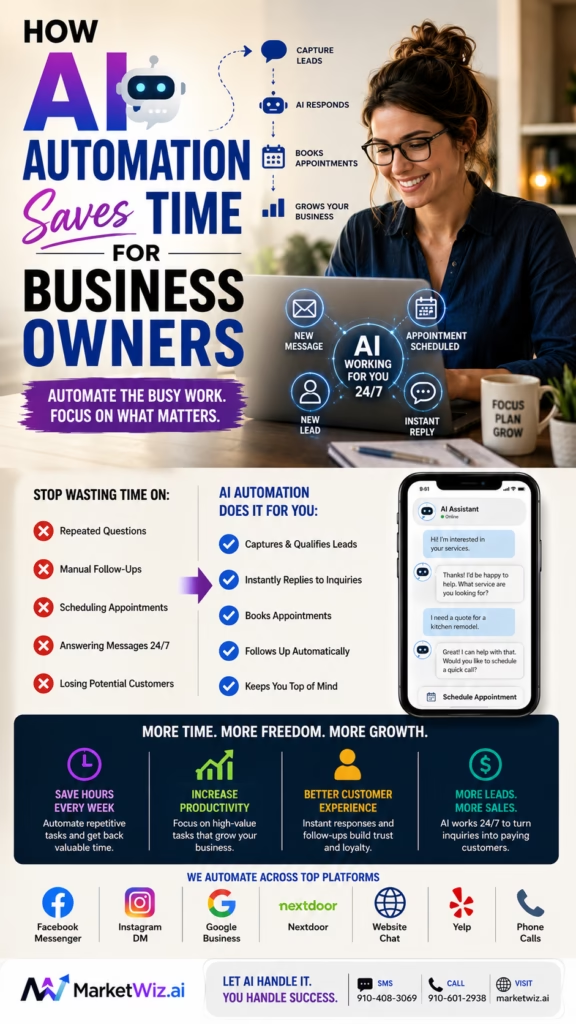
How AI Automation Saves Time for Business Owners
How AI Automation Saves Time for Business Owners explains how entrepreneurs can reduce repetitive work, respond to customers faster, organize leads, schedule appointments, improve follow-up, create content, simplify reporting, and spend more time on sales, strategy, service, and growth.
Introduction
How AI Automation Saves Time for Business Owners begins with a simple reality: most owners are responsible for far more than the work customers see.
A contractor may spend the day managing crews, checking jobs, preparing estimates, answering calls, reviewing materials, and trying to post on social media. A store owner may be serving customers while responding to online inquiries, updating product listings, coordinating deliveries, and requesting reviews. A real estate professional may be managing appointments, property questions, follow-up, marketing, paperwork, and lead qualification at the same time.
The business owner often becomes the final destination for every task. Questions, approvals, complaints, estimates, missed calls, marketing ideas, scheduling issues, and customer follow-up all return to the same person.
This creates a time problem. The owner may spend hours completing repetitive tasks that are necessary but do not require the owner’s full experience, judgment, or attention.
AI automation changes this by helping businesses complete routine work automatically or semi-automatically. A system can respond to common questions, collect customer details, organize leads, prepare content, schedule reminders, create reports, summarize conversations, and notify staff when human attention is required.
AI automation saves time by completing repeatable steps consistently while business owners focus on decisions, relationships, service quality, and revenue.
The goal is not to remove people from the business. The goal is to stop using valuable human time for every repeated administrative action.
The strongest automation systems are built around clear processes. They use accurate business information, approved responses, defined handoff rules, measurable goals, secure integrations, and regular review.
Business owners can use AI automation for customer response, lead qualification, missed-call recovery, appointment scheduling, estimate follow-up, email drafting, Marketplace messages, Google Maps content, Nextdoor posts, voice calls, CRM updates, review requests, social media planning, and performance reporting.
Even small improvements can create meaningful time savings. Saving ten minutes across thirty daily customer conversations can recover five hours. Reducing manual follow-up by one hour per day can return more than twenty hours per month.
Main idea: AI automation gives business owners more time by turning repetitive activities into organized workflows that continue working even when the owner is busy serving customers.
Table of Contents
- 1) Why business owners lose so much time
- 2) What AI automation actually means
- 3) Identifying the best tasks to automate
- 4) Saving time on customer responses
- 5) Automating lead qualification
- 6) Recovering missed calls and messages
- 7) Simplifying appointment scheduling
- 8) Automating estimates and proposal follow-up
- 9) Organizing customer information automatically
- 10) Saving time with CRM automation
- 11) Creating marketing content faster
- 12) Automating local business posting
- 13) Using AI for email and customer communication
- 14) Using AI voice agents
- 15) Automating review requests and responses
- 16) Improving internal team communication
- 17) Automating reports and performance summaries
- 18) Reducing repetitive data entry
- 19) Creating better handoffs between AI and employees
- 20) Protecting customer trust and accuracy
- 21) Calculating the time and money saved
- 22) Building an AI automation roadmap
- 23) Common AI automation mistakes
- 24) Final thoughts
- 25) FAQs
- 26) Extra keywords
1) Why Business Owners Lose So Much Time
Business owners rarely lose time because of one large task. Most time disappears through dozens of small repeated actions.
Common time-consuming business tasks include:
- Answering the same customer questions
- Returning missed calls
- Collecting contact information
- Confirming service areas
- Scheduling appointments
- Sending reminders
- Following up after estimates
- Updating spreadsheets
- Creating social media posts
- Preparing monthly reports
Each task may require only several minutes, but the total grows quickly. A business that receives forty inquiries per day may spend hours answering initial questions before a qualified customer reaches the owner.
Owners also lose time when information is scattered. Customer details may appear in text messages, emails, voicemails, social media inboxes, spreadsheets, handwritten notes, and employee conversations.
Searching for information creates additional work. The owner may need to remember who called, which estimate was sent, what service was requested, and when follow-up should occur.
Example daily time loss:
Customer responses: 90 minutes
Scheduling: 45 minutes
Follow-up: 60 minutes
Data entry: 30 minutes
Marketing content: 60 minutes
Reporting and review: 30 minutes

Total:
5 hours and 15 minutes
Not every business loses this exact amount, but the pattern is common. Repetitive work gradually consumes the time needed for leadership, sales, training, planning, and customer relationships.
The first benefit of AI automation is not faster technology. It is recovering owner attention from repeated low-value tasks.
2) What AI Automation Actually Means
AI automation combines artificial intelligence with defined business workflows. The AI understands or creates information, while the automation moves that information through the correct process.
Artificial intelligence can:
Interpret customer messages
Draft responses
Classify inquiries
Summarize conversations
Generate content
Recommend next actions

Automation can:
Send messages
Create records
Update fields
Schedule reminders
Notify employees
Move data between tools
Trigger follow-up
These functions become more useful when combined.
Example AI automation:
Customer sends inquiry
AI identifies service
AI asks approved questions
Automation records answers
CRM creates lead
Calendar offers appointment
Employee receives summary
Follow-up task is scheduled
AI automation is different from a simple automatic reply. A basic reply sends the same message to everyone. An AI-supported workflow can recognize the customer’s request and respond based on the situation.
The system should remain within approved rules. It should not invent prices, guarantees, qualifications, availability, contracts, or policies.
AI automation saves time by combining understanding, communication, and workflow execution inside one connected process.
3) Identifying the Best Tasks to Automate
The best automation opportunities are repetitive, high-volume, rule-based, and time-consuming.
Strong automation candidates usually have:
- Clear steps
- Repeated questions
- Predictable information
- High message volume
- Frequent delays
- Manual copying
- Simple approvals
- Measurable outcomes
- Low strategic complexity
- Defined human handoff points
Examples include collecting a customer’s city, service need, preferred timeline, and phone number. These questions do not always require the owner.
Complex pricing, complaints, medical concerns, legal questions, negotiations, unusual technical issues, and high-value decisions should usually remain with qualified people.
Automation priority formula:
Frequency
×
Time required
×
Business importance
×
Process clarity
=
Automation opportunity
A task performed fifty times per week is usually a stronger automation candidate than a task performed once every three months.
Owners should begin with one process that creates obvious time loss. Trying to automate the entire company at once often creates confusion.
The best first automation is usually the repetitive task employees already understand and owners are tired of doing manually.
4) Saving Time on Customer Responses
Customer response is one of the most common automation opportunities because the same initial questions appear repeatedly.
AI can answer routine questions about:
- Business hours
- Service availability
- Locations served
- Product categories
- Appointment process
- Delivery areas
- Basic pricing factors
- Required information
- Estimate steps
- Human contact options
Manual response:
Owner reads inquiry
Owner identifies service
Owner writes reply
Owner requests location
Owner requests timeline
Owner waits for response
Owner records information

AI-supported response:
AI reads inquiry
AI identifies service
AI answers approved question
AI requests location and timeline
AI records customer response
Owner receives qualified summary
The system should acknowledge the exact inquiry. A generic message such as “Thanks, how can we help?” may waste time when the customer has already explained the need.
Stronger AI response:
Thank you for asking about exterior painting. We may be able to help. What city is the property in, how many sides of the home need painting, and what timeline are you considering? Photos would also help us explain the next step.
Fast and accurate responses improve the customer experience while reducing the number of repetitive messages written by the owner.
AI saves time by handling the first useful response while the owner remains focused on qualified opportunities.
5) Automating Lead Qualification
Lead qualification determines whether a customer fits the business’s location, service, timing, and operational requirements.
AI qualification can collect:
- Customer name
- Phone number
- Email address
- City or ZIP code
- Service requested
- Project size
- Current condition
- Preferred timeline
- Photos or documents
- Appointment availability
The questions should change by business type.
Contractor qualification:
Property city
Project type
Approximate size
Current condition
Photos
Preferred timeline

Moving company qualification:
Origin ZIP code
Destination ZIP code
Move date
Home size
Stairs
Special items

Retail qualification:
Product interest
Desired size
Color or features
Delivery ZIP code
Preferred timing
Payment or financing question
AI can stop unqualified conversations from consuming owner time. A lead outside the service area can receive an accurate explanation rather than being passed through several employees.
Qualified leads can be sent to the correct person with a complete summary.
Automated qualification saves time by ensuring the owner enters the conversation after the basic facts are already organized.
6) Recovering Missed Calls and Messages
Missed calls are expensive because many customers will immediately contact another business.
AI automation can trigger a response when a call is missed, a voicemail is received, or a message remains unanswered.
Missed-call workflow:
Customer calls
Call is not answered
Automation sends immediate acknowledgment
Customer explains need
AI asks qualification questions
Lead is recorded
Employee receives alert
Follow-up call is scheduled
Missed-call recovery can include:
- Immediate acknowledgment
- Service question
- Location confirmation
- Urgency identification
- Phone callback request
- Appointment option
- Team notification
- CRM lead creation
- Follow-up reminder
- Conversation summary
Businesses should avoid implying that an employee answered when the response was automated. The communication should remain clear and helpful.
Emergency situations should have defined instructions. An AI system should not provide unsupported safety, medical, electrical, legal, or emergency advice.
Missed-call automation saves time and revenue by keeping customer conversations alive until a person can respond.
7) Simplifying Appointment Scheduling
Scheduling often requires several messages. The customer suggests a time, the business checks availability, the employee proposes another time, and the conversation continues.
AI automation can simplify this by connecting customer conversations with real calendar availability.
Scheduling automation can handle:
- Available time windows
- Appointment length
- Employee assignment
- Service-area routing
- Travel buffers
- Confirmation messages
- Appointment reminders
- Rescheduling
- Cancellation updates
- Follow-up tasks
Manual scheduling:
Customer requests time
Employee checks calendar
Employee responds
Customer suggests another time
Employee checks again
Appointment is confirmed
Employee sends reminder

Automated scheduling:
Customer requests appointment
System checks real availability
Customer selects time
Calendar is updated
Confirmation is sent
Reminder is scheduled
Scheduling rules must be accurate. The system should not double-book employees, ignore travel time, or offer appointments outside the service area.
Scheduling automation saves time by removing repeated calendar checks and reducing unnecessary back-and-forth communication.
8) Automating Estimates and Proposal Follow-Up
Many businesses spend significant time preparing estimates and then fail to follow up consistently.
AI automation can help organize estimate details, create reminders, prepare follow-up messages, and identify proposals that need attention.
Estimate automation can support:
- Estimate request intake
- Required photo collection
- Measurement reminders
- Proposal status tracking
- Follow-up scheduling
- Customer question summaries
- Expiration reminders
- Approval notifications
- Deposit reminders
- Won or lost reporting
Estimate follow-up:
Hi, I wanted to follow up regarding the proposal for your project. Do you have any questions about the scope, materials, scheduling, or next steps? We can review any updates before you make a decision.
AI should not change pricing, discounts, contract terms, or scope without approved rules and human authorization.
Owners can receive a daily or weekly list of proposals needing attention instead of searching manually through email and notes.
Automated proposal follow-up saves time and improves conversion by ensuring qualified estimates do not disappear after delivery.
9) Organizing Customer Information Automatically
Business owners often spend time copying customer information from one system to another.
Customer information may need to move between:
- Website forms
- Email inboxes
- Phone call records
- Social media messages
- Marketplace conversations
- Spreadsheets
- CRM systems
- Calendars
- Estimate software
- Reporting dashboards
Automation can create a lead record, add the contact information, identify the source, summarize the request, and assign the next step.
Automatic lead record:
Name: Maria Lopez
Phone: 555-555-0123
Source: Google Maps
City: Raleigh
Service: Interior painting
Timeline: Within six weeks
Project: Living room, hallway, and trim
Status: Qualified
Next action: Schedule estimate
This reduces duplicate data entry and prevents important details from remaining inside one employee’s messages.
Data accuracy should be checked. Incorrect phone numbers, duplicate leads, and incomplete fields can create additional work.
Automatic organization saves time by turning scattered conversations into complete and searchable customer records.
10) Saving Time with CRM Automation
A CRM becomes more useful when lead records update automatically as customers move through the sales process.
CRM automation can handle:
- New lead creation
- Lead-source tagging
- Status changes
- Task assignments
- Appointment records
- Conversation summaries
- Follow-up reminders
- Estimate tracking
- Sales notifications
- Customer reactivation
Example CRM stages:
New inquiry
Awaiting details
Qualified
Appointment scheduled
Estimate completed
Proposal sent
Follow-up needed
Won
Lost
Closed
Without automation, employees must remember to update each stage. This creates incomplete records and unreliable reports.
Automation can update the status when an appointment is booked, a proposal is sent, or a customer replies.
The owner can review the pipeline instead of asking every employee for an update.
CRM automation saves owner time by replacing manual status checks with a current and organized view of the sales pipeline.
11) Creating Marketing Content Faster
Content creation is valuable but time-consuming. Business owners may need blog posts, social media captions, Google updates, emails, FAQs, video scripts, and service descriptions.
AI can help create drafts for:
- Blog articles
- Google Business Profile posts
- Social media captions
- Video scripts
- Email campaigns
- Service pages
- Location pages
- Frequently asked questions
- Product descriptions
- Project summaries
AI does not remove the need for review. Business owners or employees should verify facts, prices, services, locations, claims, dates, and customer instructions.
Traditional content process:
Choose topic
Create outline
Write draft
Edit draft
Add local examples
Create title
Write description
Prepare social caption

AI-supported process:
Provide topic and business details
AI creates structured draft
Owner adds real experience
Employee verifies accuracy
Content is edited and published
The greatest time savings comes from using AI to create a strong first draft rather than starting from a blank page.
AI saves content time by accelerating research, organization, outlining, drafting, and repurposing while people protect accuracy and brand quality.
12) Automating Local Business Posting
Local businesses often need to publish across several platforms to remain visible.
Posting channels may include:
- Google Business Profile
- Facebook Marketplace
- Craigslist
- OfferUp
- Nextdoor
- Facebook pages
- TikTok
- YouTube
- Local directories
AI can create platform-specific variations from one core business update.
Core update:
Completed exterior painting project

Google post:
Educational project summary

Nextdoor post:
Neighborhood-focused maintenance tip

Instagram caption:
Visual before-and-after story

YouTube Short:
Twenty-five-second transformation script

Marketplace listing:
Focused exterior painting service offer
Businesses should avoid publishing identical content everywhere. Each platform has different customer behavior, formatting, and expectations.
Automated posting should follow platform rules and represent real products, services, locations, projects, and availability.
AI posting automation saves time by turning one real business activity into several useful pieces of local marketing content.
13) Using AI for Email and Customer Communication
Email communication can consume hours when owners repeatedly draft similar messages.
AI email automation can support:
- Lead responses
- Appointment confirmations
- Estimate follow-up
- Project preparation instructions
- Review requests
- Customer updates
- Payment reminders
- Reactivation campaigns
- Internal summaries
- Monthly reports
Project preparation email:
Thank you for scheduling your appointment. Before the visit, please make sure the work area is accessible and send any additional photos or measurements that may help our team prepare. We will contact you if further information is needed.
AI can personalize messages using the customer’s name, service, location, appointment, and conversation stage.
Personalization should remain accurate. The system should not invent project details or previous conversations.
Sensitive, legal, financial, medical, or complaint-related emails should be reviewed by a qualified person.
AI saves email time by creating accurate drafts and triggering routine communication at the correct stage of the customer journey.
14) Using AI Voice Agents
Business owners lose time when they answer repetitive calls or return voicemails containing basic questions.
AI voice agents can answer routine calls, collect information, schedule appointments, route callers, and summarize conversations.
AI voice agents can support:
- Inbound call answering
- Business-hours questions
- Service-area confirmation
- Lead qualification
- Appointment scheduling
- Call routing
- After-hours coverage
- Reminder calls
- Conversation summaries
- Employee notifications
AI voice workflow:
Answer call
Identify customer need
Confirm location
Ask approved questions
Schedule or route next step
Create conversation summary
Notify employee
Update CRM
The system should provide human transfer for complaints, emergencies, complex questions, high-value negotiations, and sensitive conversations.
The voice agent should not claim credentials, make binding promises, or provide restricted advice.
AI voice automation saves time by handling routine calls while employees focus on customers who need expertise and personal attention.
15) Automating Review Requests and Responses
Reviews are important for local trust, but businesses often forget to request them consistently.
Review automation can support:
- Post-service review requests
- Follow-up reminders
- Review response drafts
- Customer feedback collection
- Negative experience alerts
- Common theme summaries
- Reputation reports
- Team notifications
- Customer service improvement
- Review tracking
Review request:
Thank you for choosing our business. If you are comfortable sharing your experience, we would appreciate an honest review describing the communication, service, and overall process. Your feedback helps other local customers know what to expect.
Businesses should never automate fake reviews or ask employees to create false customer experiences.
Review responses should protect privacy. The business should not mention private pricing, medical details, property issues, contracts, or personal information.
AI can prepare a draft, while employees review sensitive or negative feedback before publication.
Review automation saves time by creating a consistent reputation process without removing the human care required for customer feedback.
16) Improving Internal Team Communication
Owners spend time repeating instructions, asking for updates, and explaining customer situations to multiple employees.
AI automation can summarize customer conversations and send the correct information to the correct team member.
Internal automation can provide:
- New lead summaries
- Appointment notifications
- Customer issue alerts
- Estimate status updates
- Project preparation notes
- Daily lead summaries
- Weekly sales summaries
- Missed-call reports
- Follow-up task lists
- Performance alerts
Internal lead summary:
Customer: James Carter
Source: Nextdoor
Location: Tampa
Service: Roof repair
Issue: Leak near rear bedroom
Timeline: As soon as available
Photos: Received
Phone: Confirmed
Next step: Schedule inspection
This reduces the need for the owner to explain the same lead several times.
Notifications should be useful and limited. Too many alerts can create a new form of distraction.
AI saves internal communication time by turning customer conversations into clear summaries, assignments, and next actions.
17) Automating Reports and Performance Summaries
Reporting often requires owners to collect numbers from several systems, organize them, and explain what changed.
AI reporting can summarize:
- Leads by source
- Response times
- Qualified opportunities
- Appointments scheduled
- Estimates completed
- Sales closed
- Revenue by channel
- Missed calls recovered
- Follow-up completion
- Customer review activity
Example weekly summary:
Google Maps generated the highest appointment rate.
Marketplace produced the most inquiries.
Nextdoor produced fewer leads but larger average projects.
Weekend response time increased.
Twelve estimates still require follow-up.
Three customers are ready for scheduling.
AI can identify trends and prepare a readable summary, but the underlying data must be accurate.
Reports should connect marketing activity with qualified leads, customers, revenue, and time saved.
The owner can review exceptions and decisions rather than manually calculating every result.
Automated reporting saves time by converting raw activity into a clear business summary with priorities and next actions.
18) Reducing Repetitive Data Entry
Manual data entry is slow and creates mistakes. Employees may copy names, numbers, dates, project details, and appointment information several times.
Data entry automation can move information into:
- CRM records
- Google Sheets
- Calendars
- Estimate systems
- Customer databases
- Email tools
- Reporting dashboards
- Task managers
- Service software
- Sales pipelines
Information should be entered once and reused where appropriate.
Manual process:
Form submission
Copy name to spreadsheet
Copy phone to CRM
Copy appointment to calendar
Copy project notes to estimator
Copy lead source to report

Automated process:
Form submission
CRM record created
Calendar updated
Estimator notified
Lead source recorded
Report updated
Businesses should use duplicate detection and validation. Automation can spread inaccurate information quickly if no checks exist.
Data automation saves time by removing repeated copying while creating more consistent customer records.
19) Creating Better Handoffs Between AI and Employees
AI automation works best when the system knows when to stop and involve a person.
Human handoff may be required for:
- Customer complaints
- Complex pricing
- Negotiations
- Emergencies
- Medical questions
- Legal concerns
- Financial decisions
- Contract changes
- Technical uncertainty
- High-value opportunities
Good handoff:
AI collects information
AI summarizes conversation
AI identifies reason for escalation
Employee receives full context
Customer is informed of next step
Employee continues conversation
A poor handoff forces the customer to repeat everything. This creates frustration and wastes employee time.
The AI should provide a concise summary containing the customer, need, location, history, urgency, and requested next action.
The system should not continue guessing after reaching uncertainty.
Strong handoffs save time because employees enter the conversation with context instead of restarting the customer experience.
20) Protecting Customer Trust and Accuracy
Time savings have little value if automation damages trust.
Safe automation requires:
- Accurate business information
- Approved response rules
- Human escalation
- Secure integrations
- Limited data access
- Customer privacy
- Clear consent practices
- Conversation review
- Error correction
- Regular testing
AI should not invent prices, appointment availability, product inventory, qualifications, guarantees, policies, licenses, or service capabilities.
Businesses in medical, legal, financial, housing, employment, insurance, and other regulated industries need additional controls.
Sensitive information should be collected only when necessary and protected appropriately.
Customers should always have a path to a person when the issue requires human attention.
AI automation should save time without reducing accuracy, privacy, accountability, or customer confidence.
21) Calculating the Time and Money Saved
Business owners should measure automation through actual time recovery and financial impact.
Monthly time saved:
Number of automated tasks
×
Average minutes saved per task
÷
60
=
Hours saved per month
Example:
1,000 customer responses
×
4 minutes saved
÷
60
=
66.7 hours savedTime-saving metrics include:
- Responses automated
- Calls recovered
- Appointments scheduled
- Follow-ups completed
- Records created
- Reports generated
- Content drafts created
- Manual hours reduced
- Lead response improvement
- Owner time recovered
Value of time saved:
Hours saved
×
Hourly value of employee or owner time
=
Estimated labor value recovered
Businesses should also track revenue improvements. Faster responses, better follow-up, and fewer missed calls may create additional appointments and sales.
Automation cost should include software, setup, management, monitoring, integrations, and employee review time.
The true value of AI automation is the combination of time recovered, leads saved, work completed, and revenue created.
22) Building an AI Automation Roadmap
Business owners should implement automation in stages.
Stage 1:
Document current process

Stage 2:
Identify repetitive tasks

Stage 3:
Select one high-value workflow

Stage 4:
Create approved rules and responses

Stage 5:
Connect required systems

Stage 6:
Test with limited volume

Stage 7:
Review customer and employee feedback

Stage 8:
Measure time and revenue impact

Stage 9:
Improve workflow

Stage 10:
Expand carefully
Good first automation projects include:
- Website lead response
- Missed-call recovery
- Appointment reminders
- Estimate follow-up
- Review requests
- Lead record creation
- Conversation summaries
- Weekly reporting
- Content draft creation
- Marketplace qualification
Each automation should have an owner responsible for monitoring performance and correcting issues.
Businesses should keep written documentation describing triggers, actions, exceptions, and handoff rules.
A phased roadmap helps business owners save time without creating a complicated system they cannot control.
23) Common AI Automation Mistakes
AI automation can waste time when it is built without a clear process or monitored poorly.
Common automation mistakes include:
- Automating a broken process
- Using inaccurate business information
- Creating robotic customer responses
- Asking too many questions
- Failing to provide human handoff
- Sending excessive follow-up
- Creating duplicate records
- Ignoring privacy requirements
- Buying too many disconnected tools
- Failing to test integrations
- Failing to train employees
- Tracking activity but not outcomes
- Scaling too quickly
- Ignoring customer feedback
- Failing to review errors
Another mistake is assuming automation requires no maintenance. Business hours, service areas, prices, products, staff, calendars, and policies change.
Outdated automation can create incorrect answers and additional work.
Businesses should regularly review conversations, failed workflows, customer complaints, handoffs, and performance metrics.
AI should support the business process rather than becoming another tool the owner must constantly repair.
AI automation fails when the system completes tasks faster but creates more confusion, corrections, and customer dissatisfaction.
24) Final Thoughts
How AI Automation Saves Time for Business Owners comes down to removing repeated manual work from customer service, lead management, scheduling, follow-up, content creation, reporting, and administration.
AI can respond to routine inquiries, collect customer details, qualify leads, recover missed calls, schedule appointments, organize CRM records, create content drafts, request reviews, summarize conversations, and prepare reports.
The strongest systems do not remove human responsibility. They give employees and owners better information, faster workflows, and more time for the work that requires judgment, expertise, relationships, and leadership.
Business owners should begin with one clear problem. Slow response, missed calls, inconsistent follow-up, repetitive data entry, weak lead organization, and time-consuming reporting are practical starting points.
Every automation should use accurate business information, defined rules, secure systems, human handoff, regular testing, and measurable goals.
Owners should calculate both hours saved and business outcomes. The best automation may recover time, improve customer experience, increase appointments, reduce missed opportunities, and create more consistent revenue.
Most importantly, automation should make the business easier to operate. A complicated system that requires constant correction does not create real time savings.
Build a Smarter Business Automation System
Market Wiz AI helps local businesses automate customer responses, Marketplace inquiries, lead qualification, appointment scheduling, Google Maps marketing, Nextdoor content, CRM organization, follow-up, voice calls, reviews, and performance reporting.
Schedule a Market Wiz AI DemoFinal takeaway: AI automation saves business owners time when clear workflows, accurate information, customer-friendly communication, and human oversight work together to reduce repetitive work and improve growth.
25) FAQs
1) What is AI automation for business owners?
AI automation uses artificial intelligence and connected workflows to handle repetitive tasks such as customer response, lead qualification, scheduling, follow-up, content creation, data entry, and reporting.
2) How does AI automation save time?
It completes repeatable steps automatically, reduces manual copying, answers routine questions, organizes customer information, and alerts employees when human attention is required.
3) What should a business automate first?
Start with a high-volume, repetitive, rule-based task such as missed-call recovery, lead response, appointment reminders, estimate follow-up, or review requests.
4) Can small businesses use AI automation?
Yes. Small businesses can begin with one focused workflow and expand after the process is accurate, useful, and measurable.
5) Does AI automation replace employees?
AI is most effective when it supports employees by handling repetitive work while people manage relationships, judgment, negotiation, and complex customer needs.
6) Can AI respond to customer messages?
Yes. AI can answer approved routine questions, acknowledge the inquiry, request initial details, and route the conversation when human help is needed.
7) Can AI qualify leads?
Yes. AI can collect location, service, project size, timing, photos, contact information, appointment preferences, and other approved details.
8) Can AI recover missed calls?
Yes. Automation can acknowledge a missed call, request the customer’s need, create a lead, and alert an employee for follow-up.
9) Can AI schedule appointments?
AI can schedule appointments when connected to real calendars, business hours, service areas, employee availability, and approved scheduling rules.
10) Can AI send appointment reminders?
Yes. AI automation can send confirmations, reminders, preparation instructions, cancellation notices, and rescheduling options.
11) Can AI follow up after estimates?
Yes. AI can schedule follow-up messages, identify unanswered proposals, notify salespeople, and record customer responses.
12) Can AI update a CRM?
Yes. AI automation can create records, update lead stages, add summaries, assign tasks, record appointments, and schedule follow-up.
13) Can AI create marketing content?
Yes. AI can draft blogs, captions, Google posts, emails, video scripts, FAQs, service descriptions, and local content.
14) Should AI-generated content be reviewed?
Yes. Businesses should verify facts, prices, locations, claims, tone, legal requirements, and customer instructions before publishing.
15) Can AI automate social media posting?
AI can help create and organize platform-specific content, but businesses should follow platform rules and review posts for accuracy and quality.
16) Can AI answer phone calls?
AI voice agents can answer routine calls, qualify leads, provide approved information, schedule appointments, route callers, and summarize conversations.
17) Can AI automate review requests?
Yes. AI can send review requests after completed services and prepare response drafts, but reviews should always come from genuine customers.
18) Can AI create reports?
Yes. AI can summarize leads, appointments, sales, response times, customer sources, follow-up activity, and revenue when connected to accurate data.
19) How much time can AI automation save?
Time savings depend on task volume, workflow complexity, staff involvement, and system quality. Businesses should calculate minutes saved per task and total monthly volume.
20) Is AI automation expensive?
Costs vary by tools, setup, integrations, usage, management, and support. The value should be compared with hours saved, leads recovered, and revenue generated.
21) Is customer data safe with AI automation?
Businesses should use secure systems, limited access, appropriate consent, privacy protections, clear retention practices, and regular review.
22) What tasks should not be fully automated?
Complaints, negotiations, emergencies, complex pricing, legal questions, medical issues, financial decisions, contract changes, and sensitive conversations often require people.
23) What is the biggest automation mistake?
One of the biggest mistakes is automating an unclear or broken process without accurate information, testing, human handoff, or measurement.
24) How should a business start with AI automation?
Document the current process, choose one repetitive task, define approved rules, test the workflow, review results, and expand carefully.
25) What is the best AI automation strategy?
Use AI to improve one measurable process, connect it to accurate business information, provide human oversight, track time and revenue, and scale only after it works reliably.
25) Extra Keywords
- How AI Automation Saves Time for Business Owners
- AI automation for business owners
- business process automation
- AI time-saving tools
- small business automation
- AI customer service automation
- AI lead follow-up
- business productivity automation
- AI workflow automation
- AI lead qualification
- AI appointment scheduling
- AI missed-call recovery
- AI CRM automation
- AI content automation
- AI voice agents for business
- AI review automation
- AI reporting automation
- AI email automation
- automated customer follow-up
- AI business efficiency
- AI tools for entrepreneurs
- business owner time management
- AI sales automation
- local business automation
- AI productivity for small business













