

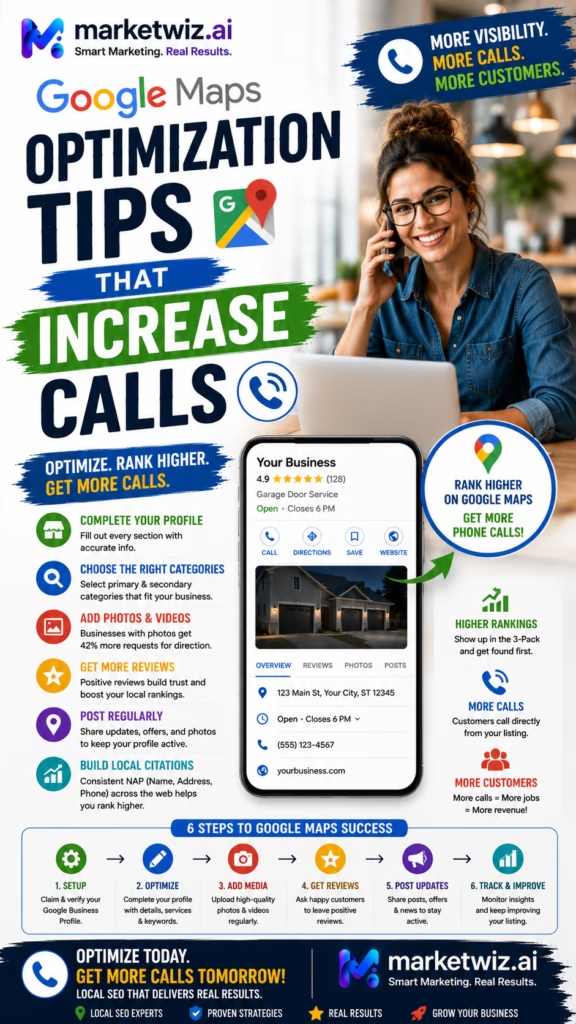
Google Maps Optimization Tips That Increase Calls
Google Maps optimization tips that increase calls are not about chasing one isolated ranking trick. The strongest local marketing systems combine an accurate Google Business Profile, the right business categories, genuine customer reviews, strong photos, useful service information, an optimized website, accurate citations, legitimate local authority, geographic ranking analysis, fast lead response, call tracking, CRM attribution, and revenue measurement.
Ranking higher on Google Maps is useful, but the ranking itself does not pay the bills.
Calls matter.
Qualified leads matter.
Appointments matter.
Estimates matter.
Customers matter.
Revenue matters.
That distinction is critical because local SEO is often measured incorrectly.
A business sees that its Google Business Profile moved from position seven to position three.
Everyone celebrates.
But did the phone ring more often?
Did those calls come from actual customers?
Did more appointments get scheduled?
Did estimate volume increase?
Did revenue improve?
Those are the questions that transform local SEO from a ranking exercise into a business-growth system.
Google Maps optimization has several jobs.
First, help the business become visible.
Second, help the customer understand the business.
Third, help the customer trust the business.
Fourth, make contacting the business easy.
Fifth, make sure the business actually handles the lead correctly.
Those steps work together.
Imagine a homeowner searching:
roofing company near me.
plumber near me.
electrician near me.
painting contractor near me.
flooring company near me.
garage door company near me.
kitchen remodeler near me.
HVAC company near me.
insulation contractor near me.
dentist near me.
auto repair near me.
Those are not random searches.
They often signal local commercial intent.
The customer may already be looking for someone to hire.
They see several local businesses.
Then compare.
Star rating.
Review count.
Recent reviews.
Photos.
Business name.
Category.
Hours.
Website.
Distance.
Services.
Project quality.
Then they make a decision.
Call.
Visit website.
Request directions.
Continue searching.
That means the profile has to perform two jobs:
rank and convert.
A profile that ranks but does not convert is underperforming.
A profile that converts well but barely appears is also underperforming.
The strongest strategy improves both.
The Google Maps Call Growth Formula
Local Visibility + Accurate Profile + Strong Reviews + Real Photos + Clear Services + Mobile-Friendly Website + Easy Contact + Fast Call Response + Lead Qualification + CRM Tracking + Revenue Attribution = More Valuable Google Maps Calls
Google Maps Visibility and Call Generation Are Not the Same Thing
Ranking Creates Opportunity
Better visibility gives more local customers an opportunity to discover the business.
Trust Creates Action
Reviews, photos, branding, and business information influence whether someone actually contacts the company.
Contact Clarity Creates Calls
Customers should immediately understand how to reach the business.
Response Speed Protects Leads
The business needs to answer or promptly return qualified calls.
Qualification Creates Efficiency
Not every call is equally valuable, so lead quality matters.
Revenue Proves Performance
Calls become meaningful marketing metrics when they can be connected with sales outcomes.
Understand the Search Intent Behind Google Maps Calls
Different local searches represent different levels of customer intent.
“Near Me” Searches
These searches usually indicate geographic urgency.
Service + City Searches
Customers may already know the exact service they need.
Emergency Searches
Certain industries receive highly time-sensitive calls.
Comparison Searches
Customers may be evaluating several local companies.
High-Ticket Project Searches
Remodelers, contractors, roofers, flooring companies, HVAC businesses, and similar companies may receive fewer leads than some retail categories but each opportunity can have significant value.
Commercial Searches
Property managers, businesses, landlords, builders, and procurement teams may search differently from homeowners.
Optimize Every Important Google Business Profile Field
An incomplete profile can create uncertainty.
Business Name
Use the genuine real-world business name.
Primary Category
Choose the category that most accurately represents the main business activity.
Secondary Categories
Add only categories that genuinely represent additional services.
Phone Number
Use a number that is actively monitored.
Website
Link to the official website or appropriate business landing page.
Hours
Keep them accurate.
Services
Add genuine services customers actually search for.
Photos
Provide useful visual proof.
Service Areas
Use real geography where appropriate.
Profile Completeness Helps Customers Make Decisions
Google Maps optimization should make the business easier to understand. The customer should not need to guess what the company does, whether it serves their area, when it is open, or how to contact it.
Use the Correct Business Name Instead of Keyword Stuffing
Use the Real-World Business Name
The profile should match legitimate customer-facing branding.
Avoid Artificial Keywords
Do not add service phrases or city names simply to influence rankings unless they genuinely belong in the business name.
Keep Branding Consistent
Important directories, the website, signage, invoices, and major social profiles should use consistent legitimate branding where appropriate.
Do Not Create Fake Name Variations
One company should not pretend to have different keyword-focused identities in multiple cities.
Choose the Most Accurate Google Business Profile Categories
Categories tell Google and customers what type of business is being represented.
Choose the Best Primary Category
Use the option that most accurately describes the main business.
Add Relevant Secondary Categories
Use only legitimate additional categories.
Avoid Category Overload
More categories do not automatically mean better rankings.
Review Category Choices Periodically
Available options can change over time.
Match Website Content
The website should reinforce the real services represented by profile categories.
Use the Correct Address or Service-Area Business Setup
Customer-Facing Locations
A location displayed publicly should satisfy current eligibility requirements.
Service-Area Businesses
Businesses that travel to customers can configure service areas where applicable.
Do Not Use Fake Addresses
Fabricated local presence can create substantial risk.
Do Not Use Ineligible Virtual Offices
Businesses should verify current profile eligibility requirements.
Do Not Create Duplicate Profiles Without Legitimate Eligibility
Multiple profiles should represent actual qualifying locations or operations.
Use Real Service Areas Instead of Trying to Rank Everywhere
Identify Real Markets
Focus on places the business actually serves.
Prioritize Profitable Markets
Different cities can produce different average customer values.
Track Call Quality by Area
A city producing many calls may not necessarily produce the best customers.
Align Website Geography
Local landing pages and profile service areas should represent genuine operating territory.
Remember That Service Areas Do Not Force Rankings
Simply adding a location does not guarantee visibility there.
Use a Phone Number That Someone Actually Answers
One of the simplest Google Maps call optimization tips has nothing to do with SEO.
Answer the phone.
Use a Monitored Business Number
Local search leads can lose value quickly when calls are ignored.
Route Calls Correctly
Qualified prospects should reach the appropriate salesperson, office manager, or customer service representative.
Use Call Tracking Carefully
Tracking can help measure marketing performance when configured correctly.
Record Call Outcomes
A business should know whether calls became appointments, estimates, or sales.
Measure Missed Calls
Missed lead volume can reveal a major conversion problem.
A Missed Qualified Call Is a Lost Marketing Opportunity
Improving Google Maps rankings while ignoring phone response can simply generate more missed opportunities. Local SEO and lead handling should be improved together.
Keep Business Hours Accurate
Regular Hours
Make sure the profile matches actual operating hours.
Special Hours
Update holiday and temporary changes where relevant.
Emergency Availability
Do not claim 24-hour service unless the business genuinely provides it.
Appointment-Based Businesses
Make consultation or showroom expectations clear.
Operational Consistency
Customers are less likely to call when they believe the business is closed.
Add the Services Customers Actually Search For
A generic profile may fail to communicate the full range of genuine business capabilities.
Use Specific Service Names
Include real services rather than vague promotional language.
Keep Services Relevant
Do not add services that the company cannot provide.
Match Website Pages
Important services should often have useful supporting pages on the website.
Think Like the Customer
Use terminology customers naturally understand.
Update Services When the Business Changes
Remove discontinued services and add legitimate new ones.
Write a Better Google Business Profile Description
Explain the Business Clearly
Tell customers what the company actually does.
Mention Core Services Naturally
Important service language can be used without keyword stuffing.
Describe Real Service Geography
Mention genuine local markets naturally where appropriate.
Explain Customer Type
Residential, commercial, retail, contractor, landlord, property management, or another legitimate customer group may be relevant.
Avoid Unsupported Claims
Do not promise guaranteed rankings, unrealistic results, fake awards, or unsupported superiority.
Add Better Photos to Increase Customer Confidence
Exterior Photos
Useful for businesses with customer-facing locations.
Interior Photos
Show showrooms, offices, retail environments, or facilities where relevant.
Team Photos
Genuine staff imagery can make the company feel more real.
Vehicle Photos
Branded service vehicles can reinforce legitimacy for local service businesses.
Product Photos
Retailers should show genuine merchandise.
Project Photos
Contractors should document completed work.
Equipment Photos
Specialized equipment may demonstrate real operational capability.
Use Genuine Project Photos to Turn Maps Visibility Into Calls
Before-and-After Projects
Transformation content can provide immediate proof of capability.
Finished Work
Show the final result clearly.
Detail Photos
Craftsmanship often becomes visible through close-up images.
Different Project Types
Demonstrate the range of genuine services.
Local Projects
Real work in actual service areas can reinforce local credibility.
Do Not Misrepresent Images
Stock or generated imagery should not be presented as completed work when it is not.
Build Genuine Reviews That Make Customers More Comfortable Calling
Ask Real Customers
Review generation should begin with genuine customer experiences.
Ask Consistently
A steady process is generally more sustainable than occasional large campaigns.
Make the Process Easy
Reduce unnecessary friction for customers who want to leave feedback.
Do Not Buy Reviews
Fabricated reviews can violate platform requirements and undermine trust.
Do Not Script Fake Customer Language
Customers should describe their real experience.
Monitor Review Themes
Repeated positive or negative feedback can reveal what customers value.
Respond to Reviews Like Future Customers Are Reading Them
Because they probably are.
Thank Positive Customers
Keep responses professional and natural.
Address Critical Feedback Calmly
Avoid public arguments.
Protect Customer Privacy
Do not reveal unnecessary private details.
Avoid Keyword-Stuffed Replies
Responses should sound like genuine customer communication.
Use Feedback Operationally
Reviews can reveal problems that affect call conversion and retention.
Improve the Website Connected to Google Maps
Many potential customers will click the website before calling.
Make the Business Immediately Clear
Visitors should understand what the company does within seconds.
Show Real Work
Project galleries and genuine product imagery can strengthen trust.
Show Core Services
Customers should not need to hunt for service information.
Show Service Areas
Make geography clear.
Make the Phone Number Easy to Find
Especially on mobile devices.
Use Strong Trust Signals
Genuine reviews, certifications, licenses, affiliations, and warranties can be useful when accurate and applicable.
Improve Loading Speed
Customers may leave slow local websites before contacting the business.
The Website Is Part of Google Maps Conversion
A potential customer may discover the business on Google Maps but make the final decision after visiting the website. Local SEO should therefore optimize the entire journey, not just the profile.
Optimize the Website for Mobile Calls
Make the Phone Number Visible
Do not bury it several screens down the page.
Use Clickable Phone Links
Make mobile contact simple.
Keep Navigation Simple
Customers should quickly reach services, projects, reviews, and contact information.
Use Readable Text
Avoid tiny fonts.
Keep Forms Short
Ask only for information that actually helps qualify the customer.
Test Real Phones
Desktop previews do not always reveal mobile usability problems.
Build Dedicated Pages for Important Services
One Clear Search Intent Per Page
Important genuine services often deserve dedicated pages.
Explain the Service Thoroughly
Customers should understand what is offered.
Add Genuine Photos
Visual evidence can strengthen conversion.
Add FAQs
Answer real questions customers ask before calling.
Add Local Relevance Naturally
Mention genuine service geography without excessive keyword repetition.
Add a Clear Contact Path
The visitor should know what to do next.
Build Useful City Pages Instead of Mass Doorway Pages
Use Real Service Areas
Target cities the business genuinely serves.
Add Local Project Examples
Genuine local work can make pages more useful.
Add City-Specific Information
Housing stock, customer needs, product demand, climate, regulations, or other legitimate factors may differ by market.
Avoid Copy-and-Paste Pages
Changing one city name throughout the same text creates weak content.
Track Calls by Market
Determine which city pages actually create business.
Publish Local Content That Answers Customer Questions
Pricing Factors
Explain what can influence cost without making unsupported universal claims.
Service Comparisons
Help customers understand different options.
Common Problems
Explain symptoms customers may notice before contacting a professional.
Project Planning
Help customers understand preparation, scheduling, and decision-making.
Local Questions
Address legitimate geographic considerations.
Buyer Guides
Useful educational resources can support both SEO and conversion.
Improve Internal Linking to Strengthen Local Relevance
Homepage to Services
Make major offerings easy to find.
Blog Content to Services
Connect educational content with relevant commercial pages.
City Pages to Services
Help local visitors find applicable offerings.
Project Pages to Services
Show the relationship between completed work and actual capabilities.
Use Natural Anchor Text
Avoid repetitive keyword stuffing.
Build Accurate Local Citations
Major Business Directories
Keep important listings accurate.
Industry Directories
Use relevant legitimate sources.
Local Organizations
Chambers and community business groups may provide useful local visibility.
Professional Associations
Genuine memberships can support trust.
Supplier or Dealer Directories
Legitimate partner listings can create additional discovery.
Quality Over Quantity
Hundreds of low-quality directories are not automatically better.
Improve Business Name, Address, and Phone Consistency
Business Name
Use legitimate branding consistently.
Address
Keep public location information accurate where applicable.
Phone Number
Prevent customers from finding disconnected or outdated numbers.
Website URL
Important listings should point to the correct official website.
Correct Old Listings
Legacy information can create confusion after moves or phone changes.
Earn Legitimate Backlinks That Strengthen Local Authority
Business Partnerships
Genuine relationships can create natural mentions.
Suppliers
Dealer or installer directories may be useful.
Local Associations
Memberships can create legitimate local references.
Community Organizations
Genuine participation can increase local awareness.
Local Media
Newsworthy work or community involvement may earn coverage.
Useful Content
Strong resources may naturally attract links.
Avoid Manipulative Link Schemes
Low-quality link networks can create long-term SEO risk.
Build Real Local Authority Beyond the Google Business Profile
Community Presence
Participate in the actual market.
Local Partnerships
Work with complementary businesses.
Customer Referrals
Strong local businesses frequently grow through referrals as well as search.
Local Reviews
Genuine customer experiences reinforce reputation.
Local Project Evidence
Completed work can demonstrate real geographic activity.
Local Brand Searches
As awareness grows, more people may search directly for the business.
Use Google Business Profile Posts to Support Customer Conversion
Project Updates
Share genuine recent work.
Product Highlights
Retail and product-driven companies can feature legitimate merchandise.
Educational Posts
Answer common customer questions.
Seasonal Updates
Discuss relevant seasonal services.
Company Updates
Share legitimate operational information.
Posting can make the profile more informative, but frequency alone should not be treated as a guaranteed ranking tactic.
Optimize the Google Business Profile for Conversion, Not Just Ranking
Professional Presentation
Customers may compare several profiles side by side.
Strong Recent Reviews
Fresh genuine customer feedback can reduce uncertainty.
Good Photos
Visual proof helps customers understand the business.
Accurate Hours
Customers need to know when they can call.
Clear Services
Customers should know whether the company provides what they need.
Useful Website
The site should reinforce trust when customers research further.
Consistent Branding
Profile and website should clearly represent the same business.
The Best Ranking Is One That Converts
A lower-ranking business with stronger reviews, better photos, clearer services, and a better customer experience can sometimes win the call over a higher-ranking competitor.
Understand Why Customers Call From Google Maps
Availability
“Can you come this week?”
Service Fit
“Do you handle this type of project?”
Location
“Do you serve my ZIP code?”
Pricing
“How much does this usually cost?”
Appointment
“Can I schedule an estimate?”
Urgency
“Can someone come today?”
Product Availability
“Do you have this item in stock?”
Trust Verification
Customers may call after researching reviews and photos to confirm the next step.
Improve Call Response Speed Before Spending More on SEO
A business can sometimes improve local marketing performance without generating a single additional lead.
It simply converts more of the existing calls.
Answer During Business Hours
Qualified callers should not consistently reach unanswered phones.
Return Missed Calls Promptly
Customers may be contacting competitors simultaneously.
Route Calls Correctly
Avoid sending leads through unnecessary transfers.
Train Staff
Phone handling should support the customer journey.
Track Missed-Call Rate
This metric can reveal whether marketing or operations is the actual bottleneck.
Qualify Google Maps Calls Without Making the Process Difficult
What Service Do You Need?
Identify the opportunity.
Where Are You Located?
Confirm geographic fit.
When Do You Need It?
Determine urgency.
What Is the Project Size?
Relevant dimensions, quantities, square footage, or scope can help.
Are You the Property Owner?
This may be relevant for certain service businesses.
What Would You Like to Schedule?
Appointment, estimate, consultation, showroom visit, or service call.
Qualification should help the customer move forward, not create unnecessary friction.
Turn More Google Maps Calls Into Appointments
Give the Customer a Clear Next Step
Avoid ending qualified calls without direction.
Offer Realistic Availability
Do not overpromise appointment times.
Confirm Contact Information
Make sure reminders and follow-up reach the right person.
Confirm Location
Prevent scheduling errors.
Record the Source
Keep Google Maps attribution connected to the appointment.
Track Appointment Completion
Scheduled appointments and completed appointments are different metrics.
Turn Google Maps Calls Into Estimates and Sales Opportunities
Record Estimate Requests
Track how many calls become actual quoting opportunities.
Record Estimate Value
Not every lead has equal economic value.
Track Estimate Presentation
Know when pricing reaches the customer.
Track Follow-Up
High-value customers often require additional communication.
Track Close Rate
Compare Google-generated estimates with other marketing channels.
Track Lost Reasons
Price, timing, competition, location, availability, and project fit can reveal useful patterns.
Track Google Maps Calls Correctly
Total Calls
Measure overall phone activity.
Qualified Calls
Separate legitimate prospects from unrelated calls.
Missed Calls
Identify preventable lead loss.
Call Duration
Useful as supporting context, though duration alone does not prove quality.
Appointment Calls
Track calls that progress into scheduled opportunities.
Estimate Calls
Track calls that become pricing opportunities.
Sales Calls
Connect completed customers to the source where possible.
Track Google Maps Calls and Leads in CRM
- Lead date
- Customer name
- Phone number
- Email where provided
- Google Maps / Google Business Profile source
- Organic Google source where applicable
- Customer city
- ZIP code
- Service requested
- Project type
- Project size
- Customer timing
- Call answered or missed
- Qualification status
- Appointment status
- Estimate status
- Estimate amount
- Follow-up status
- Sale status
- Final revenue
- Repeat customer opportunity
- Review request status
- Referral opportunity
Suggested Google Maps Lead Pipeline
- New Google Maps lead
- Call answered / returned
- Location qualified
- Service qualified
- Appointment scheduled
- Appointment completed
- Estimate prepared
- Estimate presented
- Follow-up
- Customer won
- Work scheduled
- Work completed
- Review requested
- Referral opportunity
- Lost / not qualified
Track Google Maps Rankings for the Searches That Matter
Primary Service Keywords
Track terms directly related to the company's main offering.
Secondary Services
Measure legitimate additional service categories.
“Near Me” Terms
Useful for understanding nearby local intent.
Service + City Terms
Track actual markets.
Commercial Terms
Businesses serving commercial clients should track relevant commercial searches.
Do Not Track Vanity Keywords Only
A keyword is most valuable when it aligns with profitable customer demand.
Use Geographic Grid Tracking Instead of One Ranking Screenshot
Google Maps rankings can change depending on where the searcher is located.
Track Near the Business
Understand strong proximity areas.
Track Across the City
Visibility can change significantly from neighborhood to neighborhood.
Track Nearby Suburbs
Compare genuine service areas.
Track Priority Revenue Areas
High-value ZIP codes may deserve special measurement.
Track Over Time
Trends are generally more informative than a single snapshot.
Compare Visibility With Calls
Ranking improvements should eventually produce business outcomes.
Analyze Google Maps Competitors Without Copying Their Mistakes
Primary Categories
Understand how legitimate competitors represent their businesses.
Review Profiles
Compare quantity, quality, recency, and common themes.
Photos
Review how effectively competitors demonstrate their work.
Websites
Compare service depth, local pages, speed, and conversion.
Backlinks
Look for legitimate authority sources.
Local Partnerships
Understand genuine community and industry relationships.
Call Experience
Your operational experience can become a competitive advantage even when rankings are similar.
Measure the Google Maps Metrics That Actually Matter
| Metric | Why It Matters |
|---|---|
| Local ranking visibility | Measures search exposure across priority areas |
| Google Business Profile calls | Measures direct phone engagement |
| Qualified calls | Measures genuine customer opportunity |
| Missed calls | Reveals potential lead loss |
| Appointments | Measures movement deeper into the sales process |
| Estimates | Measures legitimate sales opportunities |
| Close rate | Measures customer conversion |
| Average customer value | Measures economic lead quality |
| Google-generated revenue | Measures final business impact |
Connect Google Maps Calls to Revenue
Track the Original Source
Preserve Google Maps attribution throughout the sales process.
Track the Service
Different services may produce different customer values.
Track the City
Different markets may produce different call quality.
Track Estimate Value
One qualified call may be worth substantially more than another.
Track Final Sale Value
Revenue shows which calls actually became customers.
Track Repeat Business
One Google customer may purchase again.
Track Referrals
One Maps-generated customer may create additional customers later.
Qualified Revenue Is the Strongest Call Metric
A business does not need the most phone calls in the market. It needs enough qualified calls that convert into profitable customers. Local SEO should be optimized around that outcome.
Use Automation to Improve Google Maps Lead Handling
Lead Routing
Send new inquiries to the right team member.
Missed-Call Follow-Up
Create workflows so valuable opportunities are not forgotten.
CRM Attribution
Preserve Google Maps as the lead source where appropriate.
Appointment Reminders
Improve follow-through.
Estimate Follow-Up
Keep open opportunities organized.
Review Request Workflows
Send appropriate requests to genuine customers after completed transactions.
Reporting
Connect rankings, calls, appointments, estimates, and revenue.
Automation Should Improve Operations, Not Manipulate Google Maps
Do not use automation to create fake reviews, fabricated addresses, duplicate profiles, keyword-stuffed business names, false service areas, fake customer engagement, fabricated photos, misleading categories, mass doorway pages, spammy citations, or manipulative backlink networks intended to distort local rankings.
Common Google Maps Mistakes That Reduce Calls
Using an Incorrect Business Category
Customers and search engines need accurate business context.
Keyword Stuffing the Business Name
Use legitimate branding.
Creating Fake Locations
Do not manufacture local presence.
Creating Duplicate Profiles
Multiple profiles should represent eligible real operations.
Buying Fake Reviews
Review manipulation creates risk and damages trust.
Ignoring Reviews
Customers may interpret an abandoned profile negatively.
Using Poor Photos
Weak imagery can reduce conversion.
Using Fake Project Photos
Do not present stock imagery as completed work.
Using the Wrong Phone Number
Outdated information directly costs calls.
Not Answering Calls
Local visibility cannot overcome poor phone handling.
Using Inaccurate Hours
Customers may decide not to contact the business.
Ignoring the Website
Many Google Maps visitors research further before calling.
Building Thin City Pages
Local content should be useful and genuine.
Building Low-Quality Links
Sustainable SEO relies on legitimate authority.
Tracking One Ranking Location
Maps visibility can vary significantly by searcher location.
Tracking Calls Without Qualification
Raw volume can exaggerate performance.
Tracking Leads Without Revenue
Business impact matters more than surface metrics.
Failing to Follow Up
Qualified local leads may require multiple conversations.
Ignoring Current Google Business Profile Requirements
Eligibility, profile features, and policies can change.
A 30-Day Google Maps Optimization Plan to Increase Calls
Week 1: Fix the Google Business Profile Foundation
- Verify the legitimate business name
- Confirm the correct primary category
- Review secondary categories
- Confirm address or service-area configuration
- Confirm the correct phone number
- Confirm website URL
- Update business hours
- Add genuine services
- Improve the business description
- Review real service areas
- Remove inaccurate information
- Review current Google Business Profile requirements
Week 2: Improve Trust and Conversion
- Upload genuine recent photos
- Add project or product images
- Add team photos where appropriate
- Add location or showroom photos where applicable
- Review recent customer feedback
- Respond to genuine reviews
- Create a consistent review request workflow
- Improve website trust signals
- Make the phone number obvious on mobile
- Test the entire customer calling experience
Week 3: Strengthen Local SEO
- Improve core service pages
- Build missing genuine service pages
- Improve useful city pages
- Add genuine local project examples
- Improve internal linking
- Audit important citations
- Correct outdated phone numbers and addresses
- Identify legitimate backlink opportunities
- Publish helpful local content
- Improve mobile website performance
Week 4: Measure Calls and Revenue
- Select priority local keywords
- Track Google Maps visibility across the service area
- Track Google Business Profile calls
- Track qualified calls
- Track missed calls
- Track appointments scheduled
- Track estimates generated
- Track estimate values
- Track closed customers
- Track average customer value
- Track Google-generated revenue
- Compare results by city and service
End-of-Month Outcome
After 30 days, the business should have a more accurate Google Business Profile, stronger visual trust, better review management, clearer service relevance, improved website conversion, cleaner local citations, stronger ranking measurement, more organized call tracking, and a clearer understanding of how Google Maps visibility translates into qualified calls and revenue.
Final Takeaway: Google Maps Optimization Should Increase Qualified Calls, Not Just Rankings
Businesses often begin local SEO with one goal.
Rank higher.
That makes sense.
Visibility is important.
A company that cannot be found has fewer opportunities to earn the customer.
But visibility is only the beginning.
A customer searches.
Sees your business.
Sees competitors.
Then makes a decision.
That decision may happen in seconds.
Business A has a strong profile.
Recent reviews.
Great project photos.
Clear services.
Accurate hours.
Professional branding.
Useful website.
Business B has almost no photos.
Old reviews.
Unclear services.
Website looks abandoned.
Even if both appear in the local results, conversion can be very different.
That is why Google Maps optimization needs to address ranking and customer trust simultaneously.
Start with accuracy.
Real business name.
Real location.
Real service areas.
Correct phone.
Correct hours.
Correct website.
Correct categories.
Real services.
Those basics sound obvious.
But basic errors can directly reduce calls.
Wrong phone number?
Lost call.
Wrong hours?
Customer assumes you are closed.
Wrong category?
Poor relevance.
Weak service description?
Customer cannot tell whether you do the work.
Each small problem creates friction.
Reduce friction.
Then improve trust.
Reviews matter because local customers often do not know the business personally.
They need evidence.
A homeowner hiring a contractor may read:
Was the company responsive?
Did they show up?
Was pricing communicated clearly?
Was the project completed professionally?
Did the customer feel satisfied?
A retail customer may want to know:
Was the product as described?
Was staff helpful?
Was pickup easy?
Was the store professional?
Reviews reduce uncertainty.
Real reviews.
Not purchased reviews.
Not fake reviews.
Not employee-created customer stories.
Authentic experiences.
Photos add another layer of proof.
A roofer can show completed roofs.
Painter can show finished rooms.
Remodeler can show kitchens.
Flooring company can show completed floors.
Auto shop can show the facility.
Furniture store can show showroom inventory.
Dentist can show the office.
Garage door company can show completed installations.
Landscaper can show completed properties.
Real imagery answers the customer's unspoken question:
“Can this company actually do what I need?”
Then the website reinforces everything.
Imagine someone sees your Google Business Profile.
Likes the reviews.
Likes the photos.
Clicks the website.
The website loads slowly.
Phone number is hidden.
Services are unclear.
Mobile layout is broken.
Customer leaves.
The Maps ranking worked.
Website conversion failed.
This is why local SEO cannot be separated from user experience.
The phone number should be easy to find.
Services should be obvious.
Geography should be clear.
Project photos should reinforce trust.
Calls to action should make sense.
Then the customer calls.
Now another conversion stage begins.
Does someone answer?
This is one of the most overlooked parts of local marketing.
Companies frequently ask for more leads.
More traffic.
Better rankings.
More calls.
But they may already be losing a meaningful percentage of the calls they receive.
The best local SEO improvement might not be another backlink.
It might be fixing phone coverage.
Imagine Google Maps produces 40 calls this month.
Ten go unanswered.
That is 25 percent of the opportunity pool.
Improving rankings to generate 50 calls sounds good.
But if 12 or 13 still go unanswered, the underlying problem remains.
Marketing and operations must work together.
Answer the call.
Ask the right questions.
What service?
What city?
What project?
What timing?
What size?
What next step?
Then move the qualified prospect forward.
Appointment.
Estimate.
Consultation.
Showroom visit.
Purchase.
Service call.
That is the real purpose of the phone conversation.
Google Maps creates the introduction.
Your team creates the sale.
Track the process.
If calls are not tracked, it becomes difficult to determine whether local SEO is actually helping.
Record:
Google Maps source.
Customer name.
City.
Service.
Appointment.
Estimate.
Estimate value.
Sale.
Revenue.
Now local SEO becomes measurable.
You may discover one service produces large call volume but low sales.
Another service produces fewer calls but excellent close rates.
Another creates high-value commercial customers.
Another generates many low-value requests.
That information should influence optimization priorities.
Geography may reveal similar patterns.
City A produces 30 calls.
City B produces 12.
At first glance, City A looks stronger.
But perhaps City B produces twice the average customer value.
Revenue tells a different story.
This is why geographic grid tracking should be connected with CRM data.
Track visibility across the market.
Then compare it with customer value.
Which neighborhoods?
Which ZIP codes?
Which suburbs?
Which services?
Which keywords?
That creates better optimization decisions.
Local authority also matters.
Accurate directories.
Industry associations.
Supplier relationships.
Community involvement.
Relevant backlinks.
Local partnerships.
Genuine mentions.
These signals help create a stronger local ecosystem.
But businesses should avoid shortcuts.
Fake reviews.
Fake addresses.
Fake profiles.
Fake service areas.
Keyword-stuffed business names.
Spam links.
Mass duplicate city pages.
Those tactics create risk instead of sustainable authority.
Automation can help the legitimate process.
Call arrives.
CRM records source.
Salesperson gets assigned.
Appointment gets scheduled.
Estimate gets tracked.
Follow-up reminder triggers.
Customer closes.
Revenue gets attributed.
Review request goes out after a genuine completed transaction.
That is useful automation.
It improves the customer acquisition system.
Ultimately, the most important Google Maps optimization tip is this:
optimize the entire customer journey.
Search.
Visibility.
Profile.
Trust.
Website.
Call.
Response.
Qualification.
Appointment.
Estimate.
Follow-up.
Customer.
Revenue.
Review.
Referral.
That is the full local marketing cycle.
Better rankings create more opportunities.
Better profiles create more trust.
Better websites create more confidence.
Better phone handling creates more appointments.
Better follow-up creates more customers.
Better tracking creates smarter marketing decisions.
That is how Google Maps optimization can increase qualified calls and turn local search visibility into measurable business growth.
Frequently Asked Questions
1. Can Google Maps optimization increase customer calls?
Yes. Improving local visibility, profile trust, service relevance, website conversion, and lead response can help businesses generate more qualified opportunities from Google Maps.
2. What is Google Maps optimization?
It is the process of improving Google Business Profile information, website relevance, reviews, photos, citations, local authority, ranking visibility, and conversion tracking.
3. What is the most important Google Maps optimization tip?
Start with accurate business information, correct categories, genuine services, strong reviews, useful photos, a good website, and reliable customer response.
4. Does the Google Business Profile category matter?
Yes. Choose the most accurate available primary category and use only relevant secondary categories.
5. Do Google reviews help generate more calls?
Genuine reviews can strengthen customer confidence and influence whether a local searcher decides to call.
6. How many Google reviews does a business need?
There is no universal number that guarantees ranking or calls. Competition, recency, quality, authenticity, proximity, relevance, and other signals matter.
7. Should businesses respond to Google reviews?
Yes. Professional responses can demonstrate active customer care.
8. Do Google Business Profile photos help increase calls?
Useful genuine photos can help customers evaluate the company before deciding whether to contact it.
9. Should businesses upload new profile photos regularly?
Adding relevant recent imagery can keep the profile informative and show current business activity.
10. Does website SEO affect Google Maps performance?
Website relevance, service content, local pages, technical quality, internal links, backlinks, and authority can support the broader local search presence.
11. Should local businesses create service pages?
Yes. Dedicated pages for genuine services can improve customer understanding and website relevance.
12. Should businesses create city pages?
Yes, when they serve those areas and the pages provide useful unique local information rather than duplicated text.
13. Do local citations help Google Maps SEO?
Accurate legitimate citations can support consistent business information and local discovery.
14. What is NAP consistency?
NAP refers to name, address, and phone information. Important online listings should contain accurate core business details.
15. Do backlinks help Google Maps rankings?
Legitimate relevant backlinks can support website authority and the broader local SEO ecosystem.
16. Does adding more service areas automatically increase rankings?
No. Service-area settings alone do not guarantee visibility in those locations.
17. Should local businesses track Google Maps rankings?
Yes. Ranking trends can reveal visibility changes when evaluated with call, appointment, estimate, and revenue data.
18. Why should rankings be tracked from multiple locations?
Maps results can vary based on where the searcher is located, so geographic grid tracking can provide a broader view of local visibility.
19. Should businesses track calls from Google Business Profile?
Yes. Call tracking can help connect local visibility with real customer opportunities.
20. Should businesses measure qualified calls or total calls?
Both are useful, but qualified calls provide a stronger picture of actual lead quality.
21. How can businesses increase the percentage of Maps visitors who call?
Improve reviews, photos, service clarity, hours, website experience, trust signals, phone visibility, and the overall customer journey.
22. Does answering the phone quickly matter?
Yes. Qualified local customers may contact multiple companies, so unanswered calls can become lost opportunities.
23. Should Google Maps calls be tracked in CRM?
Yes. CRM tracking can connect Google calls with appointments, estimates, customers, completed sales, repeat business, and revenue.
24. Can Google Business Profile posts increase calls?
Useful updates can help customers learn about the business, although posting frequency alone does not guarantee more rankings or calls.
25. Should businesses optimize websites for mobile callers?
Yes. Local customers frequently browse from smartphones, so contact options should be fast and easy to use.
26. Can fake reviews improve Google Maps performance?
Businesses should not use fake or manipulated reviews. They can violate platform requirements and damage customer trust.
27. Can fake locations help a business rank in more cities?
Businesses should not create fabricated addresses, fake offices, or ineligible profiles to manipulate geographic visibility.
28. How long does Google Maps optimization take?
Timing varies by competition, proximity, website authority, profile quality, reviews, citations, backlinks, and other local-search factors.
29. Should businesses optimize for rankings or calls?
Rankings are important visibility metrics, but qualified calls, appointments, estimates, sales, and revenue provide stronger measures of business performance.
30. What is the goal of Google Maps optimization?
The goal is to improve qualified local visibility so more nearby customers discover the business, trust it, call, become customers, and generate measurable revenue.
30 Additional SEO Keywords
Use these supporting phrases naturally across local SEO articles, Google Maps resources, service pages, city pages, FAQs, lead-generation guides, CRM content, and relevant internal links.
Turn More Google Maps Searches Into Qualified Customer Calls
MarketWiz.ai helps local businesses strengthen Google Maps visibility, local SEO, lead capture, customer response, follow-up, CRM integration, and measurable reporting designed to turn more local searches into qualified calls, appointments, customers, and revenue.
This article provides general information about Google Maps optimization, Google Business Profile management, local SEO, local lead generation, reviews, citations, backlinks, website content, call tracking, CRM attribution, customer response, ranking measurement, and local marketing. It does not provide legal, tax, financial, accounting, privacy, telecommunications, advertising-law, consumer-protection, accessibility, licensing, regulatory, compliance, or Google policy advice. Google Business Profile eligibility, ranking systems, business categories, profile features, address rules, service-area requirements, review policies, verification procedures, local search systems, structured data guidance, and other platform requirements can change. Businesses should review current Google Business Profile and Google Search documentation before implementing major optimization changes. Business names, addresses, phone numbers, websites, categories, service areas, business hours, services, certifications, licenses, warranties, customer reviews, product information, project photos, pricing claims, promotional claims, and other public-facing information should remain accurate. Businesses should not create fabricated locations, fake offices, ineligible virtual offices, keyword-stuffed business names, duplicate profiles, false service areas, fake customer reviews, purchased positive reviews, fabricated customer activity, misleading categories, spammy citations, fake project photos, artificial backlink networks, mass doorway pages, or other activity intended to manipulate local-search rankings or bypass Google requirements. Review requests should be directed to genuine customers and handled in accordance with applicable platform rules and laws. Stock, generated, conceptual, manufacturer, or third-party imagery should not be presented as completed work, exact inventory, or real business facilities when it is not. Call tracking and CRM systems should be configured carefully to maintain accurate customer-facing information and comply with applicable privacy, telecommunications, recording, consent, and data-handling requirements. Businesses should not record calls or use automated calling or messaging without satisfying applicable laws and consent requirements. Google Maps rankings cannot be guaranteed. Local visibility can vary based on searcher's location, query, proximity, competition, relevance, prominence, website authority, review signals, device, personalization, business history, citations, links, and algorithm changes. Higher rankings do not guarantee additional calls, appointments, estimates, customers, or revenue. Google Business Profile calls, qualified lead volume, missed-call rates, appointment rates, estimate volume, close rates, average customer values, reviews, referrals, revenue, profitability, and return on marketing investment can vary based on local demand, competition, seasonality, pricing, business reputation, service quality, website conversion, phone response, sales execution, operational capacity, customer follow-up, market conditions, and other business factors.













