

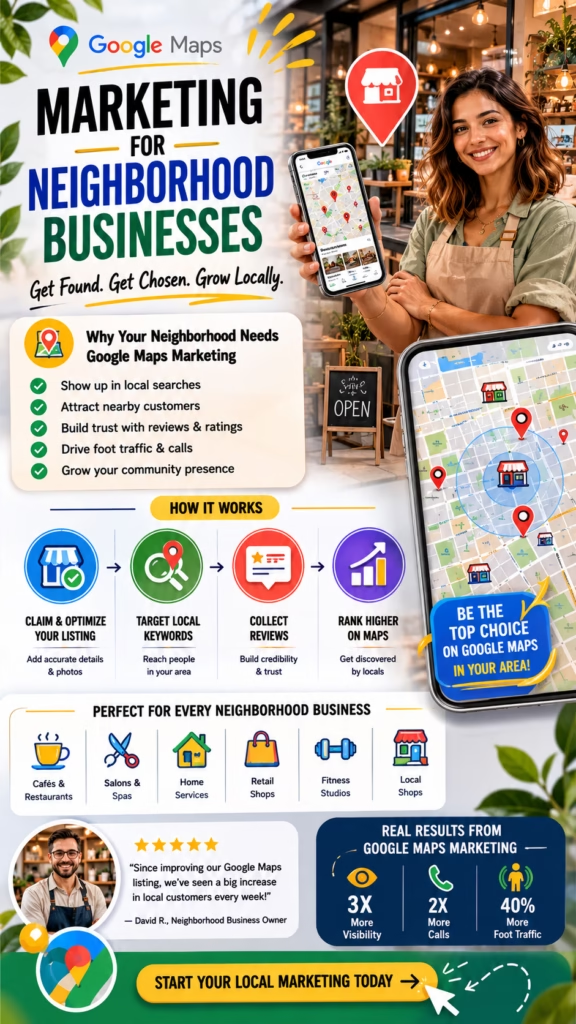
Google Maps Marketing for Neighborhood Businesses
Google Maps Marketing for Neighborhood Businesses explains how local shops, service providers, restaurants, clinics, contractors, and community-based companies can attract nearby customers through Google Maps visibility, reviews, photos, local SEO, and clear customer actions.
Introduction
Google Maps Marketing for Neighborhood Businesses is one of the most practical ways for local companies to get discovered by nearby customers. Neighborhood businesses depend on proximity, trust, convenience, reputation, and repeat visibility. Google Maps helps connect those businesses with people who are already looking nearby.
A neighborhood customer may search for a coffee shop, restaurant, salon, mattress store, plumber, painter, dentist, chiropractor, HVAC company, cleaner, repair shop, contractor, pet service, wellness provider, or local retail store. When that customer opens Google Maps, they compare reviews, photos, distance, hours, services, and contact options before choosing where to go or who to call.
Google Maps marketing helps neighborhood businesses become visible, trusted, and easy to contact when nearby customers are ready to act.
For neighborhood businesses, Google Maps can create calls, direction requests, website visits, messages, bookings, quote requests, and walk-in customers. But the listing must be complete and persuasive. A business with weak photos, missing services, outdated hours, or poor reviews may lose customers even if it appears in search results.
A strong strategy includes Google Business Profile optimization, accurate categories, detailed services, real photos, reviews, local keywords, website support, consistent citations, profile posts, tracking, and fast follow-up. Each part helps the business attract more local attention and convert that attention into customer action.
Main idea: Google Maps Marketing for Neighborhood Businesses turns local search visibility into trust, visits, calls, bookings, and repeat customers.
Table of Contents
- 1) Why Google Maps matters for neighborhood businesses
- 2) How nearby customers use Google Maps
- 3) Google Business Profile optimization
- 4) Categories, services, and local relevance
- 5) Reviews and neighborhood trust
- 6) Photos and visual proof
- 7) Local keywords and search intent
- 8) Website SEO for neighborhood visibility
- 9) Citations and business information consistency
- 10) Posts, offers, and active updates
- 11) Calls, directions, bookings, and visits
- 12) Tracking Google Maps customer actions
- 13) Follow-up systems for local inquiries
- 14) Common mistakes neighborhood businesses make
- 15) Final thoughts
- 16) FAQs
- 17) Extra keywords
1) Why Google Maps Matters for Neighborhood Businesses
Google Maps matters for neighborhood businesses because local customers often search with immediate intent. They may need a place to eat, a store nearby, a service provider, an appointment, a repair, or directions. Google Maps helps them compare options quickly.
For a neighborhood business, this visibility can directly influence foot traffic, calls, bookings, and revenue. A well-optimized listing can become one of the most valuable local marketing assets the business owns.
Google Maps can help neighborhood businesses increase:
- Phone calls
- Direction requests
- Walk-in visits
- Website clicks
- Appointment bookings
- Quote requests
- Customer messages
- Review visibility
- Local brand awareness
- Repeat customer discovery
Google Maps Marketing for Neighborhood Businesses matters because nearby customers often choose from the businesses they can quickly find and trust.
2) How Nearby Customers Use Google Maps
Nearby customers use Google Maps to solve local needs quickly. They search, scan map results, compare ratings, read reviews, check photos, confirm hours, request directions, call, book, or visit a website. Many of these actions happen on mobile devices.
The decision can happen in seconds. That is why neighborhood businesses need profiles that clearly communicate trust, convenience, and relevance.
Customer searches nearby
Google Maps shows local options
Customer compares reviews, photos, distance, hours, and services
Customer chooses the most trusted and convenient business
Customer calls, visits, books, clicks, or requests directions
Neighborhood businesses attract more customers when their Google Maps listing answers questions quickly and builds confidence instantly.
3) Google Business Profile Optimization
The Google Business Profile is the foundation of Google Maps marketing. It controls much of what customers see in the listing. A complete profile makes the business easier to understand and easier to contact.
Neighborhood businesses should keep the profile accurate and active. This includes business name, phone number, website, address, hours, categories, services, products, photos, reviews, description, attributes, and posts.
A strong neighborhood business profile should include:
- Accurate business name
- Correct phone number
- Website link
- Updated hours
- Accurate address or service area
- Primary category
- Relevant secondary categories
- Products or services
- Business description
- Photos and videos
- Review responses
- Booking or quote options
Google Maps Marketing for Neighborhood Businesses starts with a complete, accurate, and customer-focused Google Business Profile.
4) Categories, Services, and Local Relevance
Categories help Google understand what the business is. The primary category should match the main business type as closely as possible. Secondary categories should only support real services or products.
Services and products help customers know whether the business can help them. A neighborhood business should avoid vague descriptions and clearly list what it offers.
Example:
Primary category: Mattress store
Products: Mattresses, adjustable bases, pillows, bedding
Local relevance: Serving nearby shoppers
CTA: Call, visit, or request delivery details
Clear categories and services help neighborhood businesses attract the right local customers.
5) Reviews and Neighborhood Trust
Reviews are one of the strongest trust signals for neighborhood businesses. Customers want to know what other nearby people experienced. They look at star rating, number of reviews, recency, customer comments, and how the business responds.
Neighborhood businesses should request honest reviews from satisfied customers and respond professionally. Review responses show that the business is active, attentive, and customer-focused.
Review signals that build neighborhood trust:
- High star rating
- Recent reviews
- Detailed customer stories
- Location-specific comments
- Service or product mentions
- Owner responses
- Customer photos
- Consistent review growth
Reviews help Google Maps listings turn neighborhood visibility into customer confidence.
6) Photos and Visual Proof
Photos help customers see what the business looks like before visiting or contacting it. For neighborhood businesses, visual proof can make the difference between being ignored and being chosen.
Useful photos may include storefront images, interior photos, products, team members, completed work, service vehicles, menu items, waiting areas, before-and-after photos, or customer-facing experiences.
Useful photos for neighborhood businesses include:
- Storefront photos
- Interior photos
- Team photos
- Product photos
- Completed service photos
- Before-and-after photos
- Service vehicle photos
- Customer experience photos
- Short videos
Photos help nearby customers feel more comfortable calling, visiting, booking, or requesting information.
7) Local Keywords and Search Intent
Local keywords help connect a business with how nearby customers search. These keywords should appear naturally in the profile, service descriptions, posts, website pages, FAQs, and location content.
Customers may search by business type, product, service, neighborhood, city, urgency, or “near me” phrase. The business should use language that matches real customer intent.
Local keyword examples:
Google Maps Marketing for Neighborhood Businesses
Google Maps marketing
Neighborhood business marketing
Mattress store near me
Restaurant near me
HVAC company in Rochester NY
Local shop near me
Google Maps SEO for local businesses
Google Maps marketing improves when neighborhood businesses match the language nearby customers already use.
8) Website SEO for Neighborhood Visibility
A business website supports Google Maps visibility by reinforcing services, products, location, trust, and customer actions. Many customers click from Google Maps to the website before calling or visiting.
The website should include service pages, product information, location pages, reviews, photos, FAQs, contact forms, click-to-call buttons, and fast mobile performance.
Website elements that support neighborhood visibility:
- Local service pages
- Product pages
- Neighborhood or city pages
- Consistent phone number
- Clear contact forms
- Customer reviews
- Photos and proof
- FAQ sections
- Fast mobile speed
- Local business schema
Google Maps and website SEO work together to attract and convert nearby customers.
9) Citations and Business Information Consistency
Citations are online mentions of a business’s name, address, phone number, and website. They may appear on directories, social profiles, review platforms, local listings, and industry websites.
Neighborhood businesses should keep information consistent across the web. Conflicting addresses, phone numbers, or hours can confuse customers and reduce trust.
Consistent business information helps neighborhood customers trust what they see online.
10) Posts, Offers, and Active Updates
Google Business Profile posts and updates help keep the listing active. Neighborhood businesses can use posts to share offers, seasonal reminders, product updates, events, new services, promotions, and appointment availability.
Posts should include a clear reason for customers to act. They should be local, timely, and useful.
Profile post formula:
Headline: Local offer or update
Body: Explain the value
Proof: Add photo, review, or benefit
Local relevance: Mention service area or neighborhood
CTA: Call, visit, book, or request details
Active updates help Google Maps listings feel current, useful, and customer-ready.
11) Calls, Directions, Bookings, and Visits
The goal of Google Maps marketing is customer action. Neighborhood businesses should make it easy for customers to call, request directions, visit the website, send a message, book an appointment, or visit the location.
Every detail should reduce friction. Accurate hours, clear services, good photos, updated contact information, and strong reviews all support customer action.
Important Google Maps customer actions:
- Phone calls
- Direction requests
- Website clicks
- Messages
- Appointment bookings
- Quote requests
- Store visits
- Product inquiries
- Review engagement
- Photo views
Google Maps Marketing for Neighborhood Businesses works best when the listing makes every customer action simple.
12) Tracking Google Maps Customer Actions
Tracking helps neighborhood businesses understand what Google Maps is producing. A business should not only know that people saw the listing. It should know whether those views turned into calls, clicks, directions, bookings, visits, and customers.
Businesses can use Google Business Profile performance data, website analytics, call tracking, booking tools, CRM tags, and customer intake questions to understand results.
Metrics to track:
- Profile views
- Search appearances
- Phone calls
- Direction requests
- Website clicks
- Messages
- Bookings
- Quote requests
- Store visits
- Revenue from Maps leads
Tracking turns Google Maps marketing from guesswork into a measurable local customer growth system.
13) Follow-Up Systems for Local Inquiries
Attracting local customers is only the first step. Businesses need to respond quickly to calls, messages, bookings, forms, and quote requests. A slow response can cause customers to choose a competitor.
Follow-up systems may include missed call text-back, appointment reminders, quote follow-up, lead alerts, CRM notes, SMS updates, email responses, and review request workflows.
Follow-up workflow:
Customer calls, books, messages, or submits form
Business responds quickly
Lead details are saved
Appointment or quote is offered
Follow-up reminders are sent
Customer is booked, visited, nurtured, or closed
Neighborhood businesses convert more Google Maps attention when they follow up quickly and consistently.
14) Common Mistakes Neighborhood Businesses Make
Many neighborhood businesses lose customers because their Google Maps listing is incomplete, outdated, inactive, or confusing. Even small details can affect customer confidence.
- Incomplete Google Business Profile
- Wrong business category
- Missing services or products
- Outdated hours
- Incorrect phone number
- Weak or old reviews
- No review responses
- Low-quality photos
- No website support
- No posts or updates
- No clear call to action
- No tracking system
- Slow response to customer inquiries
Big mistake: treating Google Maps as a passive listing instead of an active neighborhood customer acquisition tool.
15) Final Thoughts
Google Maps Marketing for Neighborhood Businesses is about becoming visible and trusted where nearby customers are already searching. A neighborhood business does not need random attention. It needs local attention from people close enough to visit, call, book, or buy.
A strong Google Maps marketing strategy includes profile optimization, accurate categories, clear services, reviews, photos, local keywords, website SEO, consistent citations, posts, tracking, and follow-up. When these pieces work together, Google Maps can become one of the best customer acquisition tools for neighborhood businesses.
Final takeaway: Google Maps marketing helps neighborhood businesses turn local searches into calls, directions, bookings, visits, and repeat customers.
16) FAQs
1) What is Google Maps marketing for neighborhood businesses?
It is the process of using Google Maps listings, Google Business Profile optimization, reviews, photos, local keywords, posts, and tracking to attract nearby customers.
2) Why is Google Maps important for neighborhood businesses?
Google Maps is important because nearby customers often use it when they are ready to call, visit, book, or request help.
3) Can Google Maps generate customers?
Yes. Google Maps can generate calls, direction requests, website visits, messages, bookings, quote requests, and store visits.
4) What is Google Business Profile optimization?
It is the process of improving a business profile with accurate information, categories, services, products, photos, reviews, posts, and contact options.
5) Do reviews help neighborhood businesses?
Yes. Reviews build trust and help nearby customers feel more confident choosing the business.
6) Do photos help Google Maps marketing?
Yes. Photos create visual proof and help customers understand the business before calling or visiting.
7) Why are categories important?
Categories help Google understand the business and match it with relevant local searches.
8) Should neighborhood businesses list services and products?
Yes. Listing services and products helps customers understand what the business offers.
9) Does website SEO support Google Maps?
Yes. Website SEO reinforces services, products, location, trust, and customer conversion paths.
10) What are local keywords?
Local keywords are search phrases based on business type, service, product, city, neighborhood, urgency, and “near me” intent.
11) What customer actions come from Google Maps?
Customer actions include calls, website clicks, direction requests, messages, bookings, quote requests, visits, and product inquiries.
12) Why is tracking important?
Tracking helps businesses understand which Google Maps actions turn into customers and revenue.
13) Should businesses respond to reviews?
Yes. Review responses show professionalism and customer care.
14) Do Google Business Profile posts help?
Posts can help share offers, updates, events, services, products, and calls to action.
15) What is the biggest Google Maps mistake?
The biggest mistake is leaving the listing incomplete, outdated, inactive, or unsupported by reviews and photos.
16) Can restaurants use Google Maps marketing?
Yes. Restaurants can attract calls, directions, website visits, reservations, reviews, and walk-in customers.
17) Can local service providers use Google Maps marketing?
Yes. Service providers can attract calls, quote requests, appointment bookings, and customer inquiries.
18) Can retail stores use Google Maps marketing?
Yes. Retail stores can attract directions, phone calls, product interest, website visits, and walk-in traffic.
19) How often should listings be updated?
Listings should be updated whenever hours, services, products, photos, offers, or important details change.
20) What makes a listing convert better?
Strong reviews, real photos, clear services, accurate hours, easy contact options, and fast follow-up can improve conversion.
21) Do citations matter?
Yes. Consistent citations help support trust and business information accuracy.
22) Can automation help with Google Maps leads?
Yes. Automation can help with missed call text-back, lead alerts, appointment reminders, quote follow-up, and review requests.
23) How fast should businesses respond?
Businesses should respond as quickly as possible because nearby customers may contact competitors too.
24) Is Google Maps marketing a one-time setup?
No. It works best with ongoing updates, reviews, photos, website improvements, tracking, and follow-up.
25) What is the main goal of Google Maps marketing?
The main goal is to turn nearby searches into calls, visits, bookings, quote requests, and customers.
17) Extra Keywords
- Google Maps Marketing for Neighborhood Businesses
- Google Maps marketing
- neighborhood business marketing
- Google Business Profile optimization
- local SEO
- Google Maps SEO
- local customer acquisition
- neighborhood SEO
- Google Maps listings
- Google Maps customer calls
- Google Maps direction requests
- Google Business Profile leads
- local business visibility
- near me search optimization
- Google reviews strategy
- business listing optimization
- local map pack SEO
- storefront Google Maps marketing
- service business Google Maps SEO
- local shop marketing
- restaurant Google Maps marketing
- contractor Google Maps marketing
- Google Maps conversion tracking
- local customer growth
- community business marketing













