

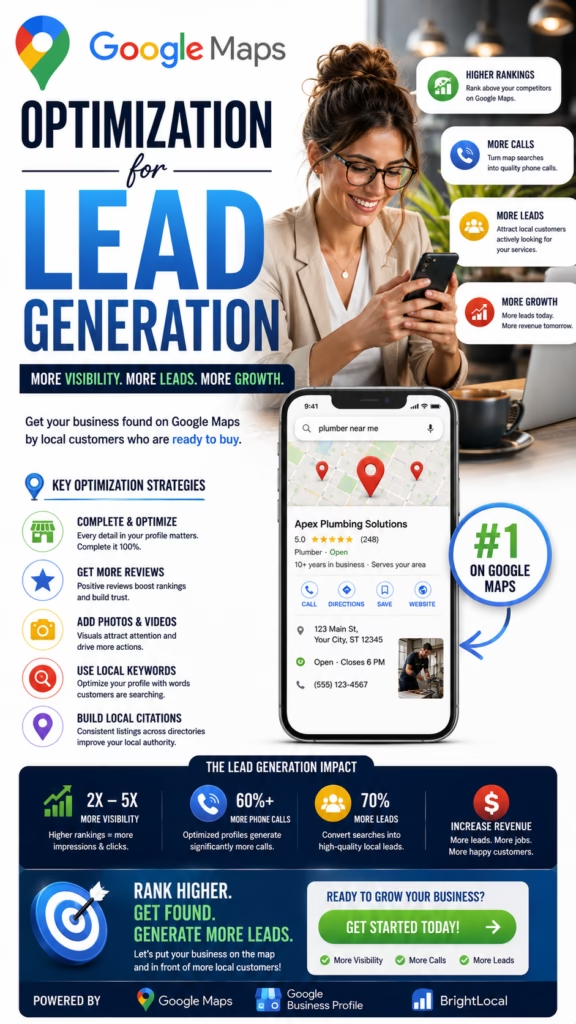
Google Maps Optimization for Lead Generation
Google Maps optimization for lead generation helps local businesses connect with customers who are actively searching for nearby products, services, appointments, estimates, repairs, consultations, showrooms, stores, and professional help. A strong strategy combines profile accuracy, local SEO, reviews, photos, website conversion, fast lead response, appointment scheduling, CRM tracking, and measurable revenue attribution.
Google Maps can become one of the most valuable lead-generation channels for a local business because it connects the company with customers who are already searching for nearby help.
A homeowner may need a contractor. A driver may need an auto repair shop. A patient may need a dentist. A business owner may need an accountant. A shopper may want a furniture store, appliance dealer, mattress showroom, or local retailer.
In each case, the customer may be ready to call, request pricing, schedule an appointment, visit a location, submit a form, or make a purchase.
Strong Google Maps performance places the business in front of that demand. However, visibility alone does not create a qualified lead. The profile must clearly explain what the company offers, where it operates, when it is open, why customers should trust it, and how to take the next step.
The business must also respond quickly, qualify the opportunity, schedule the customer, follow up, and track whether the lead becomes a sale.
The Google Maps Lead Generation Formula
Relevant Visibility + Accurate Profile + Strong Reviews + Original Photos + Useful Website + Clear Call to Action + Fast Response + Consistent Follow-Up = More Qualified Local Leads
Why Google Maps Can Generate High-Intent Local Leads
Customers Are Already Searching
Local searchers often have an active problem, product need, project, appointment need, or purchasing decision.
Phone Access Is Immediate
Customers can call directly from the profile without navigating through multiple website pages.
Reviews Build Trust Quickly
Searchers can compare ratings, detailed experiences, recent feedback, and owner responses.
Website Visits Support Research
Customers can move from the profile to service, product, location, inventory, pricing, or appointment pages.
Direction Requests Create Visits
Storefront businesses can convert local discovery into showroom, office, restaurant, clinic, or retail visits.
Results Can Be Measured
Calls, forms, appointments, estimates, visits, sales, revenue, and profit can be tracked.
Understand the Complete Google Maps Lead Journey
Step 1: Local Discovery
The customer searches for a business, service, product, specialist, or location.
Step 2: Profile Evaluation
The customer reviews the business name, categories, rating, review count, hours, location, photos, services, and website.
Step 3: Customer Action
The customer calls, submits a form, requests directions, sends a message, or schedules an appointment.
Step 4: Lead Qualification
The business confirms the customer need, location, timing, budget, service fit, and contact information.
Step 5: Sales Conversion
The lead becomes an appointment, estimate, store visit, proposal, order, purchase, or booked job.
Step 6: Retention and Reviews
The customer may return, refer others, purchase again, or leave a review that helps generate future leads.
Understand the Main Google Maps Ranking Factors
Relevance
Relevance describes how closely the business matches what the customer is searching for. Categories, services, products, website pages, reviews, and descriptions can reinforce relevance.
Distance
Local results may change based on the customer’s location, search location, business address, service area, and search context.
Prominence
Reviews, website authority, local mentions, brand recognition, directories, links, and business history may support prominence.
Important Ranking Reality
A business may rank differently across neighborhoods, devices, customers, keywords, and times. No responsible provider can guarantee one fixed position everywhere.
Build a Complete Google Business Profile Foundation
- Real-world business name
- Primary category
- Relevant secondary categories
- Address or service areas
- Phone number
- Website
- Business hours
- Special hours
- Services
- Products
- Business description
- Appointment link
- Original photos
Confirm Ownership and Access
Business owners should know which account owns the profile and which employees or agencies have management access.
Review the Profile Regularly
Hours, services, phone routing, locations, products, staff, and appointment links can change.
Use the Correct Real-World Business Name
The profile name should match how the business is represented on signage, websites, invoices, advertising, and customer materials.
Avoid Unnecessary Keyword Additions
Do not add cities, services, prices, slogans, or promotional language that are not part of the actual name.
Keep Branding Consistent
Consistent branding reduces customer confusion and strengthens trust across digital and offline channels.
Choose Categories That Match Real Customer Demand
Select the Best Primary Category
The primary category should describe the main business activity rather than a minor service.
Add Relevant Secondary Categories
Secondary categories can represent additional legitimate services, products, departments, or specialties.
Avoid Category Overload
Irrelevant categories may attract poor-quality inquiries and make the profile less clear.
Configure the Address and Service Areas Correctly
Storefront Businesses
Use an accurate customer-facing address, map pin, entrance, parking information, signage, and business hours.
Service-Area Businesses
Eligible businesses that travel to customers can use accurate service areas and may hide the address when customers are not served there.
Use Realistic Coverage
Add only areas the business can serve with its current staff, equipment, pricing, travel time, and capacity.
Optimize the Phone Number for Lead Conversion
Use a Reliable Business Number
The customer should reach the correct business, location, department, or call-routing system.
Test Call Routing
Confirm voicemail, transfers, extensions, after-hours rules, and notifications.
Use a Professional Greeting
Thank you for calling [Business Name]. What product or service can we help you with today?
Track the Source
The phone or CRM system should identify Google Maps as the lead source when possible.
Maintain Accurate Business and Special Hours
Incorrect hours can reduce calls, visits, appointments, and trust.
Update Holiday and Seasonal Hours
Use special hours for holidays, events, temporary closures, and seasonal schedules.
Match Listed Hours With Response Coverage
If the profile says the business is open, the phone and customer response systems should be prepared to handle inquiries.
Add Clear Services and Products
Use Customer-Friendly Language
Service names should be easy to understand and match what the company actually provides.
Organize Offerings Logically
- Primary services
- Repair services
- Installation services
- Maintenance services
- Consultation services
- Emergency services
- Product categories
- Appointment-based services
Keep Information Current
Remove unavailable products and discontinued services.
Improve the Google Business Profile Description
Explain What the Business Does
Summarize the main services, products, customer types, specialties, locations, and service areas.
Explain the Customer Benefit
Describe how the company solves problems, saves time, improves convenience, completes projects, or provides professional support.
Use Natural Language
Avoid forcing long lists of keywords and cities into an unreadable paragraph.
Build a Review Strategy That Supports Lead Generation
Ask Real Customers for Honest Feedback
Review requests can follow completed services, purchases, deliveries, appointments, consultations, and successful projects.
Make the Process Easy
Send a direct review path through email, text, receipts, customer portals, or follow-up workflows.
Build Consistency
A steady review process is generally more sustainable than one large campaign followed by months of inactivity.
Detailed Reviews Improve Lead Quality
Reviews that naturally describe services, products, employees, locations, communication, and outcomes help future customers understand whether the business is a good fit.
Respond to Reviews Professionally
Thank Positive Reviewers
Acknowledge the customer naturally and show appreciation.
Address Negative Feedback Calmly
Avoid arguments, accusations, threats, or public disclosure of private information.
Use Feedback to Improve Operations
Repeated concerns about communication, scheduling, product quality, cleanliness, or employee behavior should guide improvements.
Use Original Photos to Increase Customer Trust
- Storefronts and offices
- Employees
- Vehicles
- Equipment
- Products
- Completed projects
- Before-and-after examples
- Customer-facing spaces
Add Photos Regularly
New inventory, staff, projects, events, services, equipment, and locations create ongoing opportunities.
Protect Customer Privacy
Avoid publishing personal addresses, documents, license plates, or sensitive customer details without appropriate permission.
Publish Useful Google Business Profile Posts
- New services
- New products
- Appointment openings
- Seasonal offers
- Completed projects
- Customer education
- Events
- Business updates
Use One Main Call to Action
Encourage customers to call, schedule, visit, request pricing, or learn more.
Verify Every Detail
Confirm dates, pricing, availability, links, services, and offer terms before publishing.
Manage Google Questions and Answers
Monitor Common Questions
- Do you serve my area?
- Do I need an appointment?
- How much does the service cost?
- Do you have this product in stock?
- Do you provide estimates?
- Where should I park?
- What are your hours?
- How quickly can you help?
Turn Questions Into Website Content
Repeated questions can become FAQs, service-page sections, videos, sales scripts, and automated responses.
Strengthen the Website Connected to Google Maps
Create a Mobile-Friendly Experience
Customers should be able to call, schedule, request pricing, or submit a form easily from a phone.
Match Profile Information
Business names, phone numbers, addresses, hours, services, products, and locations should remain consistent.
Build Trust
- Customer reviews
- Original photos
- Business experience
- Service process
- Product information
- Employee information
- Local proof
- Frequently asked questions
Create Service Pages That Convert Local Searchers
Explain the Customer Problem
Describe common symptoms, needs, projects, and reasons someone may need the service.
Explain the Process
- Customer contacts the business
- Team confirms the need
- Appointment or consultation is scheduled
- Service or product recommendation is provided
- Customer approves the next step
- Work or purchase is completed
- Customer receives follow-up
Add Proof and Conversion Elements
- Customer reviews
- Project examples
- Product photos
- Experience
- FAQs
- Click-to-call number
- Short form
- Appointment link
Create Location Pages That Support Local Leads
Use Unique Local Information
Explain neighborhoods, nearby services, customer needs, local examples, hours, directions, service areas, and location-specific details.
Add Local Proof
- Local customer reviews
- Original local photos
- Nearby project examples
- Local employee information
- Directions and parking
- Neighborhood references
Avoid Duplicate City Pages
Every page should offer meaningful value beyond replacing the city name.
Build Real Local Authority and Prominence
- Local news mentions
- Business associations
- Chambers of commerce
- Community organizations
- Industry groups
- Local partnerships
- Sponsorships
- Useful local resources
Focus on Real Value
Local authority should come from expertise, customer service, community activity, useful information, and authentic business relationships.
Generate More Qualified Calls From Google Maps
Give Customers a Reason to Call
- Appointment availability
- Product availability
- Estimate requests
- Emergency help
- Local expertise
- Pricing information
- Consultations
- Professional support
Ask Useful Qualification Questions
- What service or product do you need?
- Where are you located?
- How soon do you need help?
- What is the best contact information?
- Would you like to schedule?
Generate More Website Form Leads
Keep the Form Short
- Name
- Phone number
- Location
- Service or product needed
- Short description
Explain What Happens Next
Tell the customer whether the team will call, provide appointment options, request more information, or send pricing.
Respond Immediately
Send confirmation and notify the correct employee or system when the form arrives.
Generate More Appointments From Google Maps
Use a Direct Scheduling Link
The customer should reach the correct appointment page without searching through the website.
Offer Real Availability
Scheduling should reflect actual employee availability, location, service duration, and capacity.
Send Confirmations and Reminders
Include the date, time, location, representative, preparation instructions, and rescheduling process.
Improve Lead Response Speed and Quality
Acknowledge the Inquiry Quickly
Thank you for contacting [Business Name]. We received your request. Please confirm the service or product you need and your location so we can help with the next step.
Offer a Specific Next Step
Schedule the appointment, transfer the caller, provide pricing context, request photos, or create a callback task.
Document the Conversation
Record the customer need, location, timing, appointment, assigned employee, and next action.
Recover Missed Google Maps Calls
Send a Missed-Call Text
Thank you for calling [Business Name]. We are sorry we missed you. Please reply with what you need and your location, and our team will follow up.
Create a Callback Task
Every valid missed call should be assigned to an employee with a defined response target.
Measure Recovery
Track how many missed calls become conversations, appointments, customers, and revenue.
Use AI and Automation for Google Maps Leads
AI Voice Applications
- Answer after-hours calls
- Collect customer information
- Confirm service areas
- Answer approved questions
- Schedule appointments
- Route urgent calls
- Send confirmations
- Create CRM records
AI Chat Applications
Website chat can answer common questions, identify customer needs, collect contact details, and offer appointment options.
Maintain Human Oversight
Complaints, pricing disputes, legal issues, sensitive information, technical questions, and high-value opportunities require human review.
Connect Google Maps Leads With the CRM
Create Complete Lead Records
- Customer name
- Phone number
- Location
- Lead source
- Requested service or product
- Urgency
- Appointment status
- Assigned employee
- Sales outcome
Use Clear Pipeline Stages
- New lead
- Contacted
- Qualified
- Appointment scheduled
- Estimate or proposal sent
- Decision pending
- Closed won
- Closed lost
Track the Final Outcome
Record revenue, gross profit, lost reason, completion date, review status, repeat-customer potential, and referral opportunities.
Track Google Maps Lead Quality
Lead Metrics
- Total calls
- Total forms
- Total messages
- Qualified leads
- Service-area matches
- Spam or vendor inquiries
Appointment Metrics
- Appointments booked
- Appointment rate
- Show rate
- Cancellation rate
- No-show rate
Sales Metrics
- Estimates or proposals sent
- Close rate
- Average transaction value
- Revenue
- Gross profit
- Repeat-customer value
Measure Revenue and Google Maps Lead Generation ROI
Qualified Lead Rate
Qualified Lead Rate = Qualified Google Maps Leads ÷ Total Valid Google Maps Leads × 100
Appointment Booking Rate
Appointment Rate = Scheduled Appointments ÷ Qualified Google Maps Leads × 100
Lead-to-Customer Conversion Rate
Lead-to-Customer Rate = New Customers ÷ Qualified Google Maps Leads × 100
Customer Acquisition Cost
Customer Acquisition Cost = Total Google Maps Marketing and Sales Cost ÷ New Google Maps Customers
Google Maps Lead Generation ROI
ROI = (Gross Profit From Google Maps Customers − Total Google Maps Marketing Cost) ÷ Total Google Maps Marketing Cost × 100
| Metric | What It Measures |
|---|---|
| Local visibility | Whether nearby customers can discover the business |
| Qualified lead rate | Whether local visibility creates relevant inquiries |
| Appointment rate | Whether the team converts inquiries into scheduled opportunities |
| Sales conversion | Whether qualified opportunities become customers |
| Average customer value | The revenue value of Google Maps customers |
| Gross profit and ROI | Whether the complete lead-generation system is profitable |
Common Google Maps Lead Generation Mistakes
Focusing Only on Rankings
Rankings do not automatically create qualified leads, appointments, customers, or revenue.
Using an Inaccurate Business Name
Extra keywords, cities, and promotional language can create trust and profile problems.
Choosing Irrelevant Categories
Categories should represent real business activities.
Ignoring Reviews
Strong visibility can still convert poorly when customer trust is weak.
Using Only Stock Photos
Customers want to see the real business, employees, products, vehicles, equipment, and projects.
Publishing Duplicate Location Pages
Thin pages provide limited local value.
Missing Calls and Forms
High-intent customers may immediately choose a competitor.
Failing to Follow Up
Customers may need reminders, answers, pricing context, or scheduling options before deciding.
Tracking Leads Without Sales Outcomes
Lead volume should be connected with appointments, customers, revenue, and profit.
A 30-Day Google Maps Lead Generation Action Plan
Week 1: Audit the Profile
- Confirm ownership and access
- Review the business name
- Review categories
- Review address or service areas
- Test the phone number
- Review hours
- Review services and products
- Document current lead volume
Week 2: Improve Trust and Conversion
- Update the description
- Add original photos
- Create a review-request workflow
- Respond to recent reviews
- Update questions and answers
- Improve phone scripts
- Create missed-call recovery
- Add appointment options
Week 3: Strengthen Website Support
- Improve mobile pages
- Add click-to-call buttons
- Shorten forms
- Improve service pages
- Improve location pages
- Add customer proof
- Connect form tracking
- Connect the CRM
Week 4: Measure and Improve
- Track calls and forms
- Measure qualified leads
- Measure appointment rate
- Measure sales conversion
- Review missed opportunities
- Improve employee follow-up
- Track revenue
- Calculate ROI
End-of-Month Outcome
After 30 days, the business should have a more accurate profile, stronger reviews and photos, better service and location pages, clearer calls to action, faster response, working missed-call recovery, cleaner CRM tracking, and measurable insight into which Google Maps leads become customers and revenue.
Final Takeaway: Turn Google Maps Visibility Into Qualified Local Leads
Effective Google Maps optimization for lead generation requires more than reaching a high local ranking.
The business must create a complete customer journey from local discovery to profile view, phone call, website visit, form submission, appointment, estimate, purchase, review, repeat customer, and referral.
The profile should contain accurate categories, services, products, hours, phone information, reviews, photos, questions, service areas, and website links.
The website should support the profile with strong service pages, useful location pages, clear contact options, customer proof, mobile-friendly forms, and appointment scheduling.
The team should respond quickly, qualify inquiries, schedule customers, recover missed calls, follow up consistently, and track sales outcomes.
AI voice, website chat, missed-call text response, appointment automation, review workflows, and CRM updates can improve speed and consistency while humans remain responsible for customer relationships, accuracy, and important decisions.
Performance should be measured through visibility, calls, forms, appointments, qualified leads, close rate, acquisition cost, average customer value, revenue, gross profit, repeat customers, and return on investment.
When the entire system works together, Google Maps can become a reliable customer-acquisition channel that generates measurable and sustainable local business growth.
Frequently Asked Questions
1. What is Google Maps optimization for lead generation?
It improves the profile, website, reviews, photos, categories, service areas, conversion paths, and response systems to generate more qualified local leads.
2. How does Google Maps generate leads?
It connects nearby searchers with phone calls, websites, directions, messages, products, services, and appointments.
3. Does ranking higher guarantee more leads?
No. Lead volume also depends on reviews, profile quality, demand, distance, website conversion, and response speed.
4. What are the main Google Maps ranking factors?
Google commonly describes local results through relevance, distance, and prominence.
5. Why is profile optimization important?
It helps customers understand the business, trust it, and take actions such as calling, visiting, or scheduling.
6. Which category should a business choose?
The primary category should closely match the main real-world business activity.
7. Can too many categories reduce lead quality?
Yes. Irrelevant categories can attract poor-quality inquiries and confuse customers.
8. How important are Google reviews?
Reviews build trust, describe customer experiences, and influence which business a searcher contacts.
9. How can businesses get more reviews?
Ask real customers after completed services, purchases, appointments, deliveries, or successful projects.
10. Should businesses respond to reviews?
Yes. Professional responses show attentiveness and help future customers understand the business.
11. Do photos increase Google Maps leads?
Original photos can improve trust and conversion by showing the real business, employees, products, and projects.
12. What photos should a business add?
Add storefronts, employees, vehicles, products, equipment, project examples, and customer-facing spaces.
13. Do profile posts generate leads?
Posts can support engagement with services, products, appointments, offers, projects, and customer education.
14. Can service-area businesses generate leads without an address?
Eligible businesses can hide the address and use accurate service areas while following current requirements.
15. Does adding more service areas increase leads?
No. Distance, competition, relevance, reviews, website content, and authority still matter.
16. Does the website affect lead generation?
A strong website supports relevance and converts profile visitors into calls, forms, and appointments.
17. Should every service have its own page?
Important services can benefit from dedicated pages that explain the problem, process, proof, FAQs, and next step.
18. Do location pages support local leads?
Useful location pages support relevance and conversion with local services, reviews, photos, directions, and examples.
19. Can duplicate location pages hurt SEO?
Thin pages that only replace city names provide limited customer value.
20. How can a business get more calls?
Improve reviews, photos, services, hours, phone access, website conversion, and call handling.
21. How can a business get more form leads?
Use a relevant mobile page with a short form, clear benefits, trust signals, and fast response.
22. Can Google Maps generate appointments?
Yes. Businesses can use calls, forms, messaging, and direct appointment links.
23. How quickly should leads receive a response?
Respond promptly because high-intent customers may contact several local businesses.
24. Can AI answer Google Maps leads?
AI voice and chat systems can collect details, answer approved questions, schedule appointments, and route leads.
25. How should missed calls be handled?
Use voicemail, missed-call text response, AI voice, callback tasks, appointment links, and CRM alerts.
26. How should businesses track lead quality?
Track service need, location, urgency, appointment status, sales outcome, revenue, and lost reason.
27. How long does optimization take?
Timing varies by competition, location, profile history, reviews, website quality, authority, and consistency.
28. Can rankings be guaranteed?
No responsible provider can guarantee one position for every customer, keyword, neighborhood, device, or time.
29. What metrics should businesses track?
Track visibility, calls, forms, appointments, qualified leads, customers, revenue, acquisition cost, profit, and ROI.
30. What is the main goal of Google Maps optimization for lead generation?
The goal is to turn local visibility into qualified conversations, appointments, purchases, customers, and measurable profit.
30 Additional SEO Keywords
Use these supporting phrases naturally across Google Maps guides, service pages, location pages, local SEO content, case studies, FAQs, and internal links.
Turn Google Maps Visibility Into More Qualified Leads and Customers
MarketWiz.ai helps local businesses strengthen Google Maps visibility, improve Google Business Profile information, build review workflows, create local content, respond to leads faster, recover missed calls, connect AI voice and CRM systems, schedule appointments, and measure qualified leads, customers, revenue, gross profit, and return on investment.
This article provides general marketing, local SEO, automation, and business information and does not provide legal, financial, privacy, telecommunications, consumer-protection, platform-compliance, or regulatory advice. Google Business Profile features, requirements, interfaces, local results, and ranking behavior may change. Businesses should review current Google requirements and applicable call-recording, consent, SMS, email, privacy, data-use, advertising, review-request, and industry-specific requirements before collecting customer data, recording calls, using tracking numbers, requesting reviews, or implementing automated lead-response systems. Rankings, calls, forms, appointments, customers, revenue, and other results cannot be guaranteed and depend on location, competition, market demand, profile quality, website quality, pricing, capacity, customer behavior, service quality, and sales execution.













