

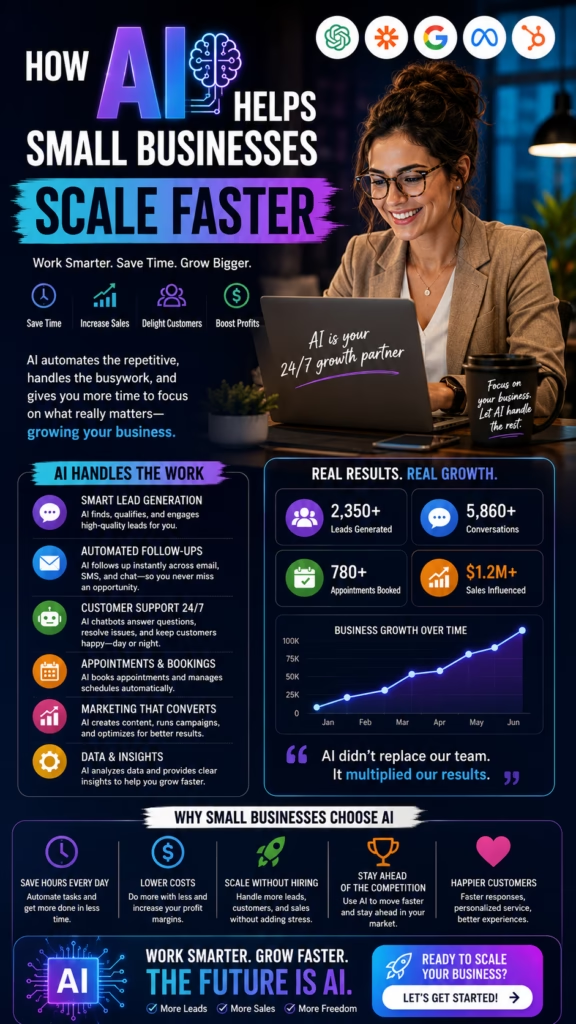
How AI Helps Small Businesses Scale Faster
How AI helps small businesses scale faster comes down to one powerful advantage: artificial intelligence allows a lean team to handle more marketing, more leads, more customer conversations, more follow-up, more appointments, and more reporting without increasing repetitive manual work at the same rate.
Small businesses often reach a point where growth creates more work faster than the team can handle it.
More advertising creates more inquiries. More customers create more calls, appointments, emails, follow-up tasks, invoices, reviews, reports, and support requests. Without better systems, growth can overwhelm the same people who created it.
Traditional scaling frequently means hiring more employees for repetitive administrative work. That may be necessary in some areas, but it can also increase payroll, training demands, management complexity, communication problems, and operational inconsistency.
Artificial intelligence gives small businesses another option. AI can automate repeatable tasks, organize information, answer common questions, route leads, schedule appointments, create drafts, update software, trigger reminders, and analyze performance.
The goal is not to replace the human side of a small business. Customers still value expertise, trust, judgment, service quality, accountability, and personal relationships.
The goal is to remove the repetitive work and avoidable delays that prevent the team from focusing on customers, sales, operations, and strategic growth.
The Small Business AI Scaling Formula
Clear Processes + Useful Automation + Fast Customer Response + Strong Human Service + Connected Data + Measurable Results = Faster, More Sustainable Growth
Why AI Helps Small Businesses Scale Faster
More Output From a Small Team
AI can handle repetitive drafts, responses, reminders, data entry, scheduling, and reporting while employees focus on higher-value work.
Faster Customer Response
Leads and customers can receive immediate acknowledgment, common answers, appointment options, and next steps.
More Consistent Execution
Important follow-up, reminders, CRM updates, review requests, and reporting do not depend entirely on employee memory.
Lower Operational Friction
Connected workflows reduce copying information between inboxes, calendars, spreadsheets, forms, and customer systems.
Better Business Visibility
AI-supported reporting can show where leads come from, how quickly the team responds, and which activities produce sales.
Scalable Customer Experiences
The business can serve more customers while maintaining clearer communication, faster scheduling, and organized follow-up.
Common Small-Business Scaling Challenges
Too Much Work Depends on the Owner
Many owners approve every advertisement, answer important calls, review estimates, solve customer complaints, train employees, and monitor every sale. This creates a bottleneck.
Lead Response Becomes Inconsistent
When the team is busy serving current customers, new inquiries may wait too long or receive incomplete responses.
Follow-Up Falls Through the Cracks
Estimates, appointments, missed calls, proposals, and old leads may remain open because nobody receives a clear task.
Marketing Becomes Difficult to Maintain
Blogging, social posting, email campaigns, listing management, review requests, and local updates require consistent attention.
Business Data Becomes Fragmented
Customer information may be spread across phones, email accounts, spreadsheets, calendars, social inboxes, and individual employee notes.
Hiring Alone Does Not Fix Broken Processes
Adding employees to an unclear workflow can increase confusion instead of improving capacity.
Build an AI Growth Strategy Before Adding Tools
Define the Business Goal
- Generate more qualified leads
- Respond to customers faster
- Book more appointments
- Reduce missed calls
- Improve estimate conversion
- Reduce administrative work
- Increase repeat business
- Improve reporting
Choose One Workflow First
Begin with a repetitive process that has a clear business outcome. Strong starting points include new-lead response, appointment reminders, missed-call recovery, review requests, CRM updates, or daily reporting.
Map the Existing Process
Document what triggers the work, who performs it, which software is used, where delays occur, what information is needed, and how success is measured.
Decide Where Humans Stay Involved
Pricing, negotiation, complaints, unusual requests, technical decisions, legal issues, and sensitive customer information may require direct employee oversight.
Automate Clear Processes, Not Confusion
AI performs best when the business already understands the desired outcome, approved information, ownership, exceptions, and next step.
Automate Small-Business Marketing
Marketing Tasks AI Can Support
- Campaign planning
- Audience segmentation
- Content outlines
- Email drafts
- Social captions
- Ad variations
- Landing-page copy
- Performance summaries
Create a Consistent Marketing Calendar
AI can help organize weekly posts, monthly offers, seasonal campaigns, service reminders, local events, customer education, and promotional content.
Repurpose Existing Content
One long article or video can become short social posts, email content, FAQ answers, video clips, marketplace descriptions, and sales follow-up resources.
Keep Human Review
Review offers, pricing, dates, locations, claims, customer examples, images, links, and industry-specific requirements before publishing.
Use AI to Generate More Qualified Leads
Potential Lead Channels
- Google search
- Google Maps
- Paid search
- Paid social media
- Facebook Marketplace
- Craigslist
- Website forms
- AI website chat
- Email outreach
- Customer referrals
Define the Ideal Customer
Use service area, industry, customer type, project size, product interest, budget range, urgency, buyer role, and timeline to focus marketing.
Qualify Before Routing
AI can collect basic details, confirm fit, identify urgency, and route the lead to the correct employee.
Measure Lead Quality
Track which sources produce appointments, estimates, sales, repeat customers, revenue, and gross profit rather than measuring lead volume alone.
Improve Lead Response Speed With AI
Acknowledge Inquiries Immediately
Thank you for contacting us. We received your request. Could you confirm your location and the service or product you need?
Answer Common Questions
AI can provide approved information about hours, service areas, appointment availability, basic pricing structure, products, locations, and next steps.
Collect Essential Information
- Name
- Phone number
- Email address
- Location
- Requested service
- Timeline
- Preferred appointment time
Notify the Correct Employee
Qualified and high-intent leads should create a CRM task, text, email, or internal notification.
Automate Appointment Booking and Reminders
Offer Real Availability
Connect AI with the business calendar so customers receive valid appointment times based on service type, employee availability, location, and appointment duration.
Collect Appointment Details
- Customer name
- Contact information
- Requested service
- Appointment time
- Location or meeting link
- Assigned employee
- Preparation instructions
Send Confirmations and Reminders
Automated reminders can reduce no-shows, confusion, last-minute cancellations, and repeated administrative calls.
Make Rescheduling Easy
Customers should have a simple way to choose another time while keeping calendars and CRM records synchronized.
Automate Customer Follow-Up
Follow-Up Opportunities
- New inquiries
- Missed calls
- Appointment confirmations
- No-show recovery
- Estimate follow-up
- Proposal nurturing
- Customer reactivation
- Review requests
Use Customer Context
Follow-up should reflect the customer's requested service, appointment, estimate, product, location, previous question, and agreed next step.
Add Value to Each Message
Provide an answer, reminder, resource, scheduling option, comparison, customer example, or useful next step.
Pause When the Customer Responds
Automated sequences should stop or change when a customer replies, books, purchases, declines, or asks for assistance.
Use AI to Improve Small-Business Customer Service
Answer Repetitive Questions
- Business hours
- Service areas
- Appointment availability
- Order status
- Preparation instructions
- Basic product information
- Return or cancellation process
- Employee contact information
Route Customers Correctly
AI can identify whether the customer needs sales, scheduling, billing, service support, management, or another department.
Summarize Customer Conversations
Employees can receive the customer issue, previous messages, account details, requested outcome, and recommended next step.
Escalate Sensitive Issues
Complaints, refunds, legal threats, emergencies, safety concerns, and sensitive information require qualified human review.
Use AI Website Chat to Capture More Business
Website Chat Goals
- Answer common questions
- Identify the requested service
- Confirm the service area
- Collect contact information
- Recommend a relevant option
- Schedule an appointment
- Notify the team
Use Page Context
A visitor on a product page, service page, pricing page, or location page should receive relevant answers and next steps.
Keep the Conversation Efficient
Ask enough questions to help the customer without creating a long, frustrating qualification process.
Transfer Complex Conversations
Pricing negotiations, unusual needs, complaints, contracts, technical questions, and sensitive information should reach a person.
Use AI Voice Automation for Calls
Voice Automation Applications
- Answering missed calls
- After-hours lead capture
- Basic qualification
- Appointment scheduling
- Frequently asked questions
- Call routing
- Appointment reminders
- Employee notifications
Use Approved Information
The system should access current hours, services, locations, calendars, escalation contacts, and customer instructions.
Provide Human Transfer
Customers should be able to reach an employee when the question is complex, urgent, sensitive, or outside the approved workflow.
Monitor Call Quality
Review appointment accuracy, transfers, abandoned calls, customer frustration, incorrect responses, and unresolved questions.
Automate Small-Business Email Marketing
Email Campaign Types
- New lead response
- Appointment confirmation
- Estimate follow-up
- Customer education
- Seasonal promotion
- Product announcement
- Reactivation campaign
- Customer retention email
Segment Contacts
Separate contacts by customer type, service, location, purchase history, appointment status, engagement, and sales stage.
Use One Clear Next Step
Ask the reader to reply, schedule, review, purchase, call, confirm, or request information.
Protect Deliverability
Maintain clean lists, accurate sender information, relevant content, controlled volume, and proper opt-out handling.
Use SMS Automation for Faster Customer Communication
Useful SMS Workflows
- Lead acknowledgment
- Missed-call response
- Appointment confirmation
- Appointment reminder
- Arrival notification
- Estimate follow-up
- Review request
- Service reminder
Keep Messages Concise
Identify the business, explain the reason for the message, and provide a simple next step.
Coordinate With Other Channels
Prevent customers from receiving duplicate email, text, and phone messages about the same action.
Respect Communication Preferences
Use appropriate consent, opt-out handling, frequency controls, and message timing.
Use AI to Improve Small-Business Local SEO
Important Local Pages
- Core service pages
- Location pages
- Service-area pages
- Industry pages
- Local customer guides
- Frequently asked questions
- Case studies
- Contact pages
Use AI to Organize Content
AI can support outlines, metadata, internal links, service descriptions, local questions, topic ideas, and content updates.
Create Useful Local Information
Include real service areas, neighborhoods, local examples, hours, photos, customer questions, directions, pricing context, and appointment options.
Avoid Thin Location Pages
Replacing only the city name across many pages provides limited value and may create a poor customer experience.
Strengthen Google Maps Visibility With AI
Maintain Accurate Business Information
- Real-world business name
- Correct address or service area
- Local phone number
- Business hours
- Relevant categories
- Website link
- Appointment link
- Original business photos
Support Profile Updates
AI can help draft approved posts, service descriptions, product information, customer questions, photo ideas, and seasonal updates.
Automate Review Workflows
Send review requests after appropriate customer interactions, monitor feedback, categorize themes, and alert managers to serious concerns.
Track Customer Actions
Measure calls, website visits, directions, messages, appointments, and revenue connected with local visibility.
Scale Marketplace and Classified Posting
Potential Business Categories
- Furniture and mattresses
- Appliances
- Vehicles and equipment
- Home services
- Sheds and carports
- Mobile and modular homes
- Commercial space
- Local retail inventory
Organize Listing Information
- Title
- Price
- Category
- Description
- Location
- Photos
- Availability
- Lead-routing details
Maintain Consistent Activity
AI and automation can help organize publishing schedules, inventory updates, description variations, renewals, and inquiry response.
Follow Platform Rules
Listings should remain accurate, relevant, non-duplicative, and compliant with the requirements of each marketplace or classified platform.
Create Small-Business Content Faster
Content AI Can Help Draft
- Blog articles
- Service pages
- Product descriptions
- Customer FAQs
- Social captions
- Email campaigns
- Video scripts
- Sales materials
Build Content From Customer Questions
Common sales and support questions can become useful articles, videos, emails, FAQs, and social posts.
Repurpose High-Value Content
Turn one guide into a blog post, email sequence, short video, social carousel, marketplace description, and sales resource.
Review Accuracy
Verify product details, services, prices, statistics, claims, dates, customer examples, and industry requirements.
Use AI to Improve Paid Advertising
AI Advertising Support
- Audience segmentation
- Headline variations
- Description variations
- Creative concepts
- Landing-page alignment
- Lead-routing rules
- Campaign summaries
- Performance analysis
Match the Advertisement to the Landing Page
The offer, location, product, service, price context, image, and call to action should remain consistent.
Measure Qualified Outcomes
Track qualified leads, appointments, sales, customer acquisition cost, revenue, and gross profit instead of measuring clicks alone.
Use Human Budget Oversight
AI can support analysis, but people should monitor spending, targeting, claims, creative quality, and business capacity.
Automate Small-Business Sales Workflows
Sales Tasks AI Can Support
- Lead qualification
- Appointment setting
- Conversation summaries
- Follow-up drafts
- Proposal reminders
- Task creation
- Pipeline alerts
- Lead prioritization
Prioritize Strong Opportunities
AI can help identify prospects with strong fit, urgent timelines, pricing interest, repeat engagement, and appointment intent.
Improve Sales Preparation
Provide the salesperson with the customer's need, questions, history, objections, source, appointment, and recommended next step.
Keep People in Complex Sales
Discovery, negotiation, contracts, technical questions, unusual needs, and relationship-building require human judgment.
Connect AI With CRM Automation
CRM Tasks AI Can Support
- Create lead records
- Assign owners
- Record lead sources
- Store customer preferences
- Summarize conversations
- Create follow-up tasks
- Schedule appointments
- Update sales stages
- Record outcomes
- Trigger reports
Standardize Pipeline Stages
- New lead
- Contacted
- Qualified
- Appointment scheduled
- Estimate or proposal sent
- Decision pending
- Closed won
- Closed lost
Protect Data Quality
Prevent duplicate customers, incorrect ownership, missing source data, outdated stages, incomplete notes, and conflicting sequences.
Create Useful Dashboards
Track leads, appointments, estimates, opportunities, sales, revenue, source performance, employee follow-up, and retention.
Use AI to Improve Small-Business Operations
Operational Automation Opportunities
- Daily task summaries
- Appointment reminders
- Lead assignment
- Customer update messages
- Inventory alerts
- Document summaries
- Employee notifications
- End-of-day reporting
Use Exception-Based Alerts
Alert managers when leads are unanswered, appointments fail, reviews become negative, inventory runs low, or performance falls outside expected ranges.
Reduce Manual Data Entry
Information from forms, calls, chat, calendars, and transactions can move into connected systems without repeated copying.
Document Human Overrides
Employees should be able to pause workflows, correct information, reassign customers, and escalate unusual situations.
Automate Business Reporting and Decision Support
Daily Reporting
- New leads
- Missed calls
- Appointments
- Unanswered customers
- Open estimates
- Sales completed
- Customer complaints
- Important follow-up tasks
Weekly Reporting
- Lead-source performance
- Response time
- Appointment rate
- Sales conversion
- Advertising cost
- Revenue and gross profit
- Employee follow-up
- Customer-review trends
Use Plain-Language Summaries
AI can summarize what changed, what improved, what declined, and which issues need attention.
Verify Important Numbers
Financial, payroll, tax, inventory, and customer metrics should be checked against reliable systems before decisions are made.
Use AI to Improve Customer Retention
Retention Workflows
- Service reminders
- Maintenance schedules
- Membership renewals
- Reorder reminders
- Customer check-ins
- Review requests
- Referral campaigns
- Win-back campaigns
Use Customer History
Follow-up can reflect previous purchases, service dates, product needs, appointments, memberships, and customer preferences.
Identify At-Risk Customers
AI can flag declining activity, missed renewals, unresolved complaints, poor feedback, or customers who have not returned.
Measure Lifetime Value
Track repeat purchases, renewals, referrals, retention, average transaction value, and long-term revenue.
Help a Small Team Work Smarter
Reduce Repetitive Work
Employees can spend less time copying information, sending routine reminders, creating basic drafts, and updating spreadsheets.
Improve Role Clarity
Automated assignments and task ownership help employees understand which customer, lead, appointment, or issue belongs to them.
Support Employee Training
AI can provide approved scripts, process checklists, knowledge-base answers, meeting summaries, and workflow guidance.
Keep Human Accountability
Employees and managers remain responsible for service quality, customer relationships, decisions, and business outcomes.
Protect Customer Data, Accuracy, and Business Quality
Data Protection Practices
- Use secure systems
- Limit employee access
- Use strong passwords
- Enable multifactor authentication
- Approve integrations
- Maintain retention policies
- Remove former employee access
- Monitor system activity
Collect Only Necessary Information
Avoid collecting sensitive customer information when it is not needed for the business purpose.
Review AI-Generated Content
Check business claims, prices, customer information, appointment details, links, locations, product features, and legal language.
Escalate High-Risk Situations
Complaints, contracts, financial information, medical information, legal issues, safety concerns, and identity data require qualified handling.
Measure the ROI of AI for a Small Business
Time Savings
Monthly Time Savings = Manual Hours Before Automation − Manual Hours After Automation
Qualified Lead Rate
Qualified Lead Rate = Qualified Leads ÷ Total Valid Leads × 100
Appointment Booking Rate
Appointment Rate = Scheduled Appointments ÷ Qualified Leads × 100
Sales Conversion Rate
Sales Conversion Rate = New Customers ÷ Qualified Opportunities × 100
Customer Acquisition Cost
Customer Acquisition Cost = Total Sales and Marketing Cost ÷ New Customers
AI Return on Investment
AI ROI = (Gross Profit and Cost Savings Attributed to AI − Total AI Cost) ÷ Total AI Cost × 100
| Metric | What It Measures |
|---|---|
| Time saved | Reduction in repetitive manual work |
| Response time | How quickly leads and customers receive help |
| Appointment rate | Whether qualified conversations become scheduled opportunities |
| Sales conversion | Whether AI-supported leads become customers |
| Customer retention | Whether automation supports repeat business and renewals |
| Attributed gross profit | Profit connected to AI-supported marketing and operations |
Common AI Mistakes Small Businesses Should Avoid
Buying Tools Before Defining the Problem
Technology should solve a clear business bottleneck rather than becoming another disconnected subscription.
Automating a Broken Process
Automation can make unclear workflows move faster without making them better.
Using Too Many Platforms
Several disconnected AI tools can increase cost, duplicate data, confuse employees, and create conflicting workflows.
Sending Generic Customer Messages
Messages should reflect the customer's need, location, service, appointment, purchase, or previous conversation.
Failing to Train Employees
Employees need to understand what the system does, when they must intervene, and how to correct errors.
Ignoring Human Handoff
Customers may still need a person for pricing, complaints, contracts, technical questions, and unusual situations.
Trusting Every AI Output
AI can produce inaccurate, outdated, incomplete, or inappropriate content. Important information requires review.
Ignoring Data Security
Customer information should not be copied into unapproved systems without understanding access, storage, retention, and privacy.
Measuring Activity Instead of Results
Drafts, messages, and automated tasks matter only when they improve response, appointments, customer service, revenue, or efficiency.
Trying to Automate Everything at Once
Start with one valuable workflow, test it, improve it, and expand gradually.
A 30-Day AI Action Plan for Small Businesses
Week 1: Identify the Best Automation Opportunity
- List repetitive tasks
- Review missed calls
- Review lead-response time
- Review appointment no-shows
- Review open estimates
- Review marketing consistency
- Review CRM data quality
- Select one measurable workflow
Week 2: Build the Workflow
- Map the current process
- Define the trigger
- Define the customer message
- Define employee ownership
- Define escalation rules
- Connect required data
- Create test cases
- Review privacy and compliance
Week 3: Launch and Test
- Connect forms or phone systems
- Connect calendars
- Connect email or SMS
- Connect the CRM
- Test customer scenarios
- Test employee notifications
- Test sequence stop rules
- Review message accuracy
Week 4: Measure and Improve
- Measure time saved
- Measure customer response
- Measure appointment rate
- Measure sales conversion
- Review employee feedback
- Review customer feedback
- Correct workflow problems
- Calculate revenue and ROI
End-of-Month Outcome
After 30 days, the business should have one working AI-supported process, clearer employee ownership, faster execution, cleaner customer data, measurable performance, and a repeatable framework for adding the next automation.
Final Takeaway: Use AI to Scale Without Losing the Human Advantage
Understanding how AI helps small businesses scale faster begins with recognizing that growth is not only about generating more demand.
The business must also respond to that demand, organize customer information, schedule work, follow up consistently, maintain service quality, support employees, and measure results.
AI can support marketing, lead generation, customer response, appointment booking, missed-call recovery, email, SMS, voice, content creation, social media, local SEO, Google Maps, marketplace posting, sales follow-up, CRM updates, reporting, and customer retention.
Human employees remain essential for relationships, service delivery, technical expertise, pricing, negotiation, complaints, strategy, creativity, and leadership.
The strongest approach combines the speed and consistency of automation with the judgment, empathy, and accountability of people.
Performance should be measured through time saved, response speed, qualified leads, appointments, sales conversion, customer acquisition cost, repeat business, retention, revenue, gross profit, and return on investment.
AI becomes even more valuable when connected with the website, Google Maps, local SEO, Facebook Marketplace, Craigslist, paid advertising, social media, email, SMS, phone systems, calendars, reviews, and CRM workflows.
When the complete system works together, a small business can serve more customers, respond faster, reduce repetitive work, protect service quality, support its team, and grow without adding unnecessary operational complexity.
Frequently Asked Questions
1. How does AI help small businesses scale faster?
AI automates repetitive marketing, response, scheduling, follow-up, customer service, CRM, and reporting tasks so small teams can handle more business.
2. What is AI automation for small businesses?
It uses artificial intelligence and connected software to complete repeatable tasks, organize information, communicate with customers, and trigger workflows.
3. Can AI help a small business generate leads?
Yes. AI can support SEO, Google Maps, paid ads, marketplaces, chat, social media, email, content, and faster inquiry response.
4. Can AI help small businesses convert more leads?
AI can improve response speed, qualification, personalization, scheduling, follow-up, lead prioritization, and routing.
5. Can AI replace small-business employees?
AI can automate repetitive tasks, but employees remain essential for judgment, relationships, technical expertise, service delivery, and management.
6. Which small-business tasks can AI automate?
AI can support lead response, scheduling, reminders, content drafts, CRM updates, call summaries, reporting, and customer follow-up.
7. Can AI answer customer questions?
AI can answer approved common questions, collect information, recommend next steps, schedule appointments, and transfer complex issues.
8. Can AI help with missed calls?
AI can respond to missed calls, identify customer needs, offer a callback or appointment, update the CRM, and notify staff.
9. Can AI schedule appointments?
AI can offer valid times, collect details, schedule appointments, update calendars, send reminders, and notify employees.
10. Can AI help with customer follow-up?
AI can automate lead response, appointment reminders, estimate follow-up, reactivation, review requests, and retention campaigns.
11. Can AI improve local SEO?
AI can support service pages, location pages, FAQs, metadata, internal links, local content, and performance reporting.
12. Can AI help a business rank on Google Maps?
AI can support profile updates, reviews, content, consistency, photo planning, and reporting, but it cannot guarantee ranking.
13. Can AI create small-business content?
AI can draft blogs, pages, captions, emails, ads, FAQs, video scripts, and product descriptions with human review.
14. Can AI manage social media?
AI can help plan content, draft captions, repurpose videos, organize calendars, create variations, and summarize results.
15. Can AI help with paid advertising?
AI can support audiences, ad variations, landing pages, creative ideas, lead routing, and performance analysis.
16. Can AI help small businesses use Facebook Marketplace?
AI may support eligible listings, descriptions, posting schedules, inquiry response, qualification, routing, and tracking.
17. Can AI help with Craigslist marketing?
AI can help create relevant ads, organize schedules, respond to inquiries, qualify leads, and track results subject to platform rules.
18. Can AI connect with a CRM?
AI can create records, assign owners, summarize conversations, update stages, create tasks, and record outcomes.
19. Can AI improve customer retention?
AI can support reminders, renewals, reorders, check-ins, reviews, loyalty communication, referrals, and win-back campaigns.
20. Can AI help small businesses save time?
AI can reduce time spent on scheduling, research, data entry, drafts, reporting, reminders, and repetitive customer communication.
21. Can AI reduce operating costs?
AI may reduce repetitive labor and administrative delays, but software, implementation, data, and oversight costs should be measured.
22. What should a small business automate first?
Start with a repetitive, measurable process such as missed-call response, lead follow-up, reminders, reviews, CRM updates, or reporting.
23. How can a small business choose an AI tool?
Evaluate the problem, integrations, security, accuracy, cost, support, ease of use, reporting, scalability, and data ownership.
24. What metrics should small businesses track?
Track leads, response time, appointments, conversion, acquisition cost, transaction value, retention, revenue, profit, time savings, and ROI.
25. What are common AI mistakes for small businesses?
Common mistakes include unclear goals, poor data, generic messages, too many tools, weak training, limited oversight, and poor measurement.
26. Does AI require human oversight?
Yes. Human oversight is important for accuracy, complaints, pricing, legal issues, sensitive information, complex sales, and quality control.
27. How should small businesses protect customer data?
Use secure systems, limited access, strong passwords, approved integrations, retention rules, consent records, and regular reviews.
28. How quickly can AI help a small business?
Simple workflows may improve quickly, while larger systems require data cleanup, integrations, training, testing, and optimization.
29. Should AI connect with existing marketing?
Yes. Connect AI with the website, SEO, Google Maps, paid ads, social media, marketplaces, email, SMS, phone, reviews, and CRM.
30. What is the main goal of using AI in a small business?
The goal is to serve more customers, respond faster, reduce repetitive work, improve consistency, and scale profitably without unnecessary complexity.
30 Additional SEO Keywords
Use these supporting phrases naturally across AI service pages, small-business automation pages, industry landing pages, local marketing guides, case studies, FAQs, internal links, and business-growth campaigns.
Use AI to Generate More Leads, Save Time, and Scale Your Business Faster
MarketWiz.ai helps small businesses automate lead generation, improve customer response, schedule appointments, strengthen local visibility, manage marketplace posting, connect CRM workflows, follow up with customers, reactivate older opportunities, improve retention, and measure revenue, gross profit, time savings, and return on investment.
This article provides general marketing, automation, operational, and business information and does not provide legal, financial, tax, employment, privacy, telecommunications, consumer-protection, platform-compliance, cybersecurity, or regulatory advice. Small businesses should review current email, SMS, telephone, advertising, privacy, data-use, consent, opt-out, call-recording, artificial-intelligence, platform, employment, and industry-specific requirements before collecting customer data, recording communications, using automated outreach, or implementing AI-supported marketing, sales, customer-service, scheduling, reporting, and operational systems. AI-generated content, customer responses, summaries, recommendations, classifications, and business decisions should receive appropriate human review for accuracy, security, relevance, fairness, and quality.














Scale Social Media Without Losing Brand Quality
AI Social Media Tasks
Show the Real Business
Combine AI-assisted content with real employees, customers, projects, products, locations, events, and behind-the-scenes work.
Use Platform-Specific Formats
A LinkedIn post, Facebook update, Instagram Reel, TikTok video, and YouTube Short should not use identical structure.
Review Customer-Facing Responses
Complaints, sensitive questions, disputes, and unusual comments should receive human attention.