

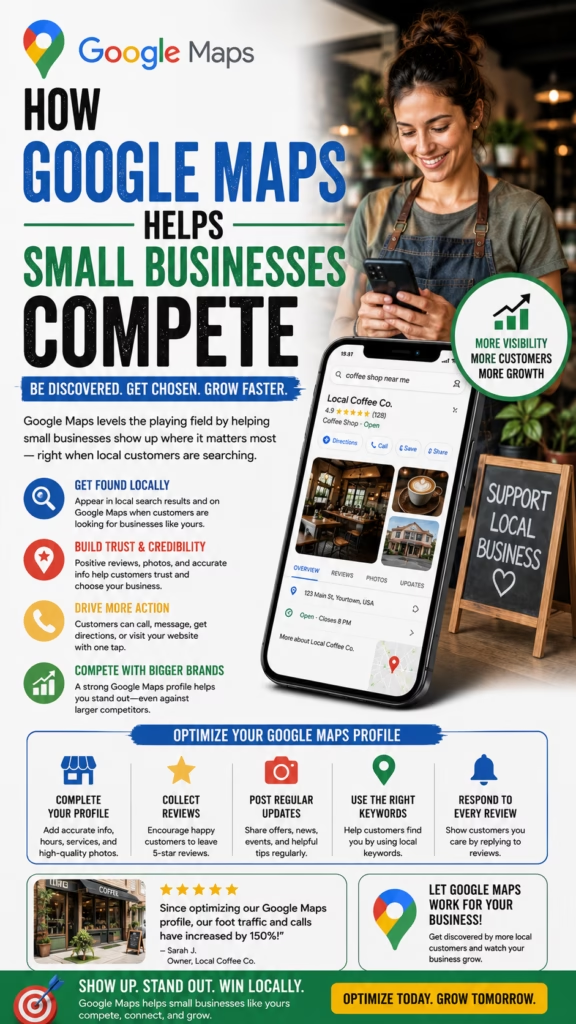
How Google Maps Helps Small Businesses Compete
How Google Maps Helps Small Businesses Compete explains how local companies can use Google Business Profile, reviews, photos, service areas, posts, and local SEO to win visibility against larger competitors.
Introduction
How Google Maps Helps Small Businesses Compete starts with one major advantage: local intent. A small business does not always need to outspend a national brand to win a customer. It needs to show up when nearby people search for help, prove trust quickly, and make the next step easy.
Google Maps gives small businesses a way to compete in the local search results where customers are already looking. Whether someone searches for a contractor, dentist, moving company, appliance repair service, restaurant, cleaning company, landscaper, retail store, or local office, Google Maps can show nearby options with reviews, photos, hours, phone numbers, directions, services, and website links.
Google Maps helps small businesses compete because customers often choose the best local option, not always the biggest company.
The strongest strategy includes a fully optimized Google Business Profile, accurate categories, strong reviews, real photos, clear services, service-area details, local website pages, consistent citations, Google Posts, and a conversion-focused call or booking process.
Main idea: How Google Maps Helps Small Businesses Compete comes down to visibility, trust, relevance, and easy conversion.
Table of Contents
- 1) Why Google Maps matters for small businesses
- 2) How local customers choose businesses
- 3) Building a strong Google Business Profile
- 4) Choosing the right categories
- 5) Using local keywords naturally
- 6) Building review trust
- 7) Responding to reviews professionally
- 8) Adding photos that prove legitimacy
- 9) Using Google Posts for visibility
- 10) Optimizing services and products
- 11) Building service-area relevance
- 12) Creating city pages and local landing pages
- 13) Improving website support for Maps SEO
- 14) Building citation consistency
- 15) Competing with bigger brands
- 16) Turning Google Maps traffic into leads
- 17) Tracking calls, clicks, and visits
- 18) Common Google Maps mistakes
- 19) Best industries for Google Maps growth
- 20) Final thoughts
- 21) FAQs
- 22) Extra keywords
1) Why Google Maps Matters for Small Businesses
Google Maps matters because local customers often search when they are close to taking action. They may need an appointment, quote, visit, repair, delivery, pickup, service call, consultation, or directions.
A strong Google Maps presence can help a small business appear near bigger competitors while showing reviews, photos, phone number, services, hours, and location details.
Google Maps can help small businesses generate:
- Phone calls
- Website visits
- Direction requests
- Appointment inquiries
- Quote requests
- Store visits
- Service leads
- Product inquiries
- Local trust
- Repeat visibility
Google Maps gives small businesses a practical way to appear when local customers are ready to act.
2) How Local Customers Choose Businesses
Local customers usually compare businesses quickly. They look at rating, review count, distance, photos, services, hours, website, and how professional the profile looks.
Local customers usually ask:
Is this business near me?
Do they offer what I need?
Do they have good reviews?
Do the photos look real?
Are they open now?
Can I call easily?
Do they seem trustworthy?
Can I get a quote or appointment?
Small businesses compete better when their Google Maps profile answers customer questions immediately.
3) Building a Strong Google Business Profile
Your Google Business Profile is the foundation of Google Maps visibility. It should be complete, accurate, and built around what customers need to know before contacting you.
Profile basics to optimize:
- Business name
- Primary category
- Secondary categories
- Phone number
- Website link
- Hours
- Address or service area
- Business description
- Services or products
- Photos
A complete profile gives customers and Google more confidence in your business.
4) Choosing the Right Categories
Categories help Google understand what your business does. The primary category should match your main service or business type as closely as possible.
Category examples:
Moving company
Plumber
Electrician
Painter
Dentist
Restaurant
Appliance repair service
Landscaper
Retail store
Cleaning service
Choose accurate categories. Incorrect categories can create poor leads and reduce customer trust.
5) Using Local Keywords Naturally
Local keywords help small businesses connect their profile and website to the searches customers use. Use city names, neighborhoods, services, products, and customer problems naturally.
Natural local keyword examples:
local moving company
emergency plumber
appliance repair near me
family dentist
interior painting company
local mattress store
lawn care service
same-day cleaning service
Local keywords should help customers understand what you do and where you serve.
6) Building Review Trust
Reviews help small businesses compete because they show real customer experience. A small business with strong reviews can look more trustworthy than a larger competitor with weak feedback.
Ways to earn more reviews:
- Ask satisfied customers politely
- Send a review link after service
- Train staff to mention reviews
- Follow up after completed jobs
- Make the process simple
- Never pressure customers
- Respond to reviews
- Use feedback to improve operations
Review trust can help small businesses compete even against larger brands.
7) Responding to Reviews Professionally
Review responses show future customers how the business communicates. A thoughtful response can strengthen trust and show professionalism.
Positive review response:
Thank you for choosing our local team. We appreciate your support and are glad we could help.

Negative review response:
Thank you for your feedback. We are sorry your experience did not meet expectations. Please contact our office so we can review the details and work toward a resolution.
Professional review responses can help turn profile visitors into customers.
8) Adding Photos That Prove Legitimacy
Photos help customers trust that the business is real, active, and professional. Small businesses should update photos consistently.
Photo ideas for small businesses:
- Storefront photos
- Team photos
- Product photos
- Service vehicle photos
- Before-and-after photos
- Office photos
- Showroom photos
- Equipment photos
- Job-site photos
- Customer-approved project photos
Real photos make a small business feel more established and trustworthy.
9) Using Google Posts for Visibility
Google Posts can help small businesses share updates, offers, service reminders, seasonal messages, product announcements, and appointment availability.
Google Post ideas:
New service availability
Seasonal reminders
Before-and-after project
Product spotlight
Appointment openings
Local offer
Customer education tip
Holiday hours
New inventory
Quote request reminder
Google Posts keep your profile active and give customers more reasons to engage.
10) Optimizing Services and Products
The services and products sections help customers understand what your business offers without leaving the profile. These sections should be clear and accurate.
Optimization ideas:
- Add core services
- Add product categories
- Use clear names
- Write simple descriptions
- Include pricing when appropriate
- Update availability
- Match website service pages
- Use customer-friendly language
Clear services and products help customers choose you faster.
11) Building Service-Area Relevance
Service-area relevance helps small businesses show where they operate. This is especially important for contractors, movers, cleaners, repair companies, landscapers, and mobile service providers.
Service-area relevance ideas:
Add accurate service areas
Mention nearby cities naturally
Create city pages
Collect reviews from different areas
Post local project photos
Use service-area FAQs
Build local internal links
Keep contact information consistent
Service-area clarity helps customers understand whether your business can help them.
12) Creating City Pages and Local Landing Pages
City pages can support Google Maps SEO by creating relevant content for the areas a business serves. Each page should be unique and useful.
Local page structure:
- City-specific headline
- Local service description
- Neighborhoods served
- Service details
- Photos or examples
- Reviews or testimonials
- FAQs
- Clear CTA
Local pages help small businesses build relevance beyond one profile.
13) Improving Website Support for Maps SEO
Your website should support your Google Maps profile by clearly explaining services, products, locations, reviews, and contact options.
Website elements to improve:
- Clear phone number
- Contact form
- Service pages
- City pages
- Review highlights
- Photos
- FAQs
- Mobile speed
- Internal links
- Schema markup
A strong website helps Google Maps visitors become real leads.
14) Building Citation Consistency
Citations are listings of your business information across directories and platforms. Consistent name, address, and phone information helps customers trust your business.
Places to check citations:
- Google Business Profile
- Bing Places
- Apple Business Connect
- Yelp
- Facebook Business Page
- Local directories
- Industry directories
- Chamber listings
- Review platforms
- Map platforms
Inconsistent business information can confuse customers and weaken local trust.
15) Competing With Bigger Brands
Small businesses can compete with bigger brands by being more local, more responsive, more personal, and more trusted in specific service areas. Big companies may have brand recognition, but small businesses can win with proximity, service quality, and stronger local relevance.
Small business advantages:
Local knowledge
Personal service
Faster communication
Neighborhood trust
Flexible scheduling
Strong reviews
Real local photos
Community reputation
Specialized services
Better customer relationships
Google Maps gives small businesses a place to prove why they are the best local choice.
16) Turning Google Maps Traffic Into Leads
Visibility is only valuable if customers take action. Your profile should make calling, booking, visiting, or requesting a quote simple.
Conversion elements to improve:
- Clickable phone number
- Accurate hours
- Appointment link
- Quote request form
- Clear website CTA
- Strong review rating
- Real photos
- Service descriptions
- Fast response process
- Tracking system
The best Google Maps profiles make the next step obvious.
17) Tracking Calls, Clicks, and Visits
Tracking helps small businesses understand whether Google Maps visibility is producing real results. Rankings matter, but revenue actions matter more.
Track these Google Maps results:
Phone calls
Website clicks
Direction requests
Appointment inquiries
Quote forms
Store visits
Booked jobs
Review growth
Photo views
Profile interactions
Measure what turns visibility into customers, not just where the profile ranks.
18) Common Google Maps Mistakes
Many small businesses underperform because their profile is incomplete, outdated, or not built to convert.
Common mistakes include:
- Incomplete profile
- Wrong categories
- No review strategy
- No review responses
- Few photos
- No services listed
- Outdated hours
- Weak website
- Inconsistent citations
- No tracking
Google Maps success requires trust, accuracy, relevance, and actionability.
19) Best Industries for Google Maps Growth
Google Maps can help many local industries, especially businesses that depend on nearby customers, phone calls, appointments, or visits.
Industries that can benefit include:
- Contractors
- Movers
- Appliance repair companies
- Dentists
- Medical offices
- Restaurants
- Retail stores
- Cleaning companies
- Landscapers
- Auto repair shops
Any small business that serves a local market can benefit from a stronger Google Maps presence.
20) Final Thoughts
How Google Maps Helps Small Businesses Compete comes down to local visibility, customer trust, review strength, profile completeness, website support, and conversion clarity. Small businesses do not need to look bigger than national brands. They need to look more relevant, more trusted, and easier to contact for local customers.
The strongest strategy includes Google Business Profile optimization, accurate categories, natural local keywords, review generation, review responses, real photos, Google Posts, service details, city pages, citations, website optimization, and tracking.
Final takeaway: Google Maps helps small businesses compete by putting trust, proximity, and action directly in front of local customers.
21) FAQs
1) How does Google Maps help small businesses compete?
Google Maps helps small businesses appear in local searches, build trust with reviews, show photos, display services, and generate calls, visits, and leads.
2) Can small businesses rank against bigger brands?
Yes. Small businesses can compete by improving local relevance, reviews, profile quality, photos, service pages, and customer response.
3) What is Google Business Profile?
Google Business Profile is the business listing that appears in Google Search and Google Maps with contact details, reviews, photos, services, and hours.
4) Why are reviews important?
Reviews build trust and help customers compare local businesses quickly.
5) How can small businesses get more reviews?
Ask satisfied customers politely, send a review link, follow up after service, and make the review process simple.
6) Should businesses respond to reviews?
Yes. Review responses show professionalism and can influence future customers.
7) Do photos help Google Maps performance?
Photos help customers trust the business and understand products, services, location, team, and results.
8) What categories should small businesses choose?
Choose categories that accurately describe the business and main services.
9) Should small businesses use Google Posts?
Yes. Google Posts can share updates, offers, service reminders, photos, and appointment availability.
10) What are local keywords?
Local keywords are phrases that combine services, products, or business types with cities, neighborhoods, or local intent.
11) What are city pages?
City pages are local website pages built around services offered in specific cities or service areas.
12) What is NAP consistency?
NAP consistency means keeping your business name, address, and phone number consistent across online listings.
13) Can service-area businesses use Google Maps?
Yes. Service-area businesses can optimize profiles, service areas, websites, reviews, and local content.
14) What should a small business website include?
It should include services, location information, reviews, photos, FAQs, contact forms, phone number, and clear CTAs.
15) How do small businesses track Google Maps results?
Track calls, website clicks, direction requests, appointment inquiries, quote forms, store visits, and booked jobs.
16) Can Google Maps reduce paid ad costs?
It can create organic local visibility and leads that may reduce dependence on paid ads over time.
17) What industries benefit from Google Maps?
Contractors, movers, repair companies, medical offices, dentists, restaurants, retailers, cleaners, landscapers, and many local companies can benefit.
18) What is the biggest Google Maps mistake?
The biggest mistake is having an incomplete, outdated, or low-trust profile.
19) How often should a profile be updated?
Businesses should update profiles whenever hours, services, photos, products, or availability change.
20) Do citations still matter?
Yes. Consistent citations help customers find accurate business information across the web.
21) How does Google Maps help with trust?
It displays reviews, photos, contact details, services, business information, and customer interactions in one place.
22) Can a small business compete without a huge budget?
Yes. Strong local optimization, reviews, photos, and customer service can help small businesses compete without massive ad spend.
23) What should businesses avoid?
Avoid fake reviews, inaccurate categories, outdated hours, keyword stuffing, poor photos, and inconsistent contact information.
24) What is the best Google Maps tip for small businesses?
Fully optimize the profile, earn steady reviews, add real photos, build local website pages, and make contacting the business easy.
25) Why does Google Maps matter for local competition?
Because it gives customers nearby options at the exact moment they are searching for a product, service, appointment, or visit.
25) Extra Keywords
- How Google Maps Helps Small Businesses Compete
- Google Maps for small businesses
- local SEO
- Google Business Profile
- small business SEO
- Google Maps marketing
- local business visibility
- Google Maps ranking
- small business local SEO
- Google Maps optimization
- local business leads
- Google reviews for small businesses
- Google Business Profile optimization
- local search marketing
- Google Maps lead generation
- small business marketing
- local business competition
- Google Maps calls
- Google Maps website clicks
- service area SEO
- city page SEO
- local citation consistency
- Google Posts for business
- small business customer acquisition
- local map pack SEO













