

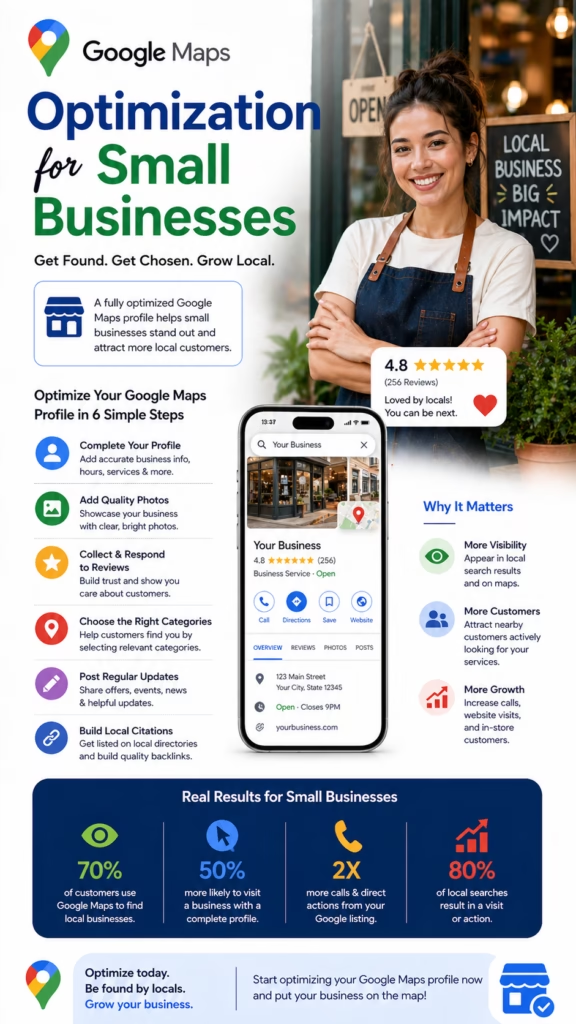
Google Maps Optimization for Small Businesses
Google Maps Optimization for Small Businesses explains how small companies can improve local visibility, strengthen their Google Business Profile, earn more reviews, increase calls, and turn nearby searches into real customers.
Introduction
Google Maps Optimization for Small Businesses is one of the most important local marketing strategies for companies that depend on nearby customers. When someone searches for a plumber, painter, mattress store, restaurant, HVAC company, roofer, dentist, landscaper, mechanic, cleaner, or local service provider, Google Maps often influences who gets the call.
For small businesses, this matters because Google Maps can put a local company directly in front of customers at the moment they are ready to act. A person searching “near me” is usually not just browsing. They are comparing options, reading reviews, checking hours, viewing photos, and deciding who to contact.
Google Maps optimization helps small businesses become easier to find, easier to trust, and easier to contact when nearby customers are ready to buy.
A strong Google Maps presence is not created by accident. It requires a complete Google Business Profile, accurate information, strong categories, service details, photos, reviews, local keywords, citation consistency, website support, and ongoing activity. Each piece helps Google understand the business and helps customers feel confident.
Main idea: Google Maps Optimization for Small Businesses improves local discovery, customer trust, search visibility, and lead generation by strengthening the business’s full local presence.
Table of Contents
- 1) Why Google Maps optimization matters
- 2) How Google Maps drives local customers
- 3) Google Business Profile optimization
- 4) Choosing the right categories
- 5) Services, products, and business details
- 6) Reviews and reputation building
- 7) Photos and visual trust
- 8) Local keywords and relevance
- 9) Website support for Maps visibility
- 10) Citations and information consistency
- 11) Posts and profile activity
- 12) Tracking calls, clicks, and leads
- 13) Common Google Maps mistakes
- 14) Practical optimization workflow
- 15) Final thoughts
- 16) FAQs
- 17) Extra keywords
1) Why Google Maps Optimization Matters
Google Maps optimization matters because customers often use Maps when they need a nearby business quickly. They may want directions, a phone number, hours, reviews, service details, or photos before making a decision. A small business that appears clearly and confidently in those moments can win more attention.
For small businesses, visibility is everything. If competitors appear above them in Google Maps, those competitors may receive more calls, more direction requests, more website clicks, and more walk-in traffic. Optimization helps level the playing field by improving relevance, trust, and profile quality.
Google Maps optimization can help small businesses increase:
- Phone calls
- Website visits
- Direction requests
- Quote requests
- Appointment bookings
- Store visits
- Review visibility
- Local brand awareness
- Customer trust
- Lead generation
Small businesses improve Google Maps performance by becoming more relevant, complete, active, and trusted locally.
2) How Google Maps Drives Local Customers
Google Maps drives local customers by connecting search intent with nearby options. A customer can search, compare, call, visit a website, get directions, read reviews, and view photos without leaving the Maps experience. This makes Google Maps one of the most powerful customer decision tools for local businesses.
Customer searches for a nearby service
Google Maps shows local businesses
Customer compares reviews, photos, hours, and location
Customer clicks call, website, directions, or message
Business receives a lead, visit, or booking
Google Maps optimization works because it helps small businesses appear during high-intent local searches.
3) Google Business Profile Optimization
The Google Business Profile is the foundation of Google Maps Optimization for Small Businesses. This profile tells Google and customers what the business does, where it operates, when it is open, how to contact it, and why it is relevant.
A complete profile should include accurate business information, strong categories, service areas, services, products, photos, hours, description, website link, and review responses. Every section should be treated as part of the business’s local marketing system.
A strong Google Business Profile includes:
- Correct business name
- Accurate address or service area
- Current phone number
- Website link
- Business hours
- Primary and secondary categories
- Services and products
- Business description
- Photos and videos
- Review responses
Small businesses improve Google Maps visibility by making their Google Business Profile complete, accurate, and useful.
4) Choosing the Right Categories
Categories are critical because they help Google understand what the business is. The primary category should match the business’s main service or product. Secondary categories should support additional services without confusing the profile.
A small business should avoid choosing categories that are too broad, inaccurate, or unrelated. The more accurately the category matches customer searches, the better the business can align with relevant local intent.
Correct categories help Google connect small businesses with the right local searches.
5) Services, Products, and Business Details
Services and products help customers understand what the business offers. They also help Google connect the business to relevant search terms. A small business should list its most important services clearly and use customer-friendly wording.
For example, a painting business can list interior painting, exterior painting, cabinet painting, drywall repair, and commercial painting. A mattress store can list mattresses, adjustable bases, delivery, financing, and brand options. A contractor can list repairs, installations, inspections, and estimates.
Service optimization example:
Business type: Local painting company
Primary service: Interior painting
Supporting services: Exterior painting, cabinet painting, drywall repair
Local CTA: Call today for a free estimate
Clear services and products help small businesses appear more relevant to customer searches.
6) Reviews and Reputation Building
Reviews are one of the strongest trust signals for small businesses. Customers often compare star ratings, review quantity, review quality, and owner responses before choosing who to call. A business with strong reviews can stand out even against larger competitors.
Review building should be consistent and ethical. Small businesses should ask satisfied customers for reviews, make the process simple, and respond professionally. Review responses show that the business is active and customer-focused.
A strong review strategy includes:
- Asking happy customers for reviews
- Using a simple review link
- Responding to positive reviews
- Handling negative reviews professionally
- Building reviews consistently over time
- Using feedback to improve service
Reviews help small businesses build trust, increase engagement, and improve local customer confidence.
7) Photos and Visual Trust
Photos help customers feel more comfortable choosing a business. A Google Business Profile with fresh, real photos often looks more active and trustworthy than a profile with no images. Visual trust can influence calls, clicks, and visits.
Small businesses should upload photos of completed work, products, storefronts, team members, service vehicles, interiors, displays, and customer experiences. Real photos usually build more trust than generic stock images.
Useful Google Maps photos include:
- Storefront photos
- Team photos
- Service vehicle photos
- Before-and-after project photos
- Product photos
- Interior photos
- Work examples
- Short videos
Photos improve Google Maps optimization by increasing trust, engagement, and profile completeness.
8) Local Keywords and Relevance
Local keywords help Google and customers understand what the business offers and where it serves. These keywords should be used naturally in the business description, services, website pages, posts, and supporting content.
The goal is not to stuff keywords. The goal is to clearly describe services and locations in the same language customers use when searching.
Local keyword examples:
Google Maps optimization for small businesses
HVAC repair in Rochester NY
Painter near Fort Worth TX
Mattress store in Henrietta NY
Emergency plumber near me
Small businesses improve Maps visibility when their profile and website clearly match local customer search intent.
9) Website Support for Maps Visibility
A business website can support Google Maps optimization by reinforcing services, location, trust, and relevance. Google can use website signals to better understand what the business does and where it operates.
Strong local websites include service pages, city pages, contact information, reviews, photos, FAQs, schema markup, and clear calls to action. The website should also be mobile-friendly because many Google Maps users are searching from phones.
Website elements that support Google Maps SEO:
- Local service pages
- City landing pages
- Consistent business information
- Customer reviews
- FAQ sections
- Local schema markup
- Fast mobile performance
- Clear phone number and forms
Google Maps optimization works best when the business profile and website support each other.
10) Citations and Information Consistency
Citations are online mentions of a business’s name, address, phone number, and website. These may appear on directories, local platforms, business listings, social profiles, and industry sites.
For small businesses, consistency matters. If the phone number, address, or business name is different across the internet, customers and search engines may become confused. Keeping information consistent helps build trust.
Consistent business information supports local trust and strengthens Google Maps optimization.
11) Posts and Profile Activity
Google Business Profile posts help small businesses keep their profile active. Posts can promote offers, seasonal services, events, new products, announcements, and updates. They can also give customers another reason to call or visit.
Useful post structure:
Headline: Clear offer or update
Body: Short explanation of value
Location: Mention service area
CTA: Call, book, visit, or request quote
Profile activity helps small businesses look current, responsive, and customer-focused.
12) Tracking Calls, Clicks, and Leads
Tracking is important because Google Maps optimization should produce measurable results. Small businesses should track calls, website clicks, direction requests, messages, bookings, and quote requests.
This helps the business understand what is working. If calls increase after new reviews, photos, or service updates, that activity may be worth repeating. Tracking turns Google Maps from a guessing game into a measurable marketing channel.
Important Google Maps metrics include:
- Phone calls
- Website clicks
- Direction requests
- Messages
- Profile views
- Photo views
- Review growth
- Booked appointments
- Closed customers
Small businesses should measure Google Maps success by real customer actions, not just visibility.
13) Common Google Maps Mistakes
Many small businesses underperform on Google Maps because they set up a profile once and then ignore it. Others choose the wrong category, forget to add services, stop asking for reviews, or leave photos outdated.
- Incomplete Google Business Profile
- Wrong primary category
- Missing services or products
- Outdated hours
- Few or no photos
- No review strategy
- Ignoring customer reviews
- Inconsistent business information
- Weak website support
- No lead tracking
Big mistake: treating Google Maps optimization as a one-time setup instead of an ongoing local marketing system.
14) Practical Optimization Workflow
If a company wants to apply Google Maps Optimization for Small Businesses, it should follow a simple repeatable workflow. This keeps the profile strong, active, and aligned with customer search behavior.
Step 1: Claim or verify the Google Business Profile
Step 2: Confirm name, address, phone, website, and hours
Step 3: Choose the best primary category
Step 4: Add relevant secondary categories
Step 5: Add services and products
Step 6: Write a clear local business description
Step 7: Upload fresh photos and videos
Step 8: Build a review request process
Step 9: Respond to every review professionally
Step 10: Publish updates and offers
Step 11: Improve website local SEO
Step 12: Clean up citations
Step 13: Track calls, clicks, directions, and leads
The best Google Maps optimization strategy combines profile quality, reviews, photos, website SEO, citations, and consistent updates.
15) Final Thoughts
Google Maps Optimization for Small Businesses is about helping local customers find, trust, and contact a business faster. A strong Maps presence can drive calls, website visits, store visits, appointments, and quote requests from people already searching nearby.
Small businesses do not need to be the biggest company in town to win attention. They need a complete profile, strong reviews, clear services, fresh photos, consistent information, local website support, and a reliable follow-up process.
Final takeaway: Google Maps optimization helps small businesses become more visible, more trusted, and more likely to turn local searches into paying customers.
16) FAQs
1) What is Google Maps Optimization for Small Businesses?
It is the process of improving a small business’s Google Maps visibility through profile optimization, reviews, photos, services, local SEO, and customer engagement.
2) Why does Google Maps matter for small businesses?
It helps small businesses appear when nearby customers are searching for services, products, directions, phone numbers, and local providers.
3) Can Google Maps optimization generate leads?
Yes. It can generate calls, website visits, direction requests, appointments, quote requests, and store visits.
4) What is a Google Business Profile?
It is the business listing that appears on Google Search and Google Maps with details like hours, reviews, photos, services, and contact information.
5) Do reviews help Google Maps performance?
Yes. Reviews help build trust and can influence customer decisions and engagement.
6) How often should small businesses ask for reviews?
They should ask consistently after positive customer experiences.
7) Should businesses respond to reviews?
Yes. Responding shows professionalism, activity, and customer care.
8) Do photos help Google Maps optimization?
Yes. Fresh photos can improve trust, engagement, and profile quality.
9) What categories should small businesses choose?
They should choose the most accurate primary category and only use relevant secondary categories.
10) Should businesses list services?
Yes. Services help Google and customers understand what the business offers.
11) Does a website help Google Maps rankings?
A strong local website can support relevance, trust, and conversion.
12) What are citations?
Citations are mentions of a business’s name, address, phone number, and website across online platforms.
13) Why is NAP consistency important?
Consistent name, address, and phone information helps avoid confusion and supports local trust.
14) Should businesses publish Google posts?
Yes. Posts can keep the profile active and promote offers, events, services, and updates.
15) What is the biggest Google Maps mistake?
The biggest mistake is leaving the profile incomplete, inactive, or outdated.
16) Can service-area businesses use Google Maps SEO?
Yes. Service-area businesses can optimize service areas, services, reviews, photos, and website content.
17) Can storefront businesses benefit from Google Maps?
Yes. Storefronts can increase calls, direction requests, website visits, and walk-in traffic.
18) How long does Google Maps optimization take?
Results vary depending on competition, location, reviews, profile strength, website quality, and consistency.
19) What should businesses track?
They should track calls, website clicks, direction requests, messages, profile views, bookings, and leads.
20) Do local keywords matter?
Yes. Local keywords help connect the business to relevant searches involving services and locations.
21) Should businesses update holiday hours?
Yes. Accurate hours improve customer experience and prevent missed opportunities.
22) Can Google Maps help new businesses?
Yes. New businesses can use Google Maps optimization to build local visibility and trust faster.
23) Is Google Maps SEO free?
The profile is free to create, but proper optimization requires time, strategy, content, review building, and ongoing maintenance.
24) Is Google Maps optimization a one-time task?
No. It works best as an ongoing process with regular updates, reviews, photos, and tracking.
25) What is the main goal of Google Maps optimization?
The main goal is to turn local searches into real customer actions such as calls, visits, bookings, and leads.
17) Extra Keywords
- Google Maps Optimization for Small Businesses
- Google Maps SEO
- Google Business Profile optimization
- small business local SEO
- Google Maps ranking
- local search optimization
- Google Maps marketing
- local business visibility
- Google Business Profile SEO
- Google Maps lead generation
- local SEO for small businesses
- Google local rankings
- map pack SEO
- near me search optimization
- Google reviews strategy
- business listing optimization
- local citation building
- NAP consistency
- service area SEO
- storefront SEO
- local customer calls
- Google Maps visibility
- small business marketing
- local lead generation
- Google Maps customer acquisition













