Craigslist Lead Generation for Restoration Businesses
Craigslist Lead Generation for Restoration Businesses
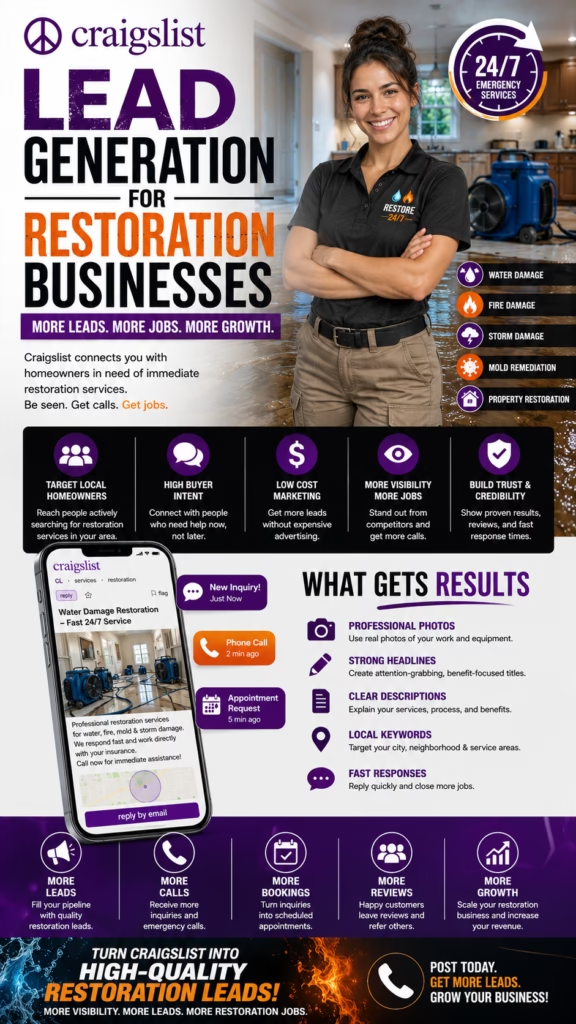
Craigslist Lead Generation for Restoration Businesses explains how restoration companies can use local Craigslist ads, emergency service offers, trust signals, and fast follow-up to generate more water damage, fire damage, mold remediation, storm cleanup, and property restoration leads.
Introduction
Craigslist Lead Generation for Restoration Businesses starts with one major advantage: restoration services are urgent, local, and problem-driven. When a homeowner, landlord, property manager, or business owner deals with water damage, fire damage, smoke odor, mold concerns, storm damage, flooding, sewage backup, or property cleanup, they often need help quickly.
Craigslist can still be a useful local lead channel for restoration companies because customers may search for practical emergency help, cleanup support, repair guidance, and local service providers. A strong Craigslist ad can turn that local urgency into calls, messages, inspections, estimates, emergency appointments, and booked restoration projects.
Craigslist lead generation works for restoration businesses when ads are local, urgent, trustworthy, specific, and built around the exact property damage problem the customer needs solved.
The best restoration companies do not post one vague “restoration service available” ad. They create focused ads around water damage cleanup, flood damage restoration, mold remediation, fire damage cleanup, smoke odor removal, storm cleanup, sewage cleanup, emergency drying, property board-up, and insurance-related restoration support.
Main idea: Craigslist Lead Generation for Restoration Businesses is about turning local emergency search intent into qualified restoration calls, inspections, estimates, and booked jobs.
Table of Contents
- 1) Why Craigslist can work for restoration businesses
- 2) What restoration customers look for before responding
- 3) Building a Craigslist restoration lead strategy
- 4) Writing restoration ad titles that get clicks
- 5) Using photos and visuals that build trust
- 6) Writing descriptions that create urgent inquiries
- 7) Local keywords for restoration companies
- 8) Restoration services to promote on Craigslist
- 9) Craigslist ads for water damage leads
- 10) Craigslist ads for mold remediation leads
- 11) Craigslist ads for fire and smoke damage leads
- 12) Craigslist ads for storm cleanup and emergency response
- 13) Pricing and estimate language
- 14) Building credibility with trust signals
- 15) Reducing low-quality restoration inquiries
- 16) Follow-up scripts for restoration leads
- 17) Posting consistency and ad rotation
- 18) Tracking Craigslist restoration performance
- 19) Common Craigslist lead generation mistakes
- 20) Final thoughts
- 21) FAQs
- 22) Extra keywords
1) Why Craigslist Can Work for Restoration Businesses
Craigslist can work for restoration businesses because property damage often creates urgent local searches. A homeowner may need water extraction after a pipe burst, drying after a leak, mold cleanup after moisture problems, smoke odor removal after a small fire, or storm cleanup after severe weather.
Restoration customers usually want a provider who can respond quickly, explain the process, protect the property, and help them understand the next step. Craigslist ads can help restoration companies appear when local customers are actively looking for help.
Craigslist can help restoration companies generate:
- Water damage leads
- Flood cleanup inquiries
- Mold remediation requests
- Fire damage restoration leads
- Smoke odor removal inquiries
- Storm cleanup requests
- Sewage cleanup leads
- Emergency drying appointments
- Property board-up requests
- Local inspection and estimate calls
Craigslist works best when restoration companies promote specific emergency services instead of one broad cleanup ad.
2) What Restoration Customers Look For Before Responding
Restoration customers want confidence before they call or message. They want to know whether the company handles their specific damage, serves their area, responds quickly, explains the process, and can provide an inspection or estimate.
Because restoration jobs can involve safety, moisture, odor, contamination, structural concerns, and insurance questions, trust matters. Customers need to feel that the business is professional, calm, and qualified.
Restoration customers usually look for:
Fast response
Local service area
Specific damage handled
Inspection availability
Emergency service language
Water extraction or drying process
Mold remediation experience
Fire and smoke cleanup experience
Insurance-friendly communication
Clear next step
Restoration ads perform better when they reduce panic and make the next step obvious.
3) Building a Craigslist Restoration Lead Strategy
A strong Craigslist restoration lead strategy should include multiple ad angles. One general restoration ad is weaker than specific ads for water damage, mold remediation, fire cleanup, storm cleanup, sewage cleanup, and emergency property drying.
Each restoration need has a different customer mindset. A water damage customer may need immediate drying. A mold customer may need inspection and remediation. A fire damage customer may need cleanup, odor removal, and property recovery guidance.
Craigslist restoration strategy elements:
- Emergency-focused ads
- Damage-specific service pages
- Local service-area wording
- Inspection and estimate CTAs
- Trust-building details
- Insurance-friendly wording
- Lead qualification questions
- Fast response process
- Seasonal storm rotation
- Performance tracking
A focused Craigslist strategy helps restoration businesses match urgent customer problems with the right service offer.
4) Writing Restoration Ad Titles That Get Clicks
The title is one of the most important parts of a Craigslist restoration ad. Customers scan quickly, especially when they are stressed. The title should clearly name the emergency or damage type.
Vague titles like “cleanup help” or “property service” do not create the same urgency as titles that name water damage, mold, fire damage, or storm cleanup directly.
Weak title:
Cleanup Service Available

Better title:
Water Damage Cleanup & Emergency Drying - Local Help

Weak title:
Restoration Company

Better title:
Mold Remediation, Water Damage & Property Cleanup

Weak title:
Fire Cleanup

Better title:
Fire Damage Cleanup & Smoke Odor Help Available Locally

Weak title:
Storm Help

Better title:
Storm Damage Cleanup, Flooding Help & Property Restoration
A strong restoration title should name the damage problem before the customer clicks.
5) Using Photos and Visuals That Build Trust
Visuals matter, but restoration companies should use them carefully. Photos should build trust without looking too alarming, graphic, or unprofessional. Real project photos, equipment photos, drying equipment, clean trucks, technician images, and before-and-after cleanup photos can help.
The goal is to communicate professionalism, speed, safety, and property recovery.
Best visuals for restoration Craigslist ads:
- Water extraction equipment photos
- Air mover and drying setup images
- Clean service truck photos
- Technician or team photos
- Before-and-after cleanup photos
- Flooded room recovery images
- Mold remediation containment images
- Fire cleanup equipment photos
- Storm cleanup project images
- Professional branded emergency service graphics
Restoration visuals should show competence, not chaos.
6) Writing Descriptions That Create Urgent Inquiries
The description should guide the customer from emergency concern to action. It should explain what damage is handled, where service is available, how inspections or estimates work, and what information the customer should send.
A strong description should be calm and practical. Restoration customers may already feel overwhelmed, so the ad should reduce confusion.
Strong restoration ad description structure:
Opening emergency problem
Service offered
Damage types handled
Local service area
Inspection or estimate process
Emergency response language
Trust signals
What the customer should send
Availability
Clear call to action
A strong restoration description should make the customer feel ready to call or message immediately.
7) Local Keywords for Restoration Companies
Local keywords help customers understand that the restoration company serves their area. Restoration work is location-based because response speed, travel time, service radius, and emergency availability all matter.
Use city, neighborhood, county, service-area, emergency response, and nearby wording naturally. Avoid spammy location stuffing.
Useful local restoration keyword phrases:
- water damage cleanup available locally
- emergency restoration service nearby
- mold remediation in your local area
- fire damage cleanup available locally
- storm cleanup near your area
- local property restoration company
- flood cleanup service nearby
- serving nearby homeowners and property managers
- local restoration inspection available
- emergency drying service near you
Local keywords should make the restoration service feel close, fast, and relevant.
8) Restoration Services to Promote on Craigslist
Restoration companies should promote specific services because each damage type attracts a different customer need. Water damage, mold remediation, fire cleanup, and storm recovery should not always be bundled into one generic ad.
Separate ads can improve lead quality and help customers instantly recognize the solution they need.
Restoration services to promote:
Water damage cleanup
Flood cleanup
Emergency drying
Mold remediation
Mold inspection support
Fire damage cleanup
Smoke odor removal
Storm damage cleanup
Sewage cleanup
Crawlspace moisture cleanup
Basement water cleanup
Property board-up
Content cleanup
Commercial restoration
Rental property restoration
Specific restoration ads usually generate better leads than broad cleanup ads.
9) Craigslist Ads for Water Damage Leads
Water damage leads are often urgent. Customers may have a burst pipe, appliance leak, roof leak, basement flooding, crawlspace moisture, overflowing toilet, or standing water. These leads need fast response and clear next steps.
Water damage ads should mention extraction, drying, moisture concerns, emergency response, and inspection or estimate availability.
Water damage ad angles:
- Burst pipe cleanup
- Basement water cleanup
- Flood damage restoration
- Appliance leak cleanup
- Emergency drying service
- Roof leak water damage help
- Crawlspace moisture cleanup
- Local water damage estimates
Water damage ads should focus on fast response, drying, and property protection.
10) Craigslist Ads for Mold Remediation Leads
Mold remediation leads often come from moisture problems, visible growth, musty odors, water damage, crawlspaces, basements, bathrooms, attics, and rental properties. These customers want a careful and professional process.
Mold ads should avoid fear-based language. Focus on inspection, containment, remediation, moisture source concerns, and safe next steps.
Mold remediation ad angles:
Mold remediation service
Mold inspection support
Musty odor concerns
Basement mold cleanup
Crawlspace mold concerns
Bathroom mold issues
Attic mold concerns
Post-water-damage mold prevention
Rental property mold cleanup
Local mold remediation estimates
Mold ads should sound professional, calm, and process-focused.
11) Craigslist Ads for Fire and Smoke Damage Leads
Fire and smoke damage leads may involve cleanup, soot, odor, contents, debris, structural concerns, and emotional stress. The ad should communicate sensitivity, professionalism, and recovery support.
Fire restoration ads should mention cleanup, odor control, smoke damage, soot cleaning, emergency support, and inspection availability.
Fire and smoke damage ad angles:
- Fire damage cleanup
- Smoke odor removal
- Soot cleaning support
- Post-fire property cleanup
- Contents cleanup guidance
- Emergency property stabilization
- Small fire cleanup help
- Local fire restoration estimates
Fire damage ads should focus on calm recovery, cleanup, and trustworthy help.
12) Craigslist Ads for Storm Cleanup and Emergency Response
Storm cleanup leads can spike after heavy rain, wind, flooding, hurricanes, snow, ice, or severe weather. Customers may need water cleanup, debris removal, board-up help, roof leak support, or property stabilization.
Storm ads should be timely, local, and clear about what services are available.
Storm cleanup ad angles:
Storm damage cleanup
Flooding help after heavy rain
Emergency water cleanup
Wind damage property cleanup
Board-up support
Roof leak water damage help
Tree and debris cleanup coordination
Basement flooding support
Local emergency restoration response
Post-storm property recovery
Storm cleanup ads should be timely, practical, and focused on urgent next steps.
13) Pricing and Estimate Language
Restoration pricing depends on damage type, affected area, moisture levels, contamination, materials, equipment, labor, emergency timing, insurance involvement, and cleanup complexity. Because of that, clear estimate-based language is important.
Avoid making unrealistic flat-price claims for complex restoration work. Instead, explain what information is needed to assess the job.
Useful restoration pricing phrases:
- Local restoration estimates available
- Pricing depends on damage type and affected area
- Emergency inspections available when possible
- Photos help with faster guidance
- Water damage and drying estimates available
- Mold remediation pricing depends on scope
- Fire and smoke cleanup estimates available
- Insurance-friendly documentation support if offered
- Ask about current emergency availability
- Quote available after basic damage details
Clear estimate language creates better restoration leads than vague price promises.
14) Building Credibility With Trust Signals
Trust signals are critical in restoration because customers may be facing serious property damage. A Craigslist ad should make the company feel professional, responsive, and capable.
Use honest details such as business name, local service area, years of experience, certifications if accurate, insurance-friendly process if offered, real equipment photos, reviews, emergency response language, and clear communication.
Restoration company trust signals:
Business name
Local service area
Years of experience
Real project photos
Equipment photos
Customer reviews if available
Certifications if accurate
Insurance-friendly process if offered
Emergency response language
Clear inspection process
Fast response language
Professional communication
Trust signals help turn urgent Craigslist searches into serious restoration calls.
15) Reducing Low-Quality Restoration Inquiries
Low-quality inquiries happen when ads are too vague. Customers may say “how much?” without sharing damage type, location, photos, affected area, or whether the problem is active.
Improve lead quality by asking for the right details inside the ad or first reply.
Ask restoration leads to send:
- City or neighborhood
- Damage type
- Whether the issue is active or resolved
- Affected rooms or areas
- Approximate size of affected area
- Photos if safe to send
- When the damage happened
- Insurance involved or not
- Urgency level
- Best contact method
Better restoration questions create faster inspections and stronger emergency conversations.
16) Follow-Up Scripts for Restoration Leads
Fast follow-up is critical because restoration leads are often urgent. The first reply should be calm, direct, and designed to gather the details needed to help quickly.
General restoration lead reply:
Thanks for reaching out. What type of damage are you dealing with, what city are you in, and is the issue active right now? Photos help if it is safe to send them.
Water damage reply:
Happy to help. Is there still standing water or an active leak, and what rooms are affected? Send your location, when it happened, and any photos if safe.
Mold remediation reply:
Thanks for the message. Are you seeing visible mold, smelling a musty odor, or following up after water damage? Send your location, affected area, and photos if possible.
The best restoration follow-up is fast, calm, and focused on the next safe step.
17) Posting Consistency and Ad Rotation
Craigslist lead generation works best when restoration businesses post consistently and rotate damage-specific ad angles. Repeating the same generic restoration ad can become stale. Better consistency means rotating water damage, mold remediation, fire cleanup, storm cleanup, sewage cleanup, emergency drying, and commercial restoration ads.
Ad rotation also helps match seasonal demand, especially during storm seasons, freeze events, heavy rain, humid months, and high-risk moisture periods.
Craigslist restoration ad rotation:
Water damage cleanup ad
Emergency drying ad
Mold remediation ad
Fire damage cleanup ad
Smoke odor removal ad
Storm cleanup ad
Sewage cleanup ad
Basement flooding ad
Crawlspace moisture ad
Commercial restoration ad
Consistent ad rotation keeps restoration companies visible when local customers urgently need help.
18) Tracking Craigslist Restoration Performance
Tracking helps restoration companies understand which Craigslist ads generate real business. Views and messages matter, but the real goal is qualified calls, inspections, estimates, emergency responses, booked jobs, and revenue.
Track each ad by service type, title, local area, message volume, call volume, lead quality, response time, inspections booked, and closed jobs.
Track these Craigslist restoration metrics:
Ad title
Restoration service promoted
Damage type
City or service area
Date posted
Messages
Calls
Qualified leads
Emergency requests
Inspections booked
Estimates sent
Jobs closed
Revenue generated
Best-performing ad angle
Tracking turns Craigslist posting into a measurable restoration lead channel.
19) Common Craigslist Lead Generation Mistakes
Many restoration businesses underperform on Craigslist because their ads are too generic. A broad ad that says “cleanup service available” does not give urgent customers enough reason to call.
Other mistakes include no emergency language, no local service area, weak trust signals, unclear estimate process, fear-based copy, no lead questions, slow replies, and no tracking.
Common restoration Craigslist mistakes:
- Using generic cleanup titles
- Not naming damage types
- No local service-area details
- No emergency response language
- No inspection or estimate process
- No trust signals
- Using fear-based copy
- No lead qualification questions
- Slow response to urgent messages
- No performance tracking
Most Craigslist restoration lead problems come from unclear offers and weak urgency handling.
20) Final Thoughts
Craigslist Lead Generation for Restoration Businesses is about using local emergency search intent to create real restoration conversations. Restoration companies can stand out by posting specific damage services, using local keywords, explaining inspections, showing trust signals, using calm urgent language, and responding quickly.
The strongest strategy includes damage-specific ads, emergency service wording, service-area targeting, helpful estimate language, clear CTAs, lead qualification questions, fast follow-up, consistent posting, and performance tracking.
Final takeaway: Restoration businesses can use Craigslist lead generation to turn local property damage searches into calls, inspections, estimates, booked jobs, referrals, and revenue growth.
21) FAQs
1) What is Craigslist Lead Generation for Restoration Businesses?
Craigslist Lead Generation for Restoration Businesses is the process of using Craigslist ads to attract local customers who need water damage cleanup, mold remediation, fire damage restoration, storm cleanup, or emergency property restoration.
2) Can restoration companies get leads from Craigslist?
Yes. Restoration companies can generate leads by posting clear, local, emergency-focused ads with trust signals and fast follow-up.
3) What restoration services work well on Craigslist?
Water damage cleanup, flood cleanup, mold remediation, fire damage cleanup, smoke odor removal, storm cleanup, sewage cleanup, and emergency drying can work well.
4) What makes a good Craigslist restoration title?
A good title names the damage type and service clearly, such as Water Damage Cleanup & Emergency Drying - Local Help.
5) Should restoration ads include photos?
Yes. Professional equipment photos, project photos, service truck images, and clean branded graphics can build trust.
6) Should restoration companies use fear-based ads?
No. Calm, urgent, professional language usually works better than fear-based messaging.
7) Should restoration ads include pricing?
When possible, yes. If pricing varies, use estimate-based language and ask for damage type, location, photos, and affected area.
8) What local keywords should restoration companies use?
Use phrases like local water damage cleanup, mold remediation nearby, emergency restoration service, storm cleanup locally, and local restoration inspection.
9) How fast should restoration companies reply?
As fast as possible. Restoration customers often need urgent help and may call multiple companies.
10) What should the first reply ask?
The first reply should ask what damage occurred, where the property is located, whether the issue is active, affected area, timing, photos if safe, and best contact method.
11) Can Craigslist work for water damage leads?
Yes. Water damage ads can attract customers dealing with leaks, flooding, burst pipes, appliance leaks, roof leaks, and basement water problems.
12) Can Craigslist work for mold remediation leads?
Yes. Mold remediation ads can attract customers dealing with visible mold, musty odors, moisture issues, crawlspaces, basements, bathrooms, and post-water-damage concerns.
13) Can Craigslist work for fire damage leads?
Yes. Fire damage ads can attract customers who need smoke odor removal, soot cleanup, debris cleanup, and property restoration help.
14) Can Craigslist work for storm cleanup leads?
Yes. Storm cleanup ads can attract customers after heavy rain, wind, flooding, roof leaks, or severe weather damage.
15) Should restoration companies post one general ad or multiple service-specific ads?
Multiple service-specific ads usually work better because each ad targets a clearer damage problem.
16) What trust signals should restoration companies include?
Trust signals include business name, local service area, years of experience, real photos, reviews, certifications if accurate, insurance-friendly process if offered, and clear inspection steps.
17) Should restoration ads mention insurance?
Yes, if the company supports insurance-related documentation or communication. Keep wording clear and accurate.
18) How can restoration companies reduce bad leads?
Ask leads for damage type, location, affected area, when it happened, photos if safe, insurance involvement, urgency, and best contact method.
19) What is the biggest Craigslist mistake restoration companies make?
The biggest mistake is posting vague cleanup ads without damage-specific wording, emergency language, local details, trust signals, or fast follow-up.
20) How can restoration companies track Craigslist results?
Track ad title, service promoted, damage type, messages, calls, qualified leads, inspections, estimates, closed jobs, and revenue.
21) Should restoration companies rotate Craigslist ads?
Yes. Rotate ads by water damage, mold, fire cleanup, smoke odor, storm cleanup, sewage cleanup, emergency drying, and commercial restoration.
22) Can Craigslist replace paid ads for restoration businesses?
Craigslist can replace part of paid ad spend for some restoration businesses and can also work alongside Google, SEO, Facebook Marketplace, reviews, and referral marketing.
23) Should restoration companies mention emergency availability?
Yes, if accurate. Emergency availability can help urgent customers understand that the company may be able to respond quickly.
24) How does Craigslist fit into restoration marketing?
Craigslist should support a larger system that includes Google Business Profile, local SEO, reviews, website forms, social media, referral partners, and follow-up automation.
25) What is the main goal of Craigslist lead generation for restoration businesses?
The main goal is to turn local Craigslist visibility into restoration inquiries, emergency calls, inspections, estimates, booked jobs, referrals, and revenue growth.
22) Extra Keywords
- Craigslist Lead Generation for Restoration Businesses
- Craigslist restoration leads
- restoration company marketing
- water damage leads
- fire damage restoration leads
- mold remediation leads
- storm cleanup leads
- emergency restoration leads
- Craigslist water damage ads
- Craigslist mold remediation ads
- property restoration advertising
- restoration business lead generation
- local restoration leads
- flood cleanup leads
- smoke odor removal leads
- sewage cleanup leads
- emergency drying leads
- commercial restoration leads
- Craigslist contractor ads
- restoration estimate requests
- restoration service advertising
- restoration follow-up strategy
- restoration lead tracking
- restoration appointment generation
- restoration business growth strategy
Craigslist Lead Generation for Restoration Businesses Read More »