

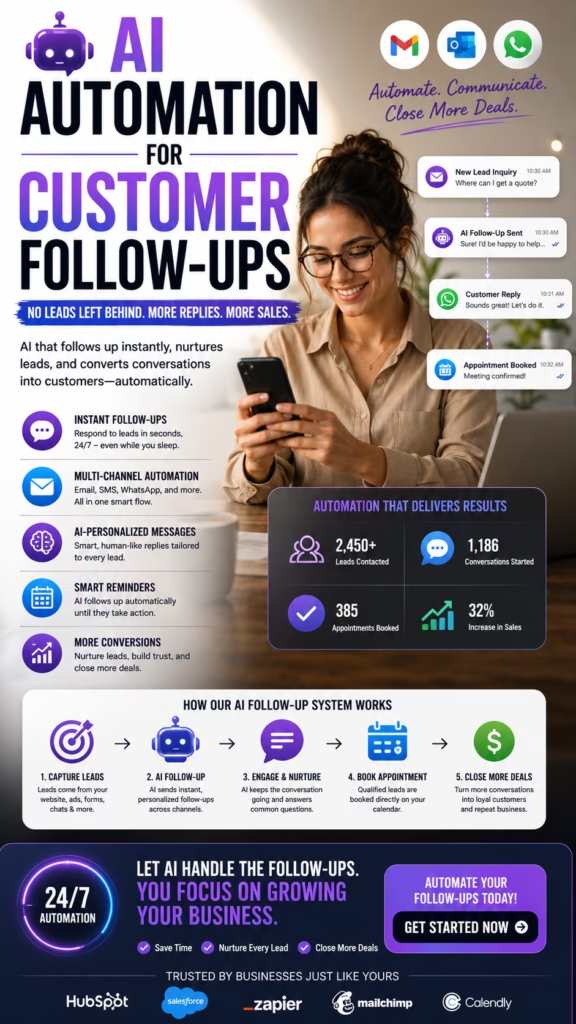
AI Automation for Customer Follow-Ups
AI automation for customer follow-ups helps businesses respond faster, maintain consistent communication, reduce missed appointments, nurture estimates and proposals, reactivate inactive leads, support customer retention, organize CRM activity, and connect follow-up efforts to measurable appointments, sales, repeat business, revenue, and gross profit.
Many businesses do not lose customers because their service is poor. They lose customers because nobody follows up at the right time with the right message.
A customer may submit a form, call after business hours, request an estimate, ask for pricing, schedule an appointment, visit a store, review a proposal, or say they need more time. Without a structured follow-up process, these opportunities can disappear.
Manual follow-up often depends on memory, handwritten notes, personal inboxes, spreadsheets, individual sales habits, and disconnected calendars. Some customers receive several messages while others receive none.
Artificial intelligence can help create a more consistent system. AI can identify the customer stage, review previous interactions, select an approved message, trigger reminders, update the CRM, and alert employees when human attention is needed.
The strongest system does not send endless robotic messages. It uses automation to make communication timely, useful, organized, and easier for the customer.
The Customer Follow-Up Formula
Fast Response + Relevant Context + Useful Information + Clear Next Step + Appropriate Timing + Human Escalation + Accurate Tracking = Better Customer Follow-Up
Why Customer Follow-Up Matters
Customers Get Busy
Interested customers may forget to respond, lose an email, miss a call, or postpone the decision.
Questions Remain Unanswered
Pricing, scheduling, service details, product availability, or implementation concerns can delay the next step.
Buying Cycles Take Time
Many customers need several conversations before they are ready to schedule, purchase, approve, or sign.
Appointments Are Forgotten
Confirmations and reminders can reduce confusion, no-shows, and last-minute scheduling problems.
Past Customers Need Reminders
Maintenance, renewals, reorders, seasonal services, and repeat purchases often depend on timely communication.
Follow-Up Produces Measurable Revenue
Consistent communication can recover leads, increase appointments, improve sales, and strengthen retention.
Why Use AI Automation for Customer Follow-Ups
Faster Response
AI can acknowledge an inquiry immediately, even when the business is closed or employees are busy.
Consistent Execution
Follow-up does not depend entirely on whether an employee remembers to send a message or create a task.
Better Personalization
Messages can reflect the customer's requested service, product, location, appointment, estimate, previous question, or CRM stage.
Smarter Escalation
High-intent responses, complaints, pricing questions, urgent requests, and complex situations can be routed to employees.
Stronger Measurement
Businesses can track which follow-up sequences produce replies, appointments, estimate approvals, purchases, and repeat customers.
Build a Clear Customer Follow-Up Strategy
Define the Primary Goal
- Generate a customer reply
- Schedule an appointment
- Confirm an appointment
- Recover a missed call
- Move an estimate forward
- Close an open proposal
- Request a customer review
- Generate repeat business
Choose the Customer Stage
A new inquiry should not receive the same message as an existing customer, proposal-stage buyer, no-show appointment, or past customer due for service.
Define the Next Step
Every follow-up should make the next action clear. Examples include replying with project details, choosing an appointment time, reviewing an estimate, confirming availability, calling a specialist, or placing an order.
Assign Human Ownership
Automation can create the message and task, but a person or team should remain responsible for the customer relationship.
Map Follow-Up to the Customer Journey
New Inquiry
The customer has contacted the business but has not yet been qualified or scheduled.
Qualified Lead
The business has confirmed that the customer fits the service, product, territory, or minimum requirements.
Appointment Scheduled
The customer needs confirmation, preparation details, reminders, and rescheduling options.
Estimate or Proposal Sent
The customer may need clarification, proof, scheduling information, options, or a conversation with a salesperson.
Customer Purchased
Follow-up may include onboarding, updates, service instructions, satisfaction checks, review requests, and future reminders.
Inactive Customer
An older lead or previous customer may be appropriate for a carefully timed reactivation or retention campaign.
Automate Follow-Up With New Leads
Immediate Acknowledgment
Thank you for contacting us. We received your request and can help you with the next step. Could you confirm your location and the service you need?
Collect Essential Information
- Name
- Phone number
- Email address
- City or ZIP code
- Requested service or product
- Preferred timeline
- Appointment availability
Offer a Clear Next Step
Provide appointment times, a callback window, an estimate process, a product link, or another specific action.
Notify the Assigned Employee
Qualified leads should generate an alert, CRM task, or assignment for the correct salesperson or service team.
Recover Missed Calls With AI Follow-Up
Send a Prompt Missed-Call Response
We are sorry we missed your call. What can we help you with today? You can reply here with a few details, and our team will follow up.
Identify the Customer Need
Ask whether the customer needs pricing, an appointment, product information, service support, an update, or a callback.
Route the Request
Use the customer's location, service, product, account, urgency, and previous history to assign the correct employee.
Track Missed-Call Recovery
Measure how many missed calls become conversations, appointments, estimates, and sales.
Follow Up With Website Form Leads
Confirm the Submission
Let the customer know the form was received and explain the next step.
Use the Form Information
The follow-up should reflect the selected service, product, city, budget range, timeline, or message provided.
Request Missing Details
Ask only for information necessary to qualify the request or schedule the next step.
Avoid Making the Customer Repeat Everything
Transfer form details into the CRM and make them visible to the employee handling the lead.
Automate Follow-Up After Website Chat
Send Requested Information
Follow up with the service page, pricing information, product details, appointment link, location directions, or guide requested during the chat.
Confirm Scheduled Appointments
Include the date, time, location or meeting link, assigned representative, and preparation instructions.
Create a Conversation Summary
Store the customer's need, questions, objections, location, timeline, and agreed next step.
Escalate Unresolved Questions
Technical, contractual, pricing, complaint, and sensitive questions should be routed to an employee.
Automate Appointment Confirmations and Reminders
Appointment Confirmation
- Customer name
- Appointment date
- Appointment time
- Time zone
- Location or meeting link
- Assigned employee
- Preparation instructions
- Rescheduling information
Reminder Timing
Reminder timing may vary by industry. A consultation may need one reminder, while an in-home service appointment may need a confirmation, day-before reminder, and arrival update.
Make Rescheduling Easy
Customers who cannot attend should have a simple method to choose a new time rather than becoming a no-show.
Notify Employees of Changes
Cancellations, reschedules, and important customer notes should update calendars and CRM tasks.
Recover No-Show Appointments
Send a Helpful Message
We missed you at your scheduled appointment. We would be happy to help you choose another time. Would later this week or early next week work better?
Avoid Blame
The message should make rescheduling easy without embarrassing or criticizing the customer.
Offer Specific Times
Specific appointment options reduce friction and make it easier to continue the conversation.
Update the CRM
Record the no-show, follow-up attempt, customer response, and new appointment if scheduled.
Automate Customer Follow-Up After Estimates
Confirm Estimate Delivery
Let the customer know the estimate was sent and explain how to review it or ask questions.
Follow Up With Useful Context
- Project scope
- Scheduling availability
- Materials or product options
- Warranty information
- Payment or financing options
- Preparation requirements
- Estimate expiration date
Ask a Simple Question
Ask whether the customer has questions, wants to review options, or is ready to schedule.
Alert Salespeople to Engagement
A reply, estimate view, pricing question, or scheduling request may indicate high intent.
Automate Follow-Up After Sales Proposals
Send a Proposal Recap
Summarize the customer's goal, recommended solution, major scope, expected next step, and who to contact with questions.
Address Common Delays
- Budget approval
- Internal decision-making
- Technical questions
- Implementation timing
- Contract review
- Comparison with competitors
Send Relevant Proof
A case study, testimonial, implementation guide, comparison, or answer to a stated concern can add value.
Know When to Stop Automating
Negotiation, legal review, contract changes, pricing concessions, and executive decisions require human involvement.
Use AI Email Automation for Customer Follow-Ups
Email Follow-Up Types
- New inquiry acknowledgment
- Requested information
- Appointment confirmation
- Appointment reminder
- Estimate follow-up
- Proposal follow-up
- Customer onboarding
- Reactivation campaign
Use Clear Subject Lines
Subject lines should help the customer understand the message without misleading urgency or vague promotional language.
Keep One Main Call to Action
Ask the customer to reply, schedule, review, confirm, call, or complete one clear next step.
Measure Replies and Conversions
Opens and clicks can help diagnose performance, but replies, appointments, estimate approvals, and sales are stronger outcomes.
Use AI SMS Automation for Customer Follow-Ups
Useful SMS Applications
- Immediate lead acknowledgment
- Missed-call response
- Appointment confirmation
- Appointment reminder
- Arrival notification
- Estimate follow-up
- Requested information
- Review request
Keep Messages Concise
Identify the business, explain the reason for the message, and provide a clear next step.
Use Frequency Controls
Prevent duplicate messages from salespeople, customer service, corporate systems, and automated sequences.
Respect Opt-Outs
Automated systems should process opt-out requests and prevent unauthorized additional messages.
Use AI Voice Automation for Customer Follow-Up
Voice Follow-Up Applications
- Returning missed calls
- Confirming appointments
- Reminding customers
- Collecting missing information
- Following up after service
- Routing customers to employees
Use Approved Information
The system should access current hours, appointment details, services, locations, customer records, and escalation contacts.
Allow Human Transfer
Customers should be transferred when they have complaints, complex questions, sensitive information, pricing disputes, or urgent requests.
Review Call Outcomes
Track answered calls, transfers, appointments, abandoned calls, errors, and customer feedback.
Personalize Automated Customer Follow-Up
Useful Personalization Fields
- Customer name
- Requested service
- Product interest
- Location
- Appointment date
- Estimate or proposal status
- Previous question
- Assigned employee
Use Conversation Context
A follow-up should reflect what the customer already discussed rather than restarting the conversation.
Personalize the Next Step
Offer the action that fits the stage: reply, schedule, approve, confirm, review, reorder, renew, or speak with a person.
Avoid False Personalization
AI should not invent customer preferences, purchase history, previous conversations, account details, or stated concerns.
Choose Better Follow-Up Timing
Immediate Follow-Up
New inquiries, missed calls, urgent service requests, and appointment requests often benefit from rapid acknowledgment.
Scheduled Follow-Up
Estimates, proposals, long-term purchases, and renewal decisions may require planned communication over days, weeks, or months.
Event-Based Follow-Up
- Form submitted
- Call missed
- Appointment scheduled
- Appointment completed
- Estimate sent
- Proposal viewed
- Purchase completed
- Service due
Use Customer Behavior
A reply, repeated visit, pricing-page view, estimate review, or appointment request may justify faster human follow-up.
Control Automated Follow-Up Frequency
Avoid Repetitive Messages
Each follow-up should add something useful instead of repeating the same request.
Coordinate Across Channels
Email, SMS, calls, social messages, and employee outreach should be coordinated so the customer is not overwhelmed.
Pause When the Customer Responds
Automated sequences should change or stop when the customer replies, books, purchases, declines, or asks for assistance.
Use Maximum Contact Rules
Establish limits based on the customer stage, communication channel, urgency, and prior engagement.
Prioritize High-Intent Customers
High-Intent Signals
- Appointment request
- Pricing question
- Estimate review
- Proposal engagement
- Repeated website visits
- Urgent timeline
- Product availability question
- Request for a salesperson
Fit Signals
- Correct service area
- Relevant service or product
- Appropriate budget range
- Decision-making authority
- Realistic timeline
- Supported customer type
Notify Employees
High-intent customers should trigger a CRM alert, task, text, email, or internal notification.
Do Not Rely Only on Scores
Lead scoring should guide prioritization, not replace employee judgment.
Nurture Customers Through Longer Sales Cycles
Useful Nurture Content
- Customer guides
- Frequently asked questions
- Case studies
- Product education
- Service explanations
- Pricing information
- Implementation details
- Customer testimonials
Match Content to the Stage
Early-stage customers need education. Later-stage customers may need proof, detailed pricing, comparisons, scheduling, or risk reduction.
Do Not Force Immediate Decisions
Nurturing should help the customer make a confident decision rather than creating artificial pressure.
Alert Sales When Interest Increases
Strong engagement can trigger a task for personalized human follow-up.
Reactivate Older Leads With AI Follow-Up
Reactivation Segments
- Unresponsive inquiries
- Old estimates
- Expired proposals
- No-show appointments
- Leads waiting on budget
- Leads waiting on timing
- Seasonal customers
- Former customers
Use a Legitimate Reason to Reconnect
New availability, updated services, seasonal timing, revised pricing, a useful resource, or a maintenance need may justify the message.
Reference the Earlier Interest Accurately
Mention the previous service, product, estimate, or appointment without pretending the conversation was more recent than it was.
Respect Communication History
Review opt-outs, permissions, closed opportunities, complaints, and customer preferences before reactivation.
Use AI Follow-Up to Improve Customer Retention
Retention Follow-Up Types
- Service reminders
- Maintenance schedules
- Membership renewals
- Reorder reminders
- Warranty check-ins
- Customer satisfaction surveys
- Loyalty offers
- Win-back campaigns
Use Purchase and Service History
Follow-up should reflect what the customer purchased, when service occurred, and what future need may be relevant.
Identify At-Risk Customers
Missed renewals, unresolved complaints, declining purchases, poor feedback, and inactivity may require human attention.
Measure Customer Lifetime Value
Track repeat purchases, renewal rates, retention, referrals, average transaction value, and long-term revenue.
Automate Customer Review Requests
Choose the Right Moment
- After successful service
- After product delivery
- After appointment completion
- After customer support
- After resolving a concern
- After a positive survey response
Make the Request Simple
Provide a direct review path and explain that genuine feedback is appreciated.
Do Not Pressure Customers
Avoid requiring positive wording, hiding the request from unhappy customers, or using incentives in ways that conflict with platform rules.
Route Negative Feedback Internally
Customer concerns should create a support or management task rather than receiving an automatic defensive response.
Connect AI Follow-Up With the CRM
CRM Automation Tasks
- Create customer records
- Record lead source
- Assign an owner
- Store conversation history
- Trigger follow-up sequences
- Create tasks
- Schedule appointments
- Update pipeline stages
- Record purchases
- Track retention
Use Clear Statuses
- New inquiry
- Contacted
- Waiting for customer
- Appointment scheduled
- Estimate sent
- Proposal pending
- Closed won
- Closed lost
- Customer follow-up
Stop Conflicting Sequences
A customer should not receive lead-nurture messages after purchasing, opting out, declining, or entering a different stage.
Keep Data Clean
Prevent duplicate contacts, incorrect owners, missing notes, outdated stages, and incomplete outcomes.
Create Clear AI-to-Human Handoff Rules
Situations Requiring Human Follow-Up
- Customer complaint
- Pricing negotiation
- Contract question
- Emergency request
- Technical issue
- Refund or billing dispute
- Sensitive personal information
- High-value sales opportunity
Provide the Employee With Context
- Customer name
- Contact information
- Lead source
- Requested service
- Previous messages
- Customer questions
- Known objections
- Recommended next step
Set Response Targets
Define how quickly employees should respond to urgent, high-intent, complaint, and appointment-ready customers.
Escalate Unhandled Tasks
Follow-up that remains incomplete should be reassigned or escalated to a manager.
Protect Customer Privacy and Communication Compliance
Communication Controls
- Clear business identification
- Accurate sender information
- Appropriate consent records
- Opt-out processing
- Frequency limits
- Quiet-hour rules
- Call-recording procedures
- Platform compliance
Protect Customer Information
Use secure systems, limited access, approved integrations, data minimization, retention policies, and account controls.
Avoid Sensitive Information in Ordinary Messages
Financial, medical, legal, identity, credit, and confidential account information may require secure communication methods.
Use Human Review for High-Risk Messages
Complaints, legal threats, refunds, financial issues, contracts, safety concerns, and sensitive customer records require qualified review.
Track Customer Follow-Up Performance
Response Metrics
- Follow-up messages sent
- Delivery rate
- Customer response rate
- Positive response rate
- Average response time
- Opt-out rate
Appointment Metrics
- Appointments scheduled
- Confirmation rate
- Show rate
- No-show rate
- Reschedule rate
- No-show recovery rate
Sales Metrics
- Estimates approved
- Proposals accepted
- Sales conversion rate
- Average sale value
- Follow-up-assisted revenue
- Gross profit
Retention Metrics
- Repeat purchase rate
- Renewal rate
- Reactivation rate
- Review request conversion
- Referral rate
- Customer lifetime value
Measure Revenue and ROI From AI Follow-Up
Customer Response Rate
Response Rate = Customers Who Reply ÷ Delivered Follow-Up Messages × 100
Appointment Recovery Rate
Appointment Recovery Rate = Rescheduled No-Shows ÷ Total No-Show Appointments × 100
Estimate Conversion Rate
Estimate Conversion Rate = Approved Estimates ÷ Total Qualified Estimates Sent × 100
Lead Reactivation Rate
Reactivation Rate = Reactivated Leads ÷ Total Eligible Older Leads Contacted × 100
Customer Retention Rate
Retention Rate = Customers Retained During the Period ÷ Eligible Existing Customers × 100
AI Follow-Up ROI
ROI = (Gross Profit From Follow-Up-Assisted Sales − Total Follow-Up Automation Cost) ÷ Total Follow-Up Automation Cost × 100
| Metric | What It Measures |
|---|---|
| Response rate | Whether follow-up messages generate customer engagement |
| Appointment show rate | Whether confirmations and reminders reduce missed appointments |
| Estimate conversion | Whether post-estimate communication produces approved work |
| Reactivation rate | Whether older leads return to the sales process |
| Customer retention | Whether follow-up supports repeat business and renewals |
| Attributed gross profit | Profit connected to automated and human-assisted follow-up |
Common AI Customer Follow-Up Mistakes
Sending Generic Messages
Messages that ignore the customer's service, product, appointment, estimate, or previous question feel automated and irrelevant.
Following Up Too Often
Excessive messages can frustrate customers and increase opt-outs.
Using Incorrect Customer Data
Wrong names, appointments, services, prices, employees, and locations damage trust.
Sending Duplicate Sequences
Customers should not receive overlapping messages from multiple systems and employees.
Failing to Pause After a Reply
Continuing an automated sequence after the customer responds makes the system appear disconnected.
Following Up Without Adding Value
Repeatedly asking whether the customer saw the last message does not help the decision.
Automating Complaints
Serious concerns require empathy, investigation, judgment, and management involvement.
Using Unsupported Urgency
Avoid false deadlines, fake scarcity, and misleading pressure.
Ignoring Customer Preferences
Contact channel, timing, frequency, and opt-out requests should be respected.
Measuring Messages Instead of Revenue
The goal is not simply to send more messages. Measure appointments, approvals, purchases, repeat business, revenue, and profit.
A 30-Day AI Customer Follow-Up Action Plan
Week 1: Map the Customer Journey
- List every lead source
- Define customer stages
- Identify follow-up gaps
- Review missed calls
- Review appointment no-shows
- Review open estimates
- Review inactive customers
- Select key performance metrics
Week 2: Build Follow-Up Messages
- Create new-lead messages
- Create missed-call responses
- Create appointment reminders
- Create no-show recovery messages
- Create estimate follow-up
- Create proposal follow-up
- Create reactivation messages
- Review compliance requirements
Week 3: Connect Automation
- Connect website forms
- Connect website chat
- Connect phone and missed calls
- Connect email and SMS
- Connect appointment calendars
- Connect the CRM
- Create employee alerts
- Test sequence stop rules
Week 4: Measure and Improve
- Measure customer responses
- Measure appointment show rate
- Measure estimate approvals
- Measure reactivation
- Review opt-outs
- Review employee handoff
- Improve timing and messages
- Calculate revenue and ROI
End-of-Month Outcome
After 30 days, the business should have faster lead response, working missed-call recovery, appointment reminders, estimate and proposal sequences, connected CRM records, clearer human handoff, better visibility into open opportunities, and measurable insight into which follow-ups produce revenue.
Final Takeaway: Turn Follow-Up Into a Reliable Growth System
Effective AI automation for customer follow-ups requires more than scheduling repetitive emails or text messages.
The business must understand each customer stage, define the next step, maintain accurate data, create useful messages, coordinate communication channels, assign human ownership, and measure real outcomes.
AI can then support new-lead response, missed-call recovery, website form follow-up, chat summaries, appointment reminders, no-show recovery, estimate nurturing, proposal follow-up, customer reactivation, review requests, retention, and CRM updates.
Employees remain essential for complaints, pricing, contracts, negotiation, technical questions, emergencies, sensitive information, and high-value customer relationships.
The strongest workflow moves smoothly from inquiry to response, qualification, appointment, estimate, decision, purchase, onboarding, review, repeat business, and referral.
Performance should be measured through response rate, appointment rate, show rate, estimate approval, proposal conversion, reactivation, repeat purchases, customer retention, revenue, gross profit, and return on investment.
AI follow-up becomes even more effective when connected with website forms, AI chat, voice response, email, SMS, Google Maps, Facebook Marketplace, Craigslist, social media, paid advertising, customer reviews, calendars, and organized CRM workflows.
When the complete system works together, a missed inquiry can become a conversation, appointment, approved estimate, completed sale, positive review, repeat customer, referral, and measurable business growth.
Frequently Asked Questions
1. What is AI automation for customer follow-ups?
It uses artificial intelligence and connected workflows to send timely responses, reminders, updates, nurturing messages, review requests, and reactivation communication.
2. Why are customer follow-ups important?
Follow-ups answer questions, maintain interest, reduce missed appointments, move opportunities forward, recover leads, and support repeat business.
3. How does AI improve customer follow-up?
AI can respond faster, use conversation context, maintain timing, update CRM records, personalize messages, and alert employees.
4. Can AI follow up with new leads automatically?
Yes. AI can acknowledge inquiries, collect details, answer approved questions, offer appointment times, and notify the correct team.
5. Can AI follow up after missed calls?
AI can send a missed-call message, identify the customer's need, offer a callback or appointment, and create a CRM task.
6. Can AI follow up after estimates or proposals?
AI can confirm delivery, answer common questions, send useful information, offer a discussion, and alert salespeople to engagement.
7. Can AI send appointment reminders?
AI can send confirmations, reminders, preparation instructions, meeting information, and rescheduling options.
8. Can AI follow up by email and SMS?
Yes, when the business uses accurate sender information, appropriate consent, relevant content, frequency controls, and opt-out handling.
9. Can AI make follow-ups personalized?
AI can use the customer's name, requested service, product, location, appointment, estimate, question, and agreed next step.
10. How often should a business follow up?
Frequency should depend on customer intent, urgency, sales cycle, channel, previous responses, preferences, and message value.
11. Can too much automated follow-up hurt conversions?
Yes. Excessive, repetitive, irrelevant, or poorly timed messages can reduce trust and increase opt-outs.
12. Should every customer receive the same follow-up?
No. Messages should reflect customer stage, service, product, location, urgency, engagement, appointment, and purchase history.
13. Can AI help with long sales cycles?
AI can maintain nurture sequences, recommend content, track engagement, summarize conversations, and notify salespeople.
14. Can AI reactivate old leads?
AI can reconnect with permitted leads using updated availability, services, timing, pricing, useful content, or appointments.
15. Can AI follow up with previous customers?
AI can support service reminders, reorders, renewals, review requests, loyalty communication, referrals, and win-back campaigns.
16. Can AI follow up after an abandoned form?
When appropriate contact information and permission are available, AI may offer assistance and provide a simpler next step.
17. Can AI follow up after website chat?
AI can send requested information, confirm appointments, summarize the conversation, update the CRM, and route questions.
18. Can AI follow up after a sales call?
AI can support recaps, next steps, requested documents, appointment confirmations, proposal reminders, and task creation.
19. How does AI connect with a CRM?
AI can create records, assign owners, store communication, trigger sequences, update stages, create tasks, and record outcomes.
20. Can AI stop follow-up when a customer replies?
A properly configured system can pause or change sequences when the customer replies, books, purchases, opts out, or needs help.
21. Can AI identify high-intent customers?
AI can prioritize customers based on responses, pricing interest, appointments, repeated activity, proposal engagement, and urgency.
22. When should follow-up be transferred to a person?
Human involvement is important for complaints, pricing, contracts, negotiation, emergencies, sensitive information, and high-value opportunities.
23. Can AI follow-up improve customer retention?
AI can support check-ins, service reminders, reorders, renewals, surveys, loyalty offers, and proactive customer support.
24. What customer follow-up metrics should be tracked?
Track responses, appointments, show rate, estimate acceptance, sales, opt-outs, repeat purchases, retention, revenue, and ROI.
25. How can businesses improve automated follow-up quality?
Use accurate data, clear segmentation, useful messages, appropriate timing, context, human escalation, and conversion-based reporting.
26. What are common automated follow-up mistakes?
Common mistakes include generic messages, excessive frequency, wrong data, duplicate sequences, poor timing, missing context, and no handoff.
27. Does AI follow-up require human oversight?
Yes. Human oversight supports message quality, customer relationships, compliance, complaints, strategy, and unusual situations.
28. How should customer data be protected?
Use secure systems, limited access, data minimization, retention rules, approved integrations, consent records, and security reviews.
29. Should AI follow-up connect with other marketing channels?
Yes. Connect it with forms, chat, phone, email, SMS, social media, Google Maps, marketplaces, paid ads, reviews, and CRM workflows.
30. What is the main goal of AI automation for customer follow-ups?
The goal is to help customers take the next step, recover opportunities, improve experiences, increase conversions, and produce measurable revenue and retention.
30 Additional SEO Keywords
Use these supporting phrases naturally across automation pages, CRM pages, sales content, lead-generation pages, customer retention pages, industry landing pages, FAQs, case studies, and internal links.
Turn Customer Follow-Up Into More Appointments, Sales, and Repeat Business
MarketWiz.ai helps businesses respond to new leads, recover missed calls, automate appointment reminders, follow up on estimates and proposals, connect CRM workflows, reactivate older opportunities, request reviews, strengthen customer retention, and measure revenue, gross profit, and return on investment.
This article provides general marketing, sales, automation, and business information and does not provide legal, privacy, telecommunications, financial, employment, consumer-protection, platform-compliance, or regulatory advice. Businesses should review current email, SMS, telephone, privacy, advertising, data-use, consent, opt-out, call-recording, artificial-intelligence, platform, and industry-specific requirements before collecting customer data, recording communications, or implementing automated follow-up, reminder, review, retention, or reactivation systems. AI-generated messages, summaries, recommendations, customer classifications, and follow-up decisions should be reviewed for accuracy, relevance, security, fairness, and appropriate human oversight.













