

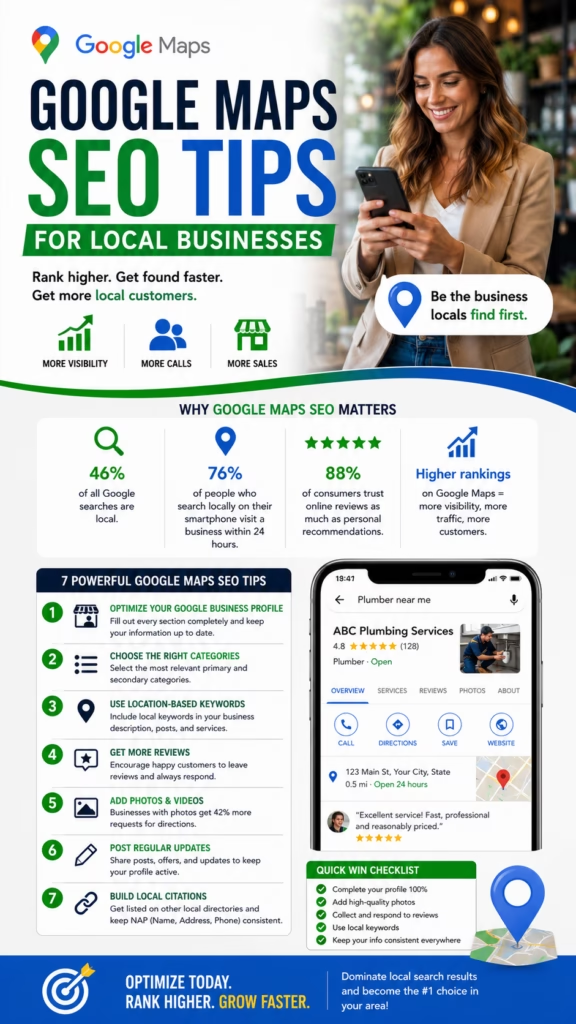
Google Maps SEO Tips for Local Businesses
Google Maps SEO Tips for Local Businesses explains how small businesses can improve Google Maps visibility, optimize Google Business Profile, build reviews, add photos, publish updates, strengthen website signals, improve local relevance, and turn nearby searches into calls, visits, bookings, and leads.
Introduction
Google Maps SEO Tips for Local Businesses can help companies become easier to find when nearby customers search for products, services, stores, restaurants, contractors, healthcare providers, professional services, and local solutions. Google Maps is often one of the first places customers compare local options before calling, visiting, booking, or requesting a quote.
Local businesses need more than a basic profile. A strong Google Maps presence requires accurate business information, the right categories, helpful services, strong reviews, real photos, local website content, citations, posts, customer engagement, and consistent tracking.
Google Maps SEO works best when the business clearly proves what it does, where it operates, and why nearby customers should trust it.
Google explains local ranking through relevance, distance, and prominence. Relevance means how well a business matches the search. Distance means how close the business is to the searcher or searched area. Prominence means how well-known and trusted the business appears. A local SEO strategy should support all three.
Whether the business is a plumber, painter, HVAC company, flooring contractor, restaurant, gym, dentist, retail store, landscaper, roofer, cleaner, attorney, salon, or real estate office, Google Maps SEO can help create more visibility and more local customer actions.
Main idea: Google Maps SEO Tips for Local Businesses are about improving relevance, distance clarity, prominence, trust, and conversion.
Table of Contents
- 1) Why Google Maps SEO matters for local businesses
- 2) How Google Maps rankings work
- 3) Optimize Google Business Profile completely
- 4) Choose the right business categories
- 5) Add services and products clearly
- 6) Keep name, address, and phone details consistent
- 7) Build better Google reviews
- 8) Respond to reviews professionally
- 9) Upload real photos and videos
- 10) Use Google Posts consistently
- 11) Improve website signals
- 12) Build strong service pages
- 13) Create useful city and location pages
- 14) Build citations and local mentions
- 15) Improve customer actions
- 16) Track Google Maps leads
- 17) Common Google Maps SEO mistakes
- 18) Google Maps SEO checklist
- 19) Final thoughts
- 20) FAQs
- 21) Extra keywords
1) Why Google Maps SEO Matters for Local Businesses
Google Maps SEO matters because local customers often search when they are close to taking action. Someone searching for “plumber near me,” “best restaurant nearby,” “flooring contractor in my area,” or “dentist open today” may already be ready to call, visit, or book.
When a business ranks better on Google Maps, it can receive more phone calls, direction requests, website clicks, appointment requests, messages, store visits, and quote inquiries. This makes Google Maps one of the most important local visibility channels for many businesses.
Google Maps SEO can help local businesses generate:
- Phone calls
- Direction requests
- Website visits
- Messages
- Appointment bookings
- Quote requests
- Store visits
- Restaurant visits
- Service calls
- Local sales opportunities
Google Maps SEO helps local businesses turn nearby search intent into real customer actions.
2) How Google Maps Rankings Work
Google Maps rankings are mainly influenced by relevance, distance, and prominence. Relevance is how well the business matches the search. Distance is how close the business is to the customer or searched location. Prominence is how trusted, known, and established the business appears.
A local business should not rely on one ranking trick. The best strategy improves the entire local presence: Google Business Profile, reviews, photos, website content, service pages, citations, local mentions, and customer engagement.
Core local ranking factors:
Relevance
Distance
Prominence
Google Business Profile completeness
Business categories
Services and products
Reviews
Photos
Website content
Citations
Local mentions
Customer actions
Strong Google Maps SEO improves the signals Google and customers use to evaluate a local business.
3) Optimize Google Business Profile Completely
Google Business Profile is the foundation of Google Maps SEO. It gives Google and customers essential information about the business, including name, location, phone number, website, hours, categories, services, products, photos, reviews, and updates.
A complete profile helps Google understand the business better and helps customers decide whether to take action. Missing details can reduce trust and make the business look less active.
Google Business Profile checklist:
- Correct business name
- Accurate address or service area
- Correct phone number
- Website link
- Updated hours
- Primary category
- Secondary categories
- Services and products
- Photos and posts
- Reviews and Q&A
A complete Google Business Profile gives customers and Google clearer reasons to trust the business.
4) Choose the Right Business Categories
Categories help Google understand what kind of business you operate. The primary category should describe the main business as accurately as possible. Secondary categories can support additional services, but they should only be used when they are truly relevant.
Wrong categories can attract poor-fit leads or confuse Google. A plumber, painter, restaurant, dentist, flooring company, gym, salon, or attorney should choose categories that match real services and real customer searches.
Category tips:
Choose the most accurate primary category
Add relevant secondary categories
Avoid unrelated categories
Match categories to real services
Review competitors carefully
Keep categories aligned with website content
Update categories when services change
Avoid keyword stuffing business names
Use services for extra detail
Keep the profile accurate
The right categories help Google connect the business with the right local searches.
5) Add Services and Products Clearly
Services and products help Google and customers understand what the business offers. A service business can list repair, installation, estimates, inspections, consultations, maintenance, and emergency services. A retail business can list product categories, brands, delivery options, or featured items.
Adding specific services and products can improve relevance for searches that are more detailed than the business category alone.
Examples of useful services and products:
- AC repair
- Interior painting
- Flooring installation
- Drain cleaning
- Lawn maintenance
- Dental cleaning
- Personal training
- Mattress delivery
- Lunch specials
- Free consultations
Detailed services and products make the profile more useful and more relevant to specific searches.
6) Keep Name, Address, and Phone Details Consistent
NAP stands for name, address, and phone number. Consistent NAP details help Google and customers trust the business information. If the business has different phone numbers, old addresses, duplicate listings, or inconsistent names across the web, it can create confusion.
Local businesses should keep their business name, address, phone number, website, and hours accurate across Google Business Profile, the website, directories, social profiles, and major citation sources.
NAP consistency checklist:
Correct business name
Correct address
Correct phone number
Correct website URL
Consistent business hours
Accurate service areas
Updated holiday hours
No duplicate profiles
No old addresses
No outdated phone numbers
Accurate business information reduces friction for customers who want to call, visit, or book.
7) Build Better Google Reviews
Reviews are one of the strongest trust signals for local businesses. Customers often compare reviews before choosing who to call or visit. Strong, recent, detailed reviews can improve customer confidence and support prominence.
Businesses should ask satisfied customers for reviews in a simple, honest way. The best reviews mention specific services, products, locations, team members, and outcomes. Review growth should be natural and consistent.
Review signals to build:
- Review count
- Review rating
- Review freshness
- Service-specific details
- Location mentions
- Staff or team mentions
- Customer outcome details
- Review response quality
- Consistent review growth
- Authentic customer sentiment
Reviews help local businesses build trust before the customer ever calls or visits.
8) Respond to Reviews Professionally
Responding to reviews shows customers that the business is active and cares about feedback. Positive review responses should be thankful and professional. Negative review responses should be calm, respectful, and focused on resolution.
Review responses also help future customers evaluate the business. A professional response can strengthen trust even when the review is not perfect.
Review response tips:
Thank the customer
Mention the service naturally
Stay professional
Do not argue
Address concerns calmly
Invite offline follow-up if needed
Respond consistently
Use a human tone
Avoid keyword stuffing
Keep responses concise
Review responses are not only for the reviewer. They are also for future customers comparing businesses.
9) Upload Real Photos and Videos
Photos and videos help customers understand the business visually. They can show products, services, staff, projects, storefronts, vehicles, menus, results, facilities, and customer experiences.
Real images usually build more trust than generic stock photos. A contractor can upload project photos, a restaurant can upload food photos, a retail store can upload product displays, and a service business can upload team and vehicle images.
Photo and video ideas:
- Exterior storefront photos
- Interior business photos
- Team photos
- Product photos
- Before-and-after project photos
- Service vehicle photos
- Menu or food photos
- Customer experience photos
- Short walkthrough videos
- Seasonal update images
Real photos make the profile feel more active, trustworthy, and useful.
10) Use Google Posts Consistently
Google Posts allow businesses to share updates, offers, events, service highlights, product announcements, and seasonal reminders directly on the Google Business Profile. Posts can help keep the profile active and give customers more reasons to engage.
Posts should be useful and customer-focused. They can promote seasonal services, new products, limited offers, recent projects, helpful tips, or appointment availability.
Google Post ideas:
Seasonal service reminder
Special offer
New product announcement
Recent project highlight
Before-and-after update
Appointment availability
Event announcement
FAQ-style post
Customer review spotlight
Holiday hours update
Google Posts help keep the profile fresh, useful, and connected to current customer needs.
11) Improve Website Signals
The website connected to Google Business Profile should support the same services, locations, and trust signals shown on the profile. A strong website can help explain the business in more detail and turn profile visitors into customers.
The website should load quickly, work well on mobile, include clear contact details, and have pages for important services or locations. Customers should not have to hunt for the phone number or booking option.
Website signals that support local SEO:
- Service pages
- Location pages
- Consistent contact information
- Click-to-call buttons
- Contact forms
- Reviews and testimonials
- Project or product photos
- Local FAQs
- Schema markup
- Fast mobile performance
A strong website reinforces the same relevance and trust signals as the Google Business Profile.
12) Build Strong Service Pages
Service pages help local businesses rank for specific searches. Instead of relying on one general homepage, businesses should create pages for their most important services. A plumber might have drain cleaning, leak repair, and water heater pages. A painter might have interior painting, exterior painting, and cabinet painting pages.
Each service page should be useful, detailed, and connected to customer intent. It should explain the service, common problems, process, photos, FAQs, reviews, and next step.
Strong service page elements:
Clear service title
Problem solved
Service details
Process overview
Project photos
FAQs
Reviews or testimonials
Service-area details
Call-to-action
Internal links
Service pages help Google and customers understand what the business actually does.
13) Create Useful City and Location Pages
City and location pages can help businesses build local relevance in target areas. These pages should be unique and useful. Copying the same page and swapping city names is weak and can hurt user experience.
A strong city page includes services offered in that area, local context, project examples, customer reviews, FAQs, nearby neighborhoods, and a clear call-to-action.
A strong city page includes:
- City-specific heading
- Services offered in that city
- Local project examples
- Customer reviews
- Photos from nearby work
- Neighborhood references
- Local FAQs
- Service-area details
- Clear CTA
- Internal links to services
Location pages work best when they are genuinely helpful for customers in that area.
14) Build Citations and Local Mentions
Citations are mentions of the business name, address, phone number, and website across directories and local platforms. Local mentions can come from chamber pages, sponsorships, community websites, local news, industry directories, supplier pages, and partner websites.
Consistent citations help reinforce that the business is real and established. Incorrect details can create confusion, so quality and accuracy matter more than random quantity.
Useful citation and mention sources:
Google Business Profile
Bing Places
Apple Business Connect
Yelp
BBB if applicable
Chamber of commerce
Industry directories
Local directories
Supplier pages
Community sponsorship pages
Local news mentions
Partner websites
Citations and local mentions support prominence by showing that the business exists beyond its own website.
15) Improve Customer Actions
Customer actions show whether people find the profile useful. These actions may include calls, website clicks, direction requests, messages, bookings, product views, menu views, photo views, and appointment requests.
Businesses can improve customer actions by making the profile complete, adding strong photos, keeping hours accurate, responding to reviews, and making calls-to-action clear.
Customer actions to improve:
- Phone calls
- Website clicks
- Direction requests
- Messages
- Bookings
- Quote requests
- Photo views
- Product views
- Menu views
- Store visits
Google Maps SEO should create measurable customer actions, not just profile views.
16) Track Google Maps Leads
Tracking helps businesses understand whether Google Maps SEO is creating real results. Rankings are useful, but the final goal is calls, bookings, visits, estimates, sales, and revenue.
Businesses should track Google Business Profile calls, website clicks, direction requests, messages, booked appointments, store visits, quote requests, and closed sales when possible.
Track these Google Maps metrics:
Profile views
Search views
Map views
Phone calls
Website clicks
Direction requests
Messages
Bookings
Quote requests
Store visits
Review growth
Top search queries
Ranking movement
Lead quality
Closed sales
The best local SEO strategy tracks both visibility and business outcomes.
17) Common Google Maps SEO Mistakes
Many local businesses underperform because their Google Business Profile is incomplete, outdated, or inconsistent. Common mistakes include wrong categories, missing services, old hours, weak photos, few reviews, no review responses, duplicate listings, thin website content, and poor tracking.
Most mistakes are fixable. A regular audit can help find profile gaps, website issues, citation errors, and conversion problems.
Common mistakes include:
- Wrong primary category
- Missing services or products
- Old business hours
- Incorrect phone number
- Weak photos
- No review strategy
- No review responses
- Duplicate profiles
- Thin website pages
- No lead tracking
Google Maps SEO fails when businesses treat the profile like a one-time setup instead of an active local marketing asset.
18) Google Maps SEO Checklist
A simple checklist can help local businesses stay organized. Google Maps SEO is not a one-time task. It should be reviewed regularly as services, hours, photos, reviews, offers, and locations change.
Google Maps SEO checklist:
Verify Google Business Profile
Complete all profile details
Choose accurate categories
Add services and products
Update hours
Add photos and videos
Publish Google Posts
Ask for reviews
Respond to reviews
Fix citation errors
Improve website pages
Create service pages
Create useful location pages
Track calls and leads
Review performance monthly
Consistent optimization helps local businesses stay more visible, trusted, and ready for customer action.
19) Final Thoughts
Google Maps SEO Tips for Local Businesses are about building a stronger local presence where customers are already searching. A strong Google Maps strategy includes Google Business Profile optimization, accurate categories, services, reviews, photos, posts, website content, citations, location pages, customer actions, and tracking.
The businesses that win on Google Maps are usually the ones that look relevant, trusted, active, local, and easy to contact. A complete profile is important, but it works best when supported by a strong website, real reviews, useful content, and consistent customer experience.
Final takeaway: Google Maps SEO helps local businesses turn nearby search visibility into calls, visits, appointments, quote requests, and sales.
20) FAQs
1) What is Google Maps SEO?
Google Maps SEO is the process of improving a business’s visibility in Google Maps and local search results through Google Business Profile, reviews, website content, citations, and local signals.
2) Why does Google Maps SEO matter for local businesses?
It matters because nearby customers often search Google Maps before calling, visiting, booking, or buying.
3) What are the main Google local ranking factors?
Google says local rankings are mainly based on relevance, distance, and prominence.
4) What is relevance in Google Maps SEO?
Relevance means how well a business matches what the searcher is looking for.
5) What is distance in Google Maps SEO?
Distance means how close the business is to the searcher or the searched location.
6) What is prominence in Google Maps SEO?
Prominence means how well-known, trusted, reviewed, and established the business appears.
7) How do I optimize Google Business Profile?
Complete all business details, choose accurate categories, add services, upload photos, post updates, collect reviews, and keep information current.
8) Do categories matter for Google Maps rankings?
Yes. Categories help Google understand what kind of business you operate and which searches you should match.
9) Should I add services and products?
Yes. Services and products help customers and Google understand what the business offers.
10) Do reviews help Google Maps SEO?
Reviews can support trust, prominence, and customer decision-making.
11) Should I respond to reviews?
Yes. Professional review responses show that the business is active and values customer feedback.
12) Do photos help Google Maps SEO?
Photos can improve trust and engagement by showing the business, products, services, projects, or customer experience.
13) Should I use Google Posts?
Yes. Google Posts can keep the profile active and promote offers, updates, services, events, and seasonal reminders.
14) What is NAP consistency?
NAP consistency means the business name, address, and phone number are accurate across Google, the website, and directories.
15) Do citations still matter?
Citations can support local trust and prominence when they are accurate and consistent.
16) Can a website help Google Maps rankings?
Yes. A strong website reinforces services, locations, trust, content depth, and conversion paths.
17) Should local businesses create service pages?
Yes. Service pages help explain specific offerings and support relevant local searches.
18) Should local businesses create city pages?
Yes, when useful and unique. City pages should provide real local value and not be copied templates with only city names changed.
19) How often should I update Google Business Profile?
Update the profile whenever hours, services, photos, offers, locations, or business details change.
20) How do I track Google Maps SEO results?
Track calls, website clicks, direction requests, messages, bookings, quote requests, visits, rankings, reviews, and closed sales.
21) What is the biggest Google Maps SEO mistake?
The biggest mistake is leaving the profile incomplete, outdated, or unsupported by a strong website and review strategy.
22) Can service-area businesses rank on Google Maps?
Yes. Service-area businesses can rank locally when their profile, website, reviews, and service-area signals are strong and accurate.
23) How long does Google Maps SEO take?
Results vary by competition, profile strength, website quality, reviews, citations, and consistency. Local SEO usually improves over time.
24) Can Google Maps SEO replace paid ads?
No. Google Maps SEO can reduce dependency on ads over time, but paid ads may still be useful for faster visibility or competitive markets.
25) What is the main goal of Google Maps SEO?
The main goal is to turn local search visibility into calls, visits, bookings, quote requests, and real customers.
21) Extra Keywords
- Google Maps SEO Tips for Local Businesses
- Google Maps SEO
- local SEO tips
- Google Business Profile optimization
- Google Maps ranking
- local business SEO
- local search optimization
- Google local rankings
- Google Maps lead generation
- Google Business Profile tips
- local pack rankings
- Google Maps visibility
- local SEO checklist
- Google reviews SEO
- Google Posts for local businesses
- local citations
- NAP consistency
- service-area SEO
- city page SEO
- service page SEO
- local SEO for small businesses
- Google Maps marketing
- improve Google Maps ranking
- local business lead generation
- Google Maps SEO checklist













