

How to Get More Leads From Google Maps
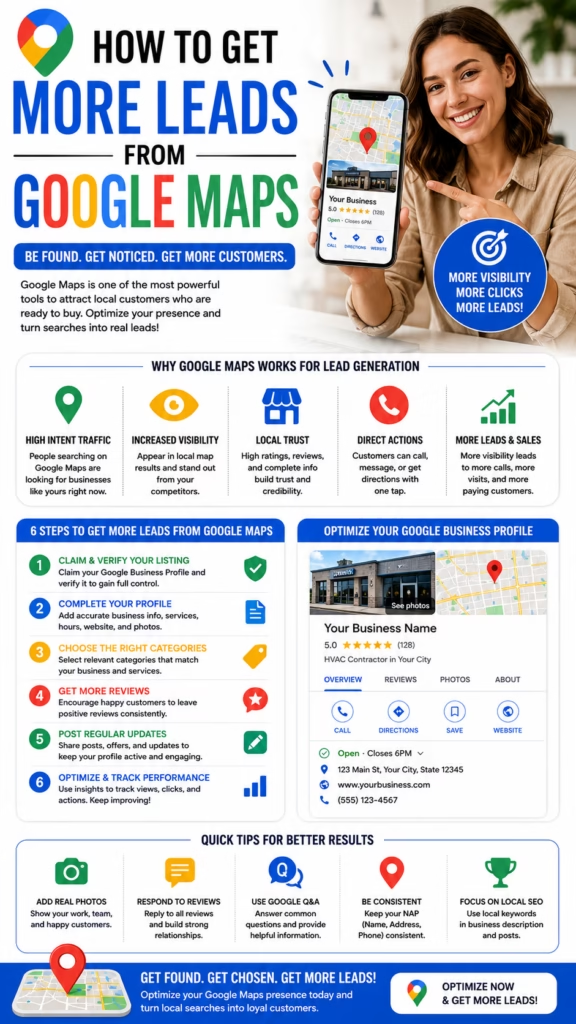
How to Get More Leads From Google Maps explains how local businesses can turn Google Maps visibility into more phone calls, website visits, direction requests, quote requests, appointments, and real customer conversations.
Introduction
How to Get More Leads From Google Maps starts with one simple fact: when people search for a nearby business, service, contractor, store, restaurant, repair company, or professional, Google Maps is often one of the first places they look.
That makes Google Maps one of the most powerful local lead generation channels for businesses that depend on nearby customers. A strong Google Maps presence can help a company show up when buyers search for services like HVAC repair, roofing, painting, plumbing, landscaping, mattresses, furniture, auto repair, restaurants, med spas, dental care, real estate services, and many other local needs.
Google Maps leads come from local search intent. When someone searches nearby, they are often close to calling, visiting, booking, or requesting a quote.
However, simply having a Google Business Profile is not enough. Many businesses are listed on Google Maps but still do not get enough calls because their profile is incomplete, outdated, poorly optimized, low on reviews, missing photos, using weak categories, or not connected to a strong lead response system.
To get more leads from Google Maps, businesses need to improve visibility, trust, relevance, conversion, and follow-up. The goal is not just ranking higher. The goal is turning searchers into real customers.
Main idea: Google Maps lead generation works best when your profile is optimized, trusted, active, locally relevant, and easy to contact.
Table of Contents
- 1) Why Google Maps matters for local leads
- 2) How Google Maps leads are generated
- 3) Optimizing your Google Business Profile
- 4) Choosing the right business categories
- 5) Writing a stronger business description
- 6) Adding services and products
- 7) Getting more reviews
- 8) Responding to reviews
- 9) Adding better photos and videos
- 10) Using Google Posts
- 11) Improving local SEO signals
- 12) Building location and service pages
- 13) Tracking Google Maps leads
- 14) Improving call conversion
- 15) Common Google Maps lead generation mistakes
- 16) Final thoughts
- 17) FAQs
- 18) Extra keywords
1) Why Google Maps Matters for Local Leads
Google Maps matters because it appears when people are searching with local intent. A person searching for “roof repair near me,” “HVAC company near me,” “best mattress store near me,” or “emergency plumber near me” is usually not just browsing casually. They are comparing options and deciding who to contact.
For local businesses, this is extremely valuable. Google Maps can put the business in front of buyers at the exact moment they are looking for help. That makes it different from many forms of advertising that interrupt people before they are ready.
Google Maps can generate:
- Phone calls
- Website visits
- Direction requests
- Appointment requests
- Quote requests
- Store visits
- Service area inquiries
- Message conversations
- Emergency service leads
- High-intent local customers
Google Maps is powerful because it connects local businesses with customers who are already searching for a solution.
2) How Google Maps Leads Are Generated
Google Maps leads usually happen when a searcher finds your business profile and takes action. That action may be calling, clicking your website, requesting directions, reading reviews, looking at photos, or comparing you with competitors.
The more complete and trustworthy your profile looks, the more likely a searcher is to take the next step. Google Maps lead generation is about increasing both visibility and conversion.
Google Maps lead flow:
Customer searches locally
Your business appears on Google Maps
Customer checks reviews and photos
Customer reads services and description
Customer compares competitors
Customer clicks call, website, directions, or message
Business responds quickly
Lead becomes appointment, visit, quote, or sale
Getting more Google Maps leads requires both ranking visibility and a profile that convinces people to contact you.
3) Optimizing Your Google Business Profile
Your Google Business Profile is the foundation of Google Maps lead generation. If the profile is incomplete, inconsistent, or outdated, it can reduce trust and hurt conversions. Every major section should be completed with accurate, helpful information.
Optimize these profile sections:
- Business name
- Primary category
- Secondary categories
- Business description
- Phone number
- Website URL
- Hours
- Service areas
- Services
- Products
- Photos
- Reviews
A complete profile gives Google more context and gives customers more confidence.
4) Choosing the Right Business Categories
Categories are one of the most important parts of Google Maps optimization. The primary category tells Google what your business is mainly about. Secondary categories help support related services.
For example, an HVAC company may choose an HVAC contractor category, while also using related categories if they accurately match the business. A painting company may use painter as the main category and include related categories only if they truly apply.
Category tips:
Choose the most accurate primary category
Use relevant secondary categories
Do not add unrelated categories
Review competitor categories
Match categories to real services
Update categories if the business changes
The right categories help Google understand which local searches your business should appear for.
5) Writing a Stronger Business Description
The business description should clearly explain who you help, what you offer, where you serve, and why customers should trust you. It should include natural local keywords without sounding stuffed or robotic.
A strong description can mention your services, service areas, experience, customer focus, and main benefits. It should be written for humans first, while still giving Google useful context.
Business description structure:
Who you are
What services you provide
Where you serve
What makes you different
How customers can contact you
A strong description helps both Google and customers understand your business faster.
6) Adding Services and Products
Services and products help your Google Business Profile become more detailed and relevant. Service businesses should list each major service clearly. Product businesses should add important product categories, offers, or inventory highlights.
Service examples:
- AC repair
- Roof inspection
- Interior painting
- Plumbing repair
- Mattress delivery
- Furniture financing
- Appliance repair
- Landscaping service
- Window installation
- Emergency service
Detailed service and product sections help customers understand exactly what you offer before they call.
7) Getting More Reviews
Reviews are one of the biggest trust signals on Google Maps. A business with more strong reviews often looks safer, more established, and more credible than a competitor with few or poor reviews.
Businesses should build a consistent review request process. Ask satisfied customers after the job is complete, after delivery, after a purchase, or after a successful appointment. The request should be simple and direct.
Ways to get more reviews:
- Ask after successful service
- Send a review link by text
- Add review requests to follow-up emails
- Train staff to ask politely
- Use QR codes in-store
- Ask repeat customers
- Follow up after delivery
- Make the process easy
More quality reviews can improve trust and increase the chance that searchers choose your business.
8) Responding to Reviews
Responding to reviews shows customers that the business is active and professional. Positive reviews should receive a warm thank-you. Negative reviews should be handled calmly, respectfully, and with a focus on resolution.
Review response tips:
Thank the customer
Mention the service naturally
Stay professional
Avoid arguments
Respond consistently
Use local context when natural
Show future customers you care
Review responses are not just for the reviewer. They are also for future customers reading your profile.
9) Adding Better Photos and Videos
Photos and videos help customers believe the business is real, active, and trustworthy. Google Maps profiles with strong visuals often feel more credible than profiles with no photos or outdated images.
Photo ideas for Google Maps:
- Exterior business photos
- Interior store photos
- Team photos
- Service vehicle photos
- Before-and-after photos
- Product photos
- Completed project photos
- Customer experience photos
- Equipment photos
- Short video walkthroughs
Better visuals can increase trust before the customer ever calls.
10) Using Google Posts
Google Posts allow businesses to share updates, offers, announcements, service highlights, seasonal promotions, and calls-to-action directly on the profile. Posts can make the profile feel active and current.
Google Post ideas:
Seasonal service reminder
Limited-time offer
New product arrival
Before-and-after project
Customer review highlight
Emergency service reminder
Financing announcement
Delivery promotion
Appointment booking CTA
Local service update
Google Posts help keep your profile fresh and can guide searchers toward a specific action.
11) Improving Local SEO Signals
Google Maps visibility is influenced by many local SEO signals. Your website, citations, reviews, keywords, location relevance, service area content, backlinks, and overall online consistency can all support better local visibility.
Important local SEO signals include:
- Consistent name, address, and phone number
- Relevant website content
- Local landing pages
- Quality reviews
- Accurate categories
- Local backlinks
- Directory listings
- Service area relevance
- On-page SEO
- Profile activity
Google Maps lead generation improves when the profile and website support the same local relevance.
12) Building Location and Service Pages
Location and service pages help your website support Google Maps rankings. A roofing company may need pages for roof repair, roof replacement, storm damage, and city-specific service areas. A mattress store may need pages for local delivery, mattress brands, financing, and nearby cities.
These pages should be helpful, unique, and locally relevant. They should not be thin duplicate pages. Each page should answer real customer questions and connect back to the services listed on the Google Business Profile.
Strong local pages help Google understand what you do and where you do it.
13) Tracking Google Maps Leads
Tracking is essential because businesses need to know whether Google Maps is creating real results. Calls, clicks, direction requests, messages, form submissions, and booked jobs should be monitored consistently.
Track these Google Maps lead metrics:
- Phone calls
- Website clicks
- Direction requests
- Messages
- Appointment requests
- Quote requests
- Search terms
- Profile views
- Review growth
- Closed customers
Lead tracking turns Google Maps from a visibility tool into a measurable revenue channel.
14) Improving Call Conversion
Getting more calls from Google Maps is only part of the goal. The business also needs to answer quickly and convert those calls into appointments, visits, quotes, or sales.
Call conversion tips:
Answer quickly
Use a friendly greeting
Ask how the customer found you
Confirm the service needed
Ask for location
Offer the next step
Book the appointment
Send follow-up confirmation
Track the lead source
Follow up if they do not book
Google Maps leads are most valuable when the business has a strong response system after the call comes in.
15) Common Google Maps Lead Generation Mistakes
Many businesses lose Google Maps leads because their profile is incomplete or inactive. Others rank but fail to convert because their photos are poor, reviews are weak, services are unclear, or phone calls are missed.
Common mistakes include:
- Wrong business category
- Incomplete profile
- Outdated hours
- Few reviews
- No review response process
- Poor photos
- No service details
- No Google Posts
- Weak website pages
- No lead tracking
- Missed calls
- Slow follow-up
Google Maps lead generation fails when businesses focus only on showing up, but not on earning trust and converting the lead.
16) Final Thoughts
How to Get More Leads From Google Maps is about building a complete local visibility and conversion system. The best results come from a fully optimized Google Business Profile, strong categories, clear services, helpful descriptions, quality reviews, better photos, active posts, local SEO support, and fast follow-up.
Google Maps can become one of the strongest lead sources for local businesses when the profile is treated like a living sales asset rather than a one-time listing.
Final takeaway: To get more leads from Google Maps, make your business easier to find, easier to trust, and easier to contact than your competitors.
17) FAQs
1) How do I get more leads from Google Maps?
Optimize your Google Business Profile, choose the right categories, get more reviews, add photos, list services, publish posts, improve local SEO, and respond quickly to calls and messages.
2) What is Google Maps lead generation?
Google Maps lead generation is the process of turning local searches into phone calls, website clicks, directions, messages, appointments, and customers.
3) Does Google Business Profile help get leads?
Yes. A well-optimized Google Business Profile can help local businesses generate more calls, visits, messages, and quote requests.
4) What is the most important part of Google Maps optimization?
The most important parts include accurate categories, complete profile information, strong reviews, local relevance, photos, services, and consistent activity.
5) Do reviews help Google Maps leads?
Yes. Reviews build trust and can influence whether a searcher chooses your business instead of a competitor.
6) How many reviews do I need?
There is no single number, but businesses should aim to consistently earn high-quality reviews and stay competitive with top local competitors.
7) Should I respond to Google reviews?
Yes. Responding to reviews shows professionalism and helps future customers see that the business is active and attentive.
8) Do photos help Google Maps rankings?
Photos can improve profile quality, customer trust, and engagement, which can support better overall Google Maps performance.
9) What photos should I add to my profile?
Add exterior photos, interior photos, team photos, product photos, service photos, before-and-after images, project photos, and vehicle photos.
10) What are Google Posts?
Google Posts are updates businesses can publish on their profile to share offers, announcements, services, products, events, and calls-to-action.
11) Should I add services to my Google profile?
Yes. Adding services helps customers understand what you offer and gives Google more context about your business.
12) Should I add products to my Google profile?
Yes, if you sell products or product categories. Product sections can help customers browse your offers before contacting you.
13) How do categories affect Google Maps leads?
Categories help Google understand what your business does and which searches your profile should appear for.
14) Can a website help Google Maps rankings?
Yes. A strong local website with service pages, location pages, clear contact information, and relevant content can support Google Maps visibility.
15) Do local landing pages help?
Yes. High-quality location and service pages can help connect your business to specific areas and services.
16) What are direction requests?
Direction requests happen when users ask Google Maps to guide them to your business location.
17) How do I track Google Maps calls?
You can track calls through Google Business Profile insights, call tracking tools, CRM records, and asking customers how they found you.
18) Why am I not getting leads from Google Maps?
Your profile may be incomplete, poorly optimized, low on reviews, missing photos, using weak categories, or not converting calls effectively.
19) How often should I update my Google Business Profile?
You should update it regularly with fresh photos, posts, service updates, hours, offers, and review responses.
20) Can service-area businesses get Google Maps leads?
Yes. Service-area businesses can generate leads from Google Maps when their profile, service areas, reviews, website, and local relevance are strong.
21) Is Google Maps better than paid ads?
Google Maps and paid ads serve different roles. Google Maps can capture organic local intent, while paid ads can create additional visibility faster.
22) Can Google Maps help emergency services?
Yes. Businesses like plumbers, HVAC companies, roofers, locksmiths, and repair providers can get urgent leads from Google Maps searches.
23) Should I use keywords in my business description?
Yes, but naturally. Use service and location keywords in a helpful way without keyword stuffing.
24) What is the biggest Google Maps mistake?
The biggest mistake is creating a profile and then ignoring it. Google Maps works best when the profile is optimized, active, trusted, and tracked.
25) What is the main goal of Google Maps marketing?
The main goal is to turn local search visibility into phone calls, website clicks, direction requests, messages, appointments, and paying customers.
18) Extra Keywords
- How to Get More Leads From Google Maps
- Google Maps lead generation
- Google Maps leads
- Google Business Profile optimization
- Google Maps marketing
- local SEO leads
- local business lead generation
- Google Maps ranking
- Google Maps optimization
- Google Business Profile leads
- local search marketing
- Google Maps calls
- Google Maps website clicks
- Google Maps direction requests
- Google reviews for leads
- Google Business Profile services
- Google Business Profile photos
- Google Posts marketing
- local pack ranking
- local SEO for small business
- service area business SEO
- Google Maps customer leads
- Google Maps appointment leads
- Google Maps quote requests
- Google Maps local marketing system













