

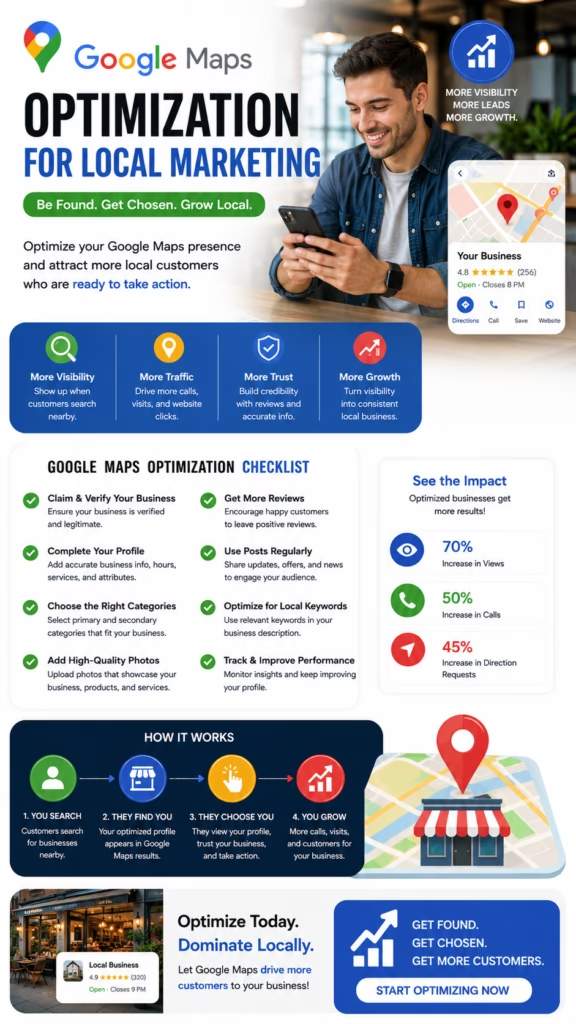
Google Maps Optimization for Local Marketing
Google Maps Optimization for Local Marketing explains how businesses can improve local visibility, strengthen customer trust, optimize Google Business Profiles, and turn nearby searches into calls, website clicks, directions, visits, bookings, and leads.
Introduction
Google Maps Optimization for Local Marketing is one of the most important strategies for businesses that depend on nearby customers. When someone searches for a plumber, painter, HVAC company, contractor, mattress store, restaurant, landscaper, dentist, retailer, wellness provider, med spa, repair service, or local agency, Google Maps often becomes one of the first places they compare options.
Google Maps is powerful because customers use it when they are close to action. They may be ready to call, get directions, visit a website, check hours, read reviews, book an appointment, or request a quote. A strong Maps presence can help a business capture that local demand before competitors do.
Google Maps optimization for local marketing helps businesses become easier to find, easier to trust, and easier to contact when nearby customers are ready to act.
Many businesses create a Google Business Profile but do not fully optimize it. They may have missing services, outdated hours, weak photos, few reviews, incorrect categories, inconsistent information, or no lead tracking. These gaps can reduce visibility and cause customers to choose a competitor.
A strong local marketing strategy treats Google Maps as an active customer acquisition channel. Businesses should optimize the profile, add services, build reviews, upload photos, publish posts, strengthen website SEO, maintain citation consistency, and track calls, clicks, directions, bookings, and leads.
Main idea: Google Maps optimization for local marketing turns local search visibility into real customer actions like calls, visits, appointments, quote requests, and sales opportunities.
Table of Contents
- 1) Why Google Maps matters for local marketing
- 2) How customers use Google Maps to choose businesses
- 3) Google Business Profile optimization
- 4) Categories and local search relevance
- 5) Services and products that match customer intent
- 6) Reviews and reputation building
- 7) Photos and videos that increase trust
- 8) Local keywords and location signals
- 9) Website SEO that supports Maps visibility
- 10) Citations and business information consistency
- 11) Posts, offers, and profile activity
- 12) Turning Maps visibility into leads
- 13) Tracking Google Maps local marketing results
- 14) Common mistakes that reduce results
- 15) Final thoughts
- 16) FAQs
- 17) Extra keywords
1) Why Google Maps Matters for Local Marketing
Google Maps matters for local marketing because it connects nearby customers with businesses at the moment they are searching. A customer may need a service immediately, compare providers, check reviews, request directions, or call directly from the listing.
This makes Google Maps different from passive advertising. Many Maps users already have intent. They are not just scrolling. They are looking for a solution, a product, a place to visit, or a business to contact.
Google Maps can help local businesses increase:
- Phone calls
- Website clicks
- Direction requests
- Store visits
- Quote requests
- Appointment bookings
- Local brand awareness
- Review visibility
- Customer trust
- Lead generation
Google Maps optimization for local marketing matters because high-intent local visibility can directly turn into customer action.
2) How Customers Use Google Maps to Choose Businesses
Customers use Google Maps to compare businesses quickly. They look at reviews, ratings, photos, distance, business hours, services, website links, categories, and contact buttons. In many cases, the customer makes a decision directly from the Maps result.
The business profile works like a local sales page. If it looks complete, active, trusted, and relevant, the customer is more likely to call, click, visit, or book. If it looks incomplete or outdated, the customer may choose a competitor.
Customer searches locally
Google Maps shows nearby businesses
Customer compares reviews, photos, hours, services, and distance
Customer chooses the most trusted option
Customer calls, clicks, visits, books, or requests directions
Google Maps local marketing works when the business profile gives customers enough confidence to take action.
3) Google Business Profile Optimization
The Google Business Profile is the foundation of Google Maps optimization. A complete profile helps Google understand the business and helps customers decide whether to contact it. Missing information creates friction and reduces trust.
Businesses should complete every relevant section, including name, address or service area, phone number, website, hours, categories, services, products, business description, attributes, photos, posts, and review responses.
A strong Google Business Profile should include:
- Accurate business name
- Correct address or service area
- Current phone number
- Website link
- Accurate business hours
- Primary category
- Secondary categories
- Services and products
- Business description
- Photos and videos
- Review responses
A complete Google Business Profile improves local marketing by making the business easier to understand, trust, and contact.
4) Categories and Local Search Relevance
Categories help Google understand what the business does. The primary category should match the main service or business type. Secondary categories can support additional services when they are relevant and accurate.
Choosing the wrong category can reduce visibility for important searches. Choosing the right category can help connect the business with customers looking for that exact service or product.
Accurate categories improve Google Maps optimization for local marketing by helping the business match relevant local searches.
5) Services and Products That Match Customer Intent
Services and products help connect the business to specific customer intent. A customer may search for “emergency AC repair,” “same-day mattress delivery,” “cabinet painting,” “roof inspection,” or “local SEO agency.” The profile should make those offerings clear.
Businesses should list main services, supporting services, product categories, delivery options, appointment options, financing details, and specialty offers when relevant. The wording should match how customers naturally search.
Service optimization example:
Main service: Interior house painting
Supporting services: Cabinet painting, drywall repair, exterior painting
Local relevance: Serving nearby homeowners
CTA: Call for a free estimate
Service and product details help Google Maps local marketing by matching the business to real customer searches.
6) Reviews and Reputation Building
Reviews are one of the strongest trust signals on Google Maps. Customers often compare star ratings, review quantity, review quality, review recency, and business responses before choosing who to contact.
A strong review strategy should be consistent and ethical. Businesses should ask satisfied customers for honest reviews, make the process easy, and respond professionally to feedback. Review responses show that the business is active and customer-focused.
Review strategy should focus on:
- Consistent review requests
- Recent customer feedback
- Detailed customer experiences
- Professional review responses
- Service-specific review language
- Reputation monitoring
- Customer experience improvement
Reviews support Google Maps optimization by increasing trust, engagement, and customer confidence.
7) Photos and Videos That Increase Trust
Photos and videos help customers see what the business offers before they contact it. A profile with fresh, real visuals often feels more active and credible than one with no images or outdated photos.
Businesses should upload real photos of storefronts, teams, products, projects, service vehicles, interiors, before-and-after results, displays, and customer-facing experiences. Visual proof can increase trust and engagement.
Useful Google Maps visuals include:
- Storefront photos
- Interior photos
- Team photos
- Before-and-after project photos
- Product displays
- Service vehicles
- Short videos
- Branded graphics
- Customer experience photos
Fresh visuals improve Google Maps local marketing by making the business look real, active, and trustworthy.
8) Local Keywords and Location Signals
Local keywords help the business match customer searches. These keywords should appear naturally in services, descriptions, posts, website pages, FAQs, and city or service-area content. The goal is relevance, not keyword stuffing.
Businesses should think about how customers search by service, product, city, neighborhood, urgency, and problem. The profile and website should reflect that language naturally.
Local keyword examples:
AC repair near me
Mattress store in Rochester NY
House painter in Fort Worth TX
Emergency plumber open now
Google Maps SEO for local businesses
Restaurant near me
Local keywords support Google Maps optimization for local marketing by aligning business content with nearby customer search behavior.
9) Website SEO That Supports Maps Visibility
A strong website can support Google Maps visibility by reinforcing services, locations, trust, and authority. The website should match the business information shown on the Google Business Profile and provide deeper details for customers who click through.
Local websites should include service pages, location pages, contact information, reviews, photos, FAQs, schema markup, fast mobile performance, and clear calls to action.
Website elements that support Google Maps marketing:
- Local service pages
- City or area landing pages
- Consistent name, address, and phone number
- Embedded map or location details
- Customer reviews
- FAQ sections
- Local schema markup
- Fast mobile speed
- Clickable phone numbers
Google Maps optimization becomes stronger when the website and business profile support the same local signals.
10) Citations and Business Information Consistency
Citations are mentions of a business’s name, address, phone number, and website across online directories, local platforms, review sites, social profiles, and industry listings. Consistency helps customers and search systems trust that the business information is accurate.
If business information is inconsistent across the web, customers may hesitate. Keeping details accurate can strengthen local trust and reduce confusion.
Business information consistency supports Google Maps local marketing by improving trust and reducing customer friction.
11) Posts, Offers, and Profile Activity
Posts, offers, and updates can keep a Google Business Profile active and useful. Businesses can share seasonal reminders, service availability, promotions, events, product updates, company news, and appointment openings.
Profile posts should be clear, local, and action-focused. They should give customers a reason to call, click, visit, book, or request a quote.
Useful post structure:
Headline: Clear offer or update
Body: Short explanation of value
Local relevance: Mention service area when helpful
CTA: Call, book, visit, or request quote
Profile activity helps Google Maps optimization by keeping the business fresh, relevant, and customer-focused.
12) Turning Maps Visibility Into Leads
Visibility is only valuable if it turns into customer action. A business should make it easy for people to call, click, request directions, book, message, visit, or request a quote. Every profile element should reduce friction.
Businesses should confirm that phone numbers work, hours are accurate, websites load quickly, forms are simple, staff answers calls, and follow-up systems are in place.
Important conversion actions include:
- Phone calls
- Website clicks
- Direction requests
- Messages
- Appointment clicks
- Quote requests
- Store visits
- Bookings
The best Google Maps optimization for local marketing turns visibility into measurable customer actions.
13) Tracking Google Maps Local Marketing Results
Tracking helps businesses understand whether Google Maps is producing results. Views are useful, but the real goal is calls, clicks, direction requests, quote requests, bookings, store visits, and closed customers.
Businesses can track results with Google Business Profile performance data, website analytics, call tracking, CRM tags, booking reports, customer intake questions, and lead source reporting.
Important Google Maps metrics include:
- Search views
- Map views
- Phone calls
- Website clicks
- Direction requests
- Messages
- Photo views
- Review growth
- Bookings
- Closed customers
Tracking helps businesses improve Google Maps local marketing based on real customer behavior.
14) Common Mistakes That Reduce Results
Many businesses underperform on Google Maps because they do not treat the profile like an active marketing channel. They create a listing and then ignore it while competitors keep improving theirs.
- Incomplete Google Business Profile
- Wrong primary category
- Outdated business hours
- Missing services or products
- Few or no reviews
- No review responses
- Low-quality photos
- Inconsistent business information online
- Weak website local SEO
- No tracking system
- No profile posts or updates
- No clear conversion path
Big mistake: treating Google Maps as a one-time listing instead of an ongoing local marketing and lead-generation system.
15) Final Thoughts
Google Maps Optimization for Local Marketing is about helping nearby customers find, trust, and contact a business when they are ready to act. A strong Google Maps strategy does more than improve visibility. It builds confidence and creates a clear path to customer action.
The best local marketing approach includes Google Business Profile optimization, accurate categories, detailed services, strong reviews, fresh photos, local keywords, website SEO, citation consistency, profile posts, and performance tracking. When these pieces work together, Google Maps can become a consistent source of calls, visits, bookings, and leads.
Final takeaway: Google Maps optimization for local marketing helps businesses improve visibility, build trust, match local intent, and turn nearby searches into real customers.
16) FAQs
1) What is Google Maps optimization for local marketing?
It is the process of improving a business’s Google Business Profile, reviews, photos, services, local keywords, website signals, and customer actions.
2) Why is Google Maps important for local marketing?
Google Maps helps nearby customers find, compare, trust, and contact local businesses when they are ready to act.
3) Can Google Maps optimization generate leads?
Yes. It can generate phone calls, website clicks, direction requests, quote requests, appointments, and store visits.
4) What is Google Business Profile optimization?
It is the process of improving profile information, categories, services, photos, reviews, posts, and contact details.
5) Do reviews help Google Maps marketing?
Yes. Reviews build trust and can influence customer decisions in local search results.
6) Do photos help Google Maps performance?
Yes. Photos can improve trust, engagement, and customer confidence.
7) What categories should businesses choose?
Businesses should choose the most accurate primary category and relevant secondary categories.
8) Should businesses add services to their profile?
Yes. Services help customers and Google understand what the business offers.
9) Does a website support Google Maps optimization?
Yes. A strong local website can reinforce services, locations, trust, and conversion.
10) What are citations?
Citations are online mentions of a business’s name, address, phone number, and website.
11) Why is information consistency important?
Consistent information helps customers and search systems trust the business details.
12) Should businesses respond to reviews?
Yes. Review responses show professionalism and customer care.
13) Do Google Business Profile posts help?
Posts can keep the profile active and communicate offers, events, services, and updates.
14) What is the biggest Google Maps mistake?
The biggest mistake is creating a profile and then leaving it incomplete, outdated, or inactive.
15) How do local keywords help?
Local keywords help match the business to searches involving services, cities, neighborhoods, products, and customer intent.
16) Can service-area businesses optimize Google Maps?
Yes. Service-area businesses can optimize with accurate service areas, services, reviews, photos, website content, and lead tracking.
17) How long does Google Maps optimization take?
Results vary based on competition, location, profile quality, reviews, website strength, and consistency.
18) Should businesses update holiday hours?
Yes. Accurate holiday hours prevent confusion and improve customer experience.
19) What should businesses track?
Businesses should track calls, website clicks, direction requests, messages, bookings, reviews, and closed customers.
20) Can Google Maps help storefronts?
Yes. Storefronts can use Google Maps to increase directions, calls, visits, and product discovery.
21) Can Google Maps help contractors?
Yes. Contractors can show services, reviews, project photos, service areas, and contact options.
22) Should businesses add videos?
Yes. Videos can show products, services, team members, projects, and customer experience.
23) Is Google Maps optimization a one-time task?
No. It works best as an ongoing process involving profile updates, reviews, photos, posts, website improvements, and tracking.
24) What makes a business stand out on Google Maps?
Strong reviews, complete information, clear services, fresh photos, accurate hours, helpful posts, and easy contact options can help a business stand out.
25) What is the main goal of Google Maps optimization?
The main goal is to help nearby customers find, trust, and contact the business.
17) Extra Keywords
- Google Maps Optimization for Local Marketing
- Google Maps SEO
- Google Business Profile optimization
- local marketing
- local SEO
- Google Maps marketing
- local business visibility
- local lead generation
- Google Maps ranking
- local search optimization
- local map pack SEO
- Google reviews strategy
- local citation building
- business listing consistency
- Google Business Profile services
- Google Maps lead generation
- near me searches
- local customer search
- service area SEO
- storefront SEO
- Google Maps profile optimization
- Google Maps customer calls
- direction requests
- local customer acquisition
- Google Maps discovery strategy













