

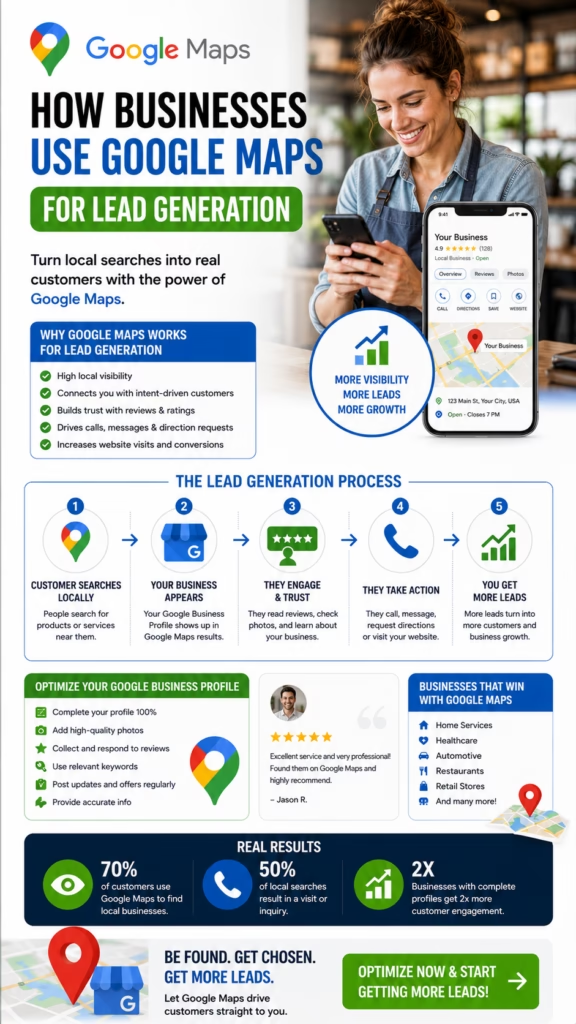
How Businesses Use Google Maps for Lead Generation
How Businesses Use Google Maps for Lead Generation explains how local companies can turn Google Maps visibility into calls, messages, website visits, direction requests, quote requests, appointment bookings, store visits, and real customers.
Introduction
How Businesses Use Google Maps for Lead Generation is one of the most important local marketing topics for companies that depend on nearby customers. Google Maps is not only a navigation tool. It is a high-intent discovery platform where people search, compare, evaluate, and contact businesses when they are ready to take action.
When a customer searches for a plumber, painter, HVAC company, mattress store, restaurant, dentist, landscaper, repair service, contractor, agency, clinic, or local shop, Google Maps often becomes the first place they decide who looks trustworthy. Businesses that appear clearly and professionally in Maps have a stronger chance of turning that search into a lead.
Businesses use Google Maps for lead generation by combining visibility, trust, profile optimization, customer actions, tracking, and follow-up.
The goal is not simply to appear on Google Maps. The goal is to convert nearby searchers into real inquiries. That means the business needs a complete Google Business Profile, accurate contact information, strong reviews, clear services, real photos, local keywords, website support, calls to action, and a system for responding to leads quickly.
A strong Google Maps lead generation strategy helps customers find the business, trust it, and take the next step. That next step may be a phone call, website click, message, direction request, booking, appointment, quote request, or visit.
Main idea: How Businesses Use Google Maps for Lead Generation comes down to getting found locally, building trust fast, making action easy, and following up with every inquiry.
Table of Contents
- 1) Why Google Maps matters for lead generation
- 2) How customers search and convert on Google Maps
- 3) Google Business Profile optimization
- 4) Categories, services, and local relevance
- 5) Reviews and customer trust
- 6) Photos and visual proof
- 7) Local keywords and search intent
- 8) Website SEO that supports Google Maps leads
- 9) Citations and information consistency
- 10) Posts, offers, and profile updates
- 11) Customer actions that create leads
- 12) Lead tracking and performance measurement
- 13) Follow-up systems that convert inquiries
- 14) Common mistakes that reduce leads
- 15) Final thoughts
- 16) FAQs
- 17) Extra keywords
1) Why Google Maps Matters for Lead Generation
Google Maps matters for lead generation because local customers often use it when they already have intent. They are not just browsing randomly. They may need help, want directions, need a quote, want to book an appointment, or want to compare businesses nearby.
For local businesses, this creates a major opportunity. A well-optimized Google Maps presence can turn searches into calls, clicks, bookings, messages, and visits. A weak or incomplete profile can cause the business to lose leads to competitors.
Google Maps can help businesses generate:
- Phone calls
- Website visits
- Messages
- Direction requests
- Store visits
- Quote requests
- Appointment bookings
- Service inquiries
- Product interest
- Local brand awareness
Google Maps lead generation works because it reaches customers when they are already looking for a local solution.
2) How Customers Search and Convert on Google Maps
Customers usually follow a simple path on Google Maps. They search for a business type, service, product, problem, or “near me” phrase. Then they compare options based on reviews, distance, photos, hours, services, and contact buttons.
The business that appears relevant and trustworthy has a better chance of getting the inquiry. Customers may call directly, visit the website, request directions, send a message, or book an appointment.
Customer searches locally
Google Maps shows nearby businesses
Customer compares reviews, photos, services, hours, and distance
Customer chooses the most trusted option
Customer calls, clicks, messages, books, requests directions, or visits
Google Maps lead generation happens when a profile makes the customer feel confident enough to take action.
3) Google Business Profile Optimization
The Google Business Profile is the foundation of Google Maps lead generation. A complete and active profile helps Google understand the business and helps customers trust it. Every major section should support visibility, credibility, and conversion.
Businesses should make sure the profile includes accurate business information, category selection, service details, photos, reviews, website link, hours, phone number, description, attributes, and posts.
A lead-focused Google Business Profile should include:
- Accurate business name
- Correct phone number
- Website link
- Updated hours
- Address or service area
- Primary category
- Secondary categories
- Detailed services
- Business description
- Photos and videos
- Review responses
- Booking or quote options
How Businesses Use Google Maps for Lead Generation starts with a complete, accurate, and active Google Business Profile.
4) Categories, Services, and Local Relevance
Categories and services help Google understand what the business does. They also help customers quickly determine whether the business can solve their problem. The primary category should match the main business type, while secondary categories should support real services.
Service listings should be specific. A business should not make customers guess. Clear services improve relevance and can help attract more qualified inquiries.
Example:
Primary category: Plumbing company
Services: Drain cleaning, water heater repair, leak repair, emergency plumbing
Local relevance: Serving nearby cities and neighborhoods
CTA: Call or request a quote
Clear categories and services help Google Maps connect the business with the right local customers.
5) Reviews and Customer Trust
Reviews are one of the strongest lead generation tools on Google Maps. Customers often compare star ratings, review count, recent feedback, detailed comments, and owner responses before choosing a business.
A business with strong reviews can convert more profile views into calls. Reviews help customers feel safer and more confident. Businesses should request honest reviews from satisfied customers and respond professionally to feedback.
Review signals that support lead generation:
- High star rating
- Recent reviews
- Detailed customer feedback
- Service-specific review language
- Location-specific comments
- Owner responses
- Customer photos
- Consistent review growth
Reviews turn Google Maps visibility into trust, and trust turns searchers into leads.
6) Photos and Visual Proof
Photos help customers understand the business before contacting it. Visual proof can make a profile feel real, active, and trustworthy. This is important for service businesses, storefronts, restaurants, retailers, contractors, clinics, and local providers.
Businesses should upload photos of completed work, products, team members, storefronts, service vehicles, interiors, equipment, before-and-after results, and customer-facing experiences.
Photos that support Google Maps leads:
- Storefront photos
- Interior photos
- Team photos
- Service vehicle photos
- Before-and-after photos
- Completed project photos
- Product photos
- Equipment photos
- Short videos
Visual proof helps customers move from browsing to calling, clicking, booking, or requesting a quote.
7) Local Keywords and Search Intent
Local keywords help connect a business with customer search intent. These keywords should appear naturally in the business description, service list, posts, website pages, FAQs, and location content.
Customers may search by service, product, city, neighborhood, problem, urgency, or “near me” phrase. A strong Google Maps lead strategy aligns profile and website content with those searches.
Local keyword examples:
How Businesses Use Google Maps for Lead Generation
Google Maps lead generation
Google Maps SEO
Plumber near me
HVAC repair in Rochester NY
House painter in Fort Worth
Local SEO for service businesses
Emergency roof repair near me
Google Maps lead generation improves when business content matches how customers actually search.
8) Website SEO That Supports Google Maps Leads
A website supports Google Maps lead generation by giving customers more detail after they click from the profile. It also reinforces services, locations, trust, and local relevance for search engines.
A strong website should include service pages, city pages, contact forms, clickable phone numbers, reviews, photos, FAQs, fast mobile performance, and local schema markup. It should make the next step easy.
Website elements that support Google Maps lead generation:
- Service pages
- City or service area pages
- Consistent phone number
- Clear contact forms
- Click-to-call buttons
- Customer reviews
- Project photos
- FAQ sections
- Fast mobile speed
- Local business schema
Google Maps and website SEO work together to attract, inform, and convert local customers.
9) Citations and Information Consistency
Citations are online mentions of a business’s name, address, phone number, and website. They may appear across directories, review platforms, social profiles, local listings, and industry websites.
Consistent information supports trust. If customers see different phone numbers, outdated addresses, or conflicting hours, they may hesitate. Keeping information accurate helps customers and search engines trust the business.
Consistent business information supports Google Maps lead generation by reducing confusion and improving credibility.
10) Posts, Offers, and Profile Updates
Google Business Profile posts and updates help businesses communicate current offers, services, events, seasonal reminders, product highlights, appointment availability, and company news.
Posts can encourage customers to act now. They also show that the business is active and engaged. Businesses should use posts to support customer action, not just fill space.
Profile post formula:
Headline: Clear offer or update
Body: Explain the value
Local relevance: Mention service area if helpful
Proof: Add photo or review point
CTA: Call, book, message, or request a quote
Active profile updates can help turn Google Maps visibility into timely customer inquiries.
11) Customer Actions That Create Leads
Lead generation happens when a customer takes action. On Google Maps, this may include calling, clicking the website, requesting directions, sending a message, booking an appointment, submitting a form, or visiting the location.
The business profile should be designed to make these actions easy. Clear hours, accurate contact details, strong reviews, good photos, and clear services all support conversion.
Important Google Maps lead actions:
- Phone calls
- Website clicks
- Messages
- Direction requests
- Appointment bookings
- Quote requests
- Form submissions
- Store visits
- Review engagement
- Photo views
Google Maps lead generation depends on making customer action easy, clear, and trackable.
12) Lead Tracking and Performance Measurement
Tracking helps businesses understand whether Google Maps is producing real results. Visibility alone is not enough. Businesses should track calls, clicks, messages, bookings, direction requests, quote requests, and closed customers.
Tracking can include Google Business Profile performance data, call tracking, website analytics, CRM tags, UTM links, form tracking, booking software, and customer intake questions.
Important metrics to track:
- Profile views
- Search appearances
- Phone calls
- Website clicks
- Direction requests
- Messages
- Bookings
- Quote requests
- Closed customers
- Revenue from Google Maps leads
Tracking turns Google Maps lead generation from guesswork into a measurable growth system.
13) Follow-Up Systems That Convert Inquiries
Getting the lead is only the first step. A business must respond quickly and follow up consistently. Many customers contact multiple businesses, so response speed can directly affect conversion.
A good follow-up system includes missed call text-back, appointment reminders, quote follow-up, lead alerts, CRM notes, email replies, SMS updates, and review requests after the service is complete.
Follow-up workflow:
Customer calls, messages, or submits form
Business responds quickly
Lead details are saved
Appointment or quote is offered
Follow-up reminders are sent
Lead becomes a booked customer
Businesses use Google Maps more effectively when every inquiry gets fast response and organized follow-up.
14) Common Mistakes That Reduce Leads
Many businesses fail to generate leads from Google Maps because their profile is incomplete, outdated, or unsupported by a broader local marketing system. Some businesses get views but fail to convert them because they have weak reviews, poor photos, unclear services, or slow response times.
- Incomplete Google Business Profile
- Wrong primary category
- Missing service list
- Outdated hours
- Incorrect phone number
- Weak or old reviews
- No review responses
- Low-quality photos
- Weak website landing pages
- No clear call to action
- No call tracking
- Slow follow-up
- Missed calls
Big mistake: treating Google Maps as a basic listing instead of a complete lead generation system.
15) Final Thoughts
How Businesses Use Google Maps for Lead Generation comes down to building a complete path from search visibility to customer action. Businesses need to be found, trusted, clicked, called, tracked, and followed up with.
A strong strategy includes a complete Google Business Profile, accurate categories, clear services, strong reviews, real photos, local keywords, website SEO, citation consistency, profile updates, tracking, and fast response. When these pieces work together, Google Maps can become one of the best local lead generation channels.
Final takeaway: Businesses use Google Maps for lead generation by turning local visibility into trust, action, tracking, follow-up, and customer growth.
16) FAQs
1) How do businesses use Google Maps for lead generation?
Businesses use Google Maps for lead generation by optimizing their Google Business Profile, earning reviews, adding photos, listing services, tracking actions, and following up with inquiries.
2) Why is Google Maps useful for leads?
Google Maps is useful because customers often use it when they are ready to call, visit, book, request directions, or ask for a quote.
3) Can Google Maps generate phone calls?
Yes. A complete and trusted Google Maps profile can generate direct phone calls from nearby customers.
4) Can Google Maps generate website visits?
Yes. Customers often click from Google Maps to the business website to learn more before contacting the business.
5) What is Google Business Profile optimization?
It is the process of improving a business profile with accurate information, categories, services, photos, reviews, posts, and contact options.
6) Do reviews help lead generation?
Yes. Reviews build trust and help customers feel confident enough to contact the business.
7) Do photos help Google Maps leads?
Yes. Photos create visual proof and make the business feel more credible.
8) Why are categories important?
Categories help Google understand the business and match it with relevant local searches.
9) Should businesses list services?
Yes. Listing services helps customers understand what the business offers and improves relevance.
10) Does website SEO support Google Maps leads?
Yes. Website SEO supports lead generation by reinforcing services, locations, trust, and contact options.
11) What are Google Maps lead actions?
Lead actions include phone calls, website clicks, messages, direction requests, bookings, quote requests, and store visits.
12) Why is tracking important?
Tracking shows which Google Maps actions become leads, appointments, customers, and revenue.
13) Should businesses use call tracking?
Call tracking can help businesses measure how many phone inquiries come from Google Maps.
14) How fast should businesses respond to leads?
Businesses should respond as quickly as possible because customers often contact multiple providers.
15) Can automation help Google Maps leads?
Yes. Automation can help with missed call text-back, lead alerts, appointment reminders, quote follow-up, and review requests.
16) What is the biggest Google Maps lead mistake?
The biggest mistake is treating Google Maps like a simple listing instead of a full lead generation system.
17) Can service-area businesses use Google Maps?
Yes. Service-area businesses can generate leads with service areas, reviews, services, website content, and accurate information.
18) Can storefront businesses use Google Maps?
Yes. Storefronts can use Google Maps to generate calls, direction requests, website visits, and store visits.
19) Do posts help generate leads?
Posts can help by sharing offers, seasonal reminders, updates, and clear calls to action.
20) What metrics should businesses track?
Businesses should track calls, website clicks, direction requests, messages, bookings, quote requests, and closed customers.
21) What makes a Google Maps profile convert better?
Strong reviews, clear services, accurate information, real photos, easy contact options, and fast follow-up can improve conversion.
22) What are citations?
Citations are mentions of a business’s name, address, phone number, and website across online platforms.
23) Is Google Maps lead generation a one-time setup?
No. It works best with ongoing optimization, reviews, photos, updates, tracking, and follow-up.
24) How can businesses improve lead quality?
Businesses can improve lead quality by clarifying services, targeting the right locations, adding FAQs, and using qualification steps.
25) What is the main goal of Google Maps lead generation?
The main goal is to turn local searches into calls, messages, bookings, quote requests, visits, and customers.
17) Extra Keywords
- How Businesses Use Google Maps for Lead Generation
- Google Maps lead generation
- Google Maps SEO
- Google Business Profile optimization
- local lead generation
- local SEO
- Google Maps marketing
- Google Maps business leads
- Google Business Profile leads
- phone calls from Google Maps
- quote requests from Google Maps
- appointment bookings from Google Maps
- Google Maps customer inquiries
- local customer acquisition
- near me lead generation
- local map pack SEO
- Google reviews strategy
- business listing optimization
- Google Maps profile optimization
- service business lead generation
- contractor Google Maps SEO
- home service local SEO
- Google Maps conversion tracking
- local SEO lead system
- Google Maps customer growth













